
Inspiring
May 19, 2023
Question

Reassign several folders at once?

  • May 19, 2023
  • 1 reply
  • 265 views

Hi,

I moved several foldes with DNG files into one subfolder (folder by folder, not all files into one folder) online by using OneDrive and not within Lightroom oder with Windows Explorer to avoid a re-upload of several gigabytes.


How can I reassign the subfolders in Lightroom at once? If a select several subfolders (in my test case 2 of them) and select "search missing folder" ...



... I get this message:
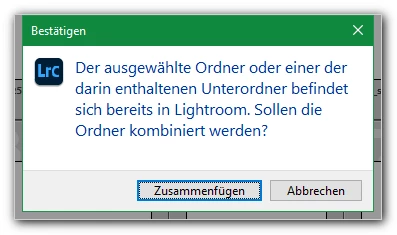
 

What does this mean? Afterwards all files are in one single folder? Or will Lightroom assign the two  selected folders to the both subfolders correctly?


Thanks!

mycc

This topic has been closed for replies.

1 reply

TheDigitalDog
Inspiring
May 19, 2023

This is a problem when you move (or copy, rename, delete; anything like that) outside of LR. It doesn't know what you did. 

Go to the top, root folder where the others should reside and try the Synchronize folder command (contextual menu). 

Author “Color Management for Photographers" & "Photoshop CC Color Management/pluralsight"
myccAuthor
Inspiring
May 19, 2023
quote

This is a problem when you move (or copy, rename, delete; anything like that) outside of LR. It doesn't know what you did. 


Yes, I know this. Therefore I described the reason why I moved the folders with "OneDrive Online" and not withing LR.


Go to the top, root folder where the others should reside and try the Synchronize folder command (contextual menu). 


Yes, see also my screenshot and my description! 🙂