
Known Participant
February 5, 2024
Question

Rebuild sync data - what does it do, and how do I know it is doing it?

  • February 5, 2024
  • 1 reply
  • 4638 views

Hoping to hear from Adobe engineers. It bugs me that a version of this question has been asked a number of times with 0 answers. I undertand if users don't know the answer, but what about Adobe?


My sync got stuck, I wrote about it at length in https://community.adobe.com/t5/lightroom-classic-discussions/sync-is-stuck-in-lightroom-classic-without-errors/m-p/14381921


I decided to try Rebuild sync data (after trying other solutions that worked for some). It warned me that it may take a while, and that sync will be unavailable while it's running. I agreed.


My LrC got restarted, and my sync is paused. There is no progress indcator and no estimate when the rebuild will be completed. I am watching my Lightroom folder on the harddrive. The Previews.lrdata is getting updated, but since I did not stop working in LrC, I am not sure if it's updating because of what I am doing or because of the rebuild. Some of the other files are stuck with the timestamp of 12:32 PM, which is when I initiated the rebuild. 
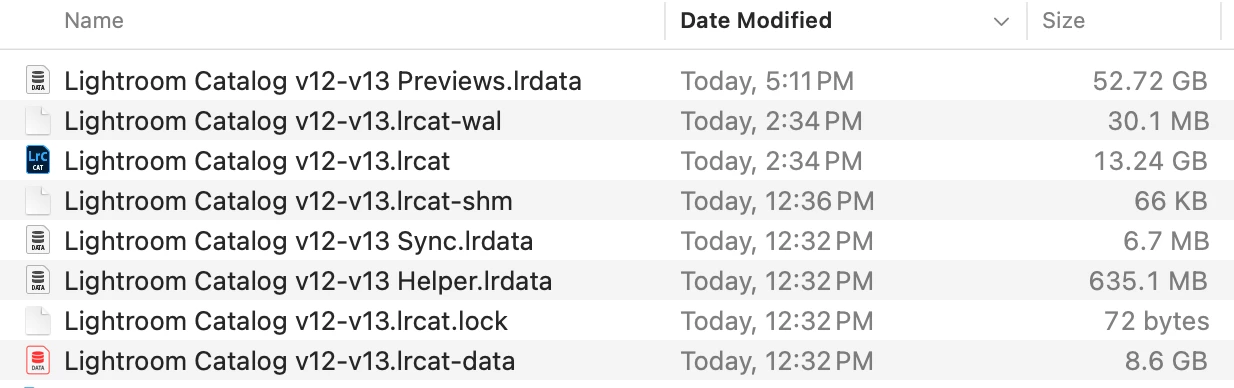
 

Does anyone have any expereince with productive Rebuild sync process, and what was your expereince?


Adobe, what do you say? LrC 13.1, MacOS 14.0

This topic has been closed for replies.

1 reply

KostFan2
Known Participant
February 5, 2024

@alexeit20270339 

  • What: I believe it rebuilds the index by comparing DATA in the Primary Catalog. lrcat to the Index on the Master Database on Adobe’s servers to identify issues: missing files, etc.


  • Time Required: You should not use Lrc until it finishes rebuilding, it should not take too long. For example if, I synced my entire catalog from scratch that takes about 8 hours because files are being transferred from Computer to Adobe’s servers.  In contrast, if I rebuild the index it can take less than 15 minutes because only data is being compared.  I do not believe that any files are being moved.

    Please see the attached file

KostFan2
Known Participant
February 5, 2024

From your linked longer post, it seems that you already performed most of these steps.  However, see the attached file just in case.

Known Participant
February 6, 2024

@alexeit20270339 

  • Videos: For me, videos caused sync problems with syncing.  Therefore, I had to remove them from folders on my computer that were syncing with Lightroom.  Instead, I manually uploaded them to lightroom.adobe.com. Of course, in to lightroom.adobe.com they were no longer associated with the original locations on my computer, but at least that solved the sync problem.  Since this is in the official article regarding syncing, I expect this is contributing to your sync problem.
  • Library Size: I was aware of your library size based on your other post.  Once you get to that size you will begin to see performance issues.  However, I know customers who have libraries that are 5x larger than yours.  It does mean that you need to optimize your catalog as much as you can.
  • Time Required to Rebuild the Library: It should definitely not take 8 hours for this function.  I expect the videos may be causing it to not function correctly. I recommend you remove the videos and then try rebuilding the index.
  • Find All Missing Photos: Have you run this to identify if you have issues with your Library in this area?


Thanks! For better or worse, there are no videos in my All Synched Photographs.


Catalog was optimized yesterday as part of the sync troubleshooting.


The sync has been paused (by LrC) for well over 24 hours now. This is the only indication that rebuild MAY be ongoing. What if the same foundational issue that makes the sync stick at "Syncing 200K+ photos" is blocking the rebuilding, and is doing it silently, without any outward errors? I need Adobe looking into this, not well meaning and well informed power users such as yourself. I have 12 Gb worth of diagnostics, someone ought to be looking at it.

Find All Missing Photos... no, not lately. I guess at this point there is no reason not to give up on "rebuild" (I almost said "cancel", but I don't see a way how). For all we know, it finished and forgot to turn sync back on. So I can try Find All Missing Photos.


But I have to say, in the past, I have see missing photos and I have seen sync issues listed in Activity dialog and in special collections, and handled them one way or another. This time, it just stops counting down the "Syncing X photos", and there are no errors visible anywhere.