
Participant
October 21, 2020
Answered

Recover trashed files Mac Catalina 10.15.7

  • October 21, 2020
  • 1 reply
  • 329 views

Inadvertantly I moved 30 images to trash on my Mac.  An Adobe support person told me to highlight the trashed files, right click, and select restore, and drag the files to the folder. Operating on the latest release of Catalina, there is no Restore option, or any similar option. Is there a bulk. Restore option?  Clearly I can drag them to Desktop and recover them one at a time, but that is so time consuming. My LR files are on an external drive. Thanks for any help.
 

This topic has been closed for replies.
Correct answer Ian Lyons

In Catalina the command is 'Put Back'.


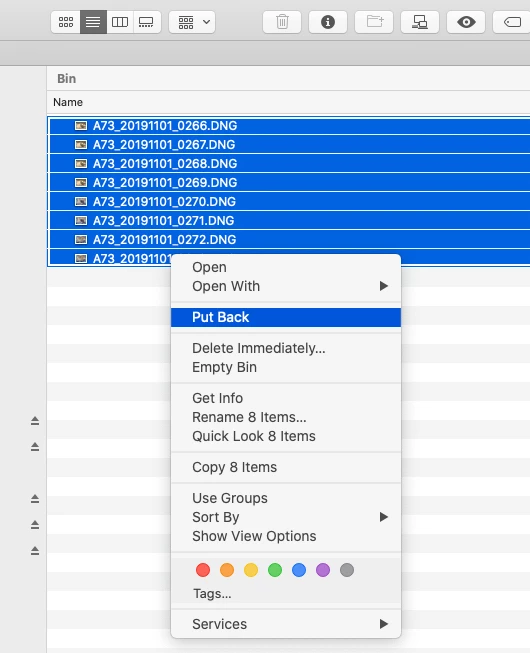
Assuming you haven't emptied the Trash, then simply select the images in the trash folder, then choose 'Put Back' (see attached screesnhot). The images will then be returned to their original location.


1 reply

Ian Lyons
Community Expert
Ian LyonsCommunity ExpertCorrect answer
Community Expert
October 21, 2020

In Catalina the command is 'Put Back'.


Assuming you haven't emptied the Trash, then simply select the images in the trash folder, then choose 'Put Back' (see attached screesnhot). The images will then be returned to their original location.


Participant
October 22, 2020

Hi Ian, 

Thanks for your reply. Unfortunately Catalina 10.15.7. no longer has Put Back as an option, otherwise I would have used it. Fortunately, I did not delete my trash, and as a precaution I never re-format my SD cards, so the original CR2's are downloadable. Still, it would be better if the Put Back option were put back.