
Participant
August 2, 2023
Answered

Recovering Lightroom Develop Settings from PSD

  • August 2, 2023
  • 1 reply
  • 180 views

I'm trying to find a way to recover lightroom develop settings from a PSD file.

Basically, I made my adjustments in LR and then edited it in PS for some retouching. I re-imported the same images from a different folder and now my original RAW file has reverted back to its original settings without any adjustments. I only have the PSD file with all the adjustments. I was wondering if there was anyway to get those settings back into LR so that it matches or even closely resembles the PSD file.


Thanks
This topic has been closed for replies.
Correct answer JohanElzenga

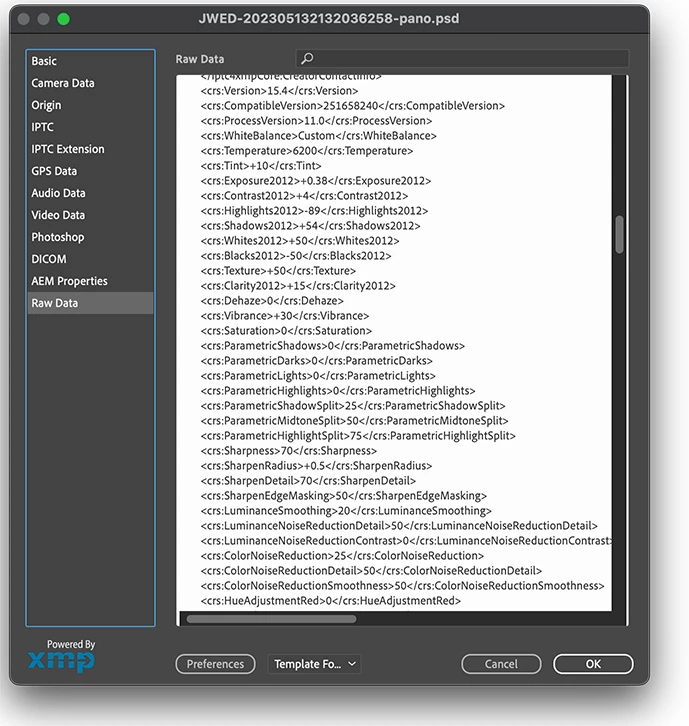
Open the PSD file in Photoshop and then choose 'File - File Info'. In the dialog that comes up choose 'Raw Data'. This will show you everything in metadata and at about one third you should see your Lightroom edits as XMP. Here's how that looks:


1 reply

JohanElzenga
Community Expert
JohanElzengaCommunity ExpertCorrect answer
Community Expert
August 2, 2023

Open the PSD file in Photoshop and then choose 'File - File Info'. In the dialog that comes up choose 'Raw Data'. This will show you everything in metadata and at about one third you should see your Lightroom edits as XMP. Here's how that looks:


-- Johan W. Elzenga
Participant
August 3, 2023

Thank you so much!