

Todd Shaner
Legend
November 17, 2021
Answered

Red Eye Tool Behavior Changed in LrC 11

  • November 17, 2021
  • 3 replies
  • 573 views

LrC 11 Red Eye tool Pupil Size and Darken controls behavior has changed.


Here's what I see in LrC 9.4 after dragging a selection over the eye.
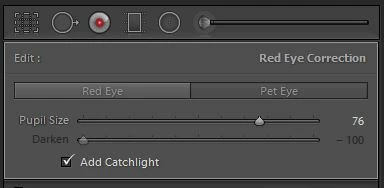


In LrC 11.0.1 here's what I see after dragging a selection over the eye.  The Pupil Size and Darken controls briefly flash onscreen and only reappear if you click on the dragged eye selection circle. At first I didn't see them flash onscreen and thought they had been removed. They also disappear after moving either control slider. Clearly this is not normal behavior.


In addition the 'Add Catchlight' option has been removed.
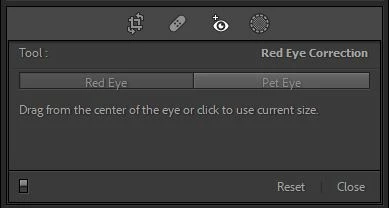


Anyone else seeing this behavior with LrC? I'm on a Windows 10 system.

This topic has been closed for replies.
Correct answer johnrellis

I just verified that's the as-designed behavior from 10.4.  You can't use Darken with Pet Eye, and Add Catchlight is only for Pet Eye.

3 replies

Todd Shaner
Legend
November 18, 2021

Thanks John, it's been a while since I last used this tool. I checked LrC 9.4 with both pet eye and red eye pictures and the behavior is as you describe and listed in my table. So no issue except why the controls disappeared when I first dragged a selection using the tool. It's working properly after resetting the Preferences file AND now after restoring the original Preferences file. Anyone seeing this issue should try that by renaming the original Preferences file, restarting LrC, and checking if the issue is fixed. If so try deleting the new Preferences file and change the original file name back. Restart LrC and see if the issue is now resolved. Location as shown below.


Windows

C:\Users\[user name]\AppData\Roaming\Adobe\Lightroom\Preferences\Lightroom Classic CC 7 Preferences.agprefs


Mac

/Users/[username]/Library/Preferences/com.adobe.LightroomClassicCC7.plist

Todd Shaner
Legend
November 17, 2021

I reset Preferences and now the Pupil Size and Darken controls remain visible after dragging the eye selection. However there appears to be an issue with the Darken control and Add Catchlight as shown below. Interestingly restoring my original Preferences file LrC now exhibits the exact same behavior as the default Preferences file reset. This appears to be a bug. John, can you confirm what you are seeing concerning the below behavior.


Control                Red Eye          Pet Eye

Pupil Size            No Issues         No Issues

Darken                 No Issues        Grayed out and fixed at -100

Add Catchlight    Not Present      No Issues

johnrellis
johnrellisCorrect answer
Legend
November 17, 2021

I just verified that's the as-designed behavior from 10.4.  You can't use Darken with Pet Eye, and Add Catchlight is only for Pet Eye.

johnrellis
Legend
November 17, 2021

Red Eye on both my LR 11.0.1 Mac OS and Windows 10 appears to work correctly.  Perhaps time to try a preferences reset?