
diegitalus
Known Participant
May 11, 2021
Answered

Registration Issue with old Lightroom v5.0 Release

  • May 11, 2021
  • 3 replies
  • 2469 views

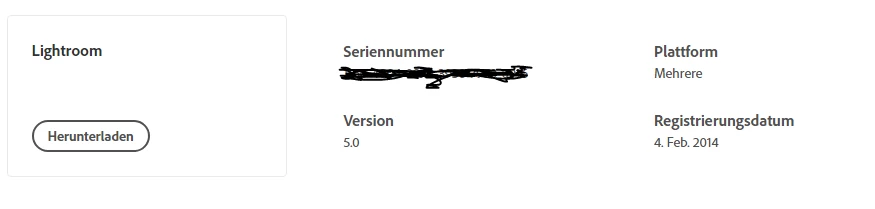
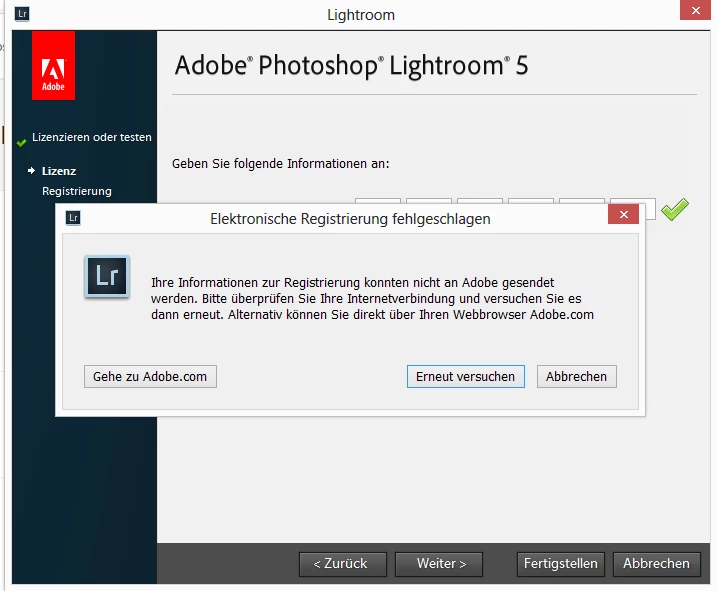
For an older laptop running Windows 8.1 I needed to re-install Lightroom v5.0 (from CD). I have a valid serial shown in my account settings for this version, but registration process does complete with an error. (see images). Serial is valid and also recognized valid during the registration process.


Anybody any idea why it isn't possible to activate this license?

Any help is greatly appreciated.


I also have an old Lightroom 2.0 license unused, but it is the same error on registration.

For me it seems that the registration URL might have changed, since the error reply takes a while and is a suspicious timeout. Internet access is working without any issues from that notebook.
 

PS: Yes, it is an old Windows version and also a pretty old Lightroom version, but it was always running successfully on that notebook and was sufficient for that purpose (it is the notebook of my father-in-law). 


This topic has been closed for replies.
Correct answer Per Berntsen

For reference by English speakers, Google translation of the dialog: "Electronic registration failed. Your registration information could not be sent to Adobe. Please check your internet connection and try again. Alternatively, you can go directly to Adobe.com via your web browser. [Go to Adobe.com]. [Try again]. [Abort]."


To test my understanding, if you click Abbrechen (Cancel), LR still shows your LR as in the trial period, even though it gave a green check mark when you entered the serial number? To build on what the others have said, registration of the perpetually licensed LR versions was always optional (at least in the US), so this behavior surprises me. 


Registration was optional in Europe as well.

Also, LR 5 did not use activation, all it required was a valid serial number.

So I would also have thought that cancelling the registration dialog would not prevent one from using the program.

3 replies

dj_paige
Legend
May 11, 2021

@diegitalus 

I just installed Lightroom 5 on my computer. Worked fine. I entered the serial number and it was accepted without problem.


So Lightroom 5 can still have its serial number verified by Adobe.


The error message indicates that Lightroom 5 cannot contact Adobe, and that there might be a problem connecting to the Internet. Please make sure your firewall is not blocking Lightroom 5.

diegitalus
Known Participant
May 11, 2021

Thanks for the hint. I already checked Internet connectivity and it works successfully from the browser.

I'll doublecheck firewall settings.

Thanks for your help. 👍😊

Participant
June 12, 2021

I have exactly the same Problem with LR 6. I Installed it successful. ASfter starting i got a message:

Serial number already in use. Maximum Installatibn reached.  Pleas deinstall within 30  Days one installation.

The Problem is, i cannot deinstall. The old PC is broken.

So what can i do?

JP Hess
Inspiring
May 11, 2021

What I recall from those days is that if you have the serial number then all that is necessary is to enter the serial number in the appropriate space. Registering with Adobe is optional, and in the case Lightroom 5 irrelevant because that version is unsupported.

diegitalus
Known Participant
May 11, 2021

... ok, then let's see. 🙂

Currently, the dialog "License or test" tells me that 21 days remaining. This statement made me suspicious that I would need to register at least at the end of the 30-days testing period. But let's see, maybe it keeps on functioning properly.

Thanks for your help. 👍


JP Hess
Inspiring
May 11, 2021

No, I don't think that will work. You at least must enter the serial number. Did you do that? Registering Lightrroom with Adobe is a separate step, as I recall.

JP Hess
Inspiring
May 11, 2021

One possible answer is that Adobe no longer supports Lightroom 5 in any manner whatsoever. That version has long been abandoned. Adobe no longer makes the installation files available, and there is no point in registering the installation because Lightroom 5 isn't on Adobe's radar. It might be. It might be sufficient for the purpose, as you suggest, but operating systems have changed and Lightroom has changed dramatically.

diegitalus
Known Participant
May 11, 2021

Hi Jim, 

thanks for the quick answer. Somehow I was expecting it. 😟

But it would be bad, because I still kept the installation sources from the old version and I bought it and have therefore a valid license. The only thing is that I cannot register it, so it continues to run in trial mode for 30 days.

Of course the old versions are not on Adobe's radar, but as far as I know when I buy a product license of some software (like it was usual before the introduction of the subscription plans) this is not time limited. As long as it is supported on the operating system I should be able to run and register it.

It's a bit disappointing ... 😟

I also have a subscription plan running, but I am already sharing it with my wife. The old laptop with the old version was used from my 88 year old father-in-law and it was absolutely sufficient. He would be confused by the latest version and the Cloud updates and so on ... that's why I've tried to get the old software running again.