TakingTheMike
Known Participant
August 31, 2023
Question

Relink edited photos after name change outside Lightroom

  • August 31, 2023
  • 5 replies
  • 2785 views

Hi all,


I have done something really stupid.


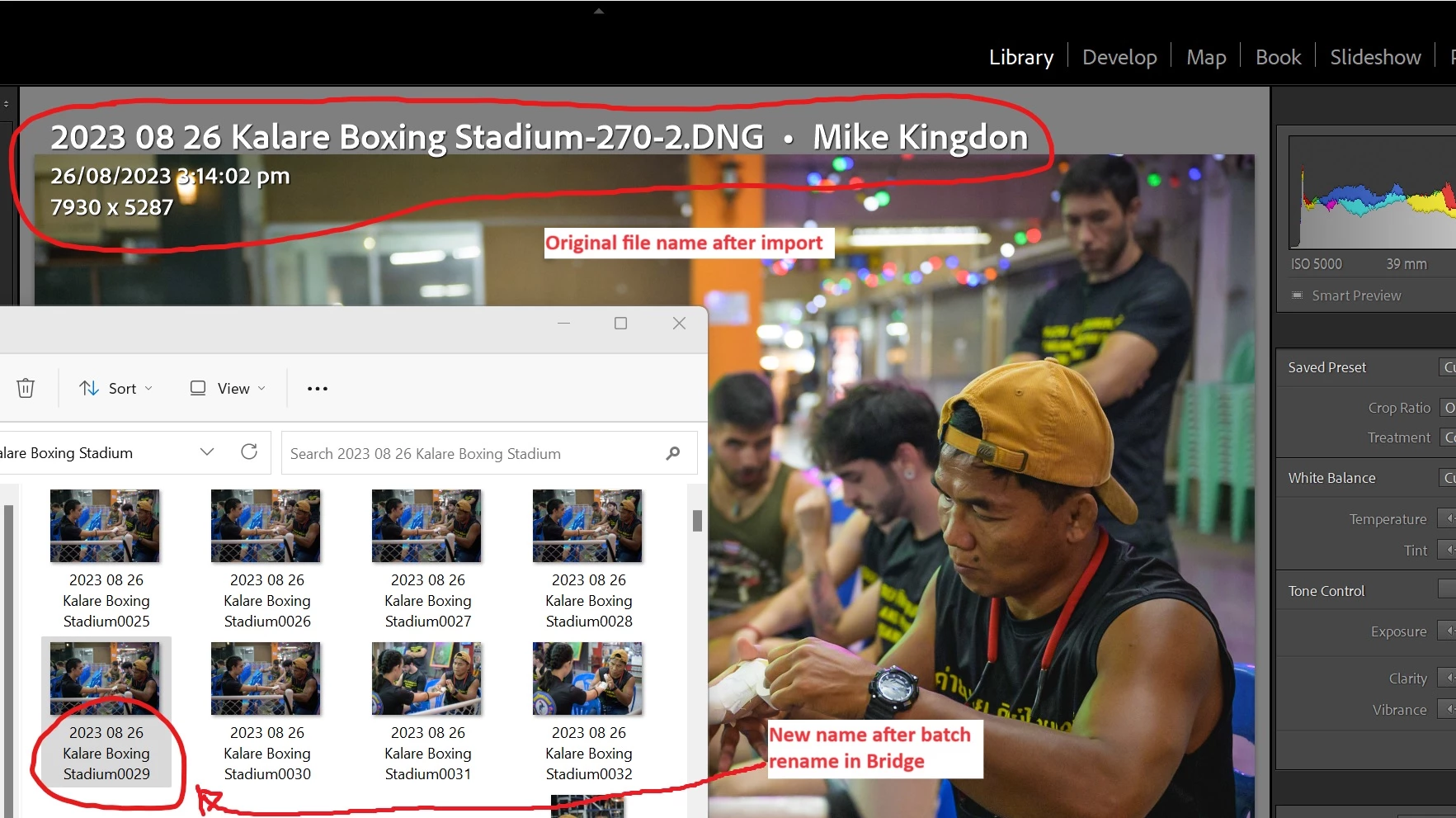
I imported and edited an album of Muay Thai photos.  The photos were arranged by shot time in Lightroom and this was fine.  However, I noticed that if I arranged the photos by name the order was different.  Not sure what was wrong with the file naming, maybe a mistake I made during the renaming process during import.  Anyway, in my infinite wisdom I decided to use Bridge and rename all the raw photos so the naming and shot time sequence matched.  


Now Lightroom is only using the smart previews and does not know where the original photos are because they have all been renamed.  Is it possible to get Lightroom to find these photos but not by file name, but by another metric.  I am worried if I sync the folder or delete the smart previews I will loose all my edits.


Thanks,


Mike

 

5 replies

john beardsworth
Community Expert
Community Expert
September 2, 2023

Note that Bridge's Batch Rename can rename files back to the original names, providing you had ticked the option to preserve them.


TakingTheMike
Known Participant
September 3, 2023

Good to know in future.  Unfortunately, I was not aware of this option when I was making my rash renaming decision.

TakingTheMike
Known Participant
September 2, 2023

I was able to fix this problem. Within Lightroom I exported all the photos with the original name. I then copied all the exported file names in an excel column, I also copied all the names of the raw file that were renamed outside of Lightroom into another column. I then combined the columns, along with some rename commands to be used in CMD and pasted everything the CMD and ran a batch rename command that restored the old names. Lightroom now shows my photos are original + smart preview.


Example of the CMD command, including another 2000 lines:
ren "2023 08 26 Kalare Boxing Stadium0002.DNG" "2023 08 26 Kalare Boxing Stadium-1418.DNG"
ren "2023 08 26 Kalare Boxing Stadium0003.DNG" "2023 08 26 Kalare Boxing Stadium-1873.DNG"
ren "2023 08 26 Kalare Boxing Stadium0004.DNG" "2023 08 26 Kalare Boxing Stadium-1924.DNG"


This YouTube video explains the Excel part:
https://www.youtube.com/watch?v=znhqGrF4gVQ


TakingTheMike
Known Participant
August 31, 2023

I could resolve the problem easily if I could force Lightroom to rename the missing photos.

JohanElzenga
Community Expert
Community Expert
September 2, 2023
quote

I could resolve the problem easily if I could force Lightroom to rename the missing photos.


By @TakingTheMike


Yes, but unfortunately that is impossible, so do not file a feature request for this function. How would Lightroom rename a file if it does not know where that file is? 🙂


-- Johan W. Elzenga
TakingTheMike
Known Participant
September 2, 2023

Because Lightroom stores information regarding file in the catalog, not the file.  I am not asking for this feature to be added, but the ability to relink phtos based on more metric other than file name would be useful, like by a photo's preserved name for example.

Abambo
Community Expert
Community Expert
August 31, 2023

The best option would be: use Bridge to name them back to their original name, before renaming in bridge. Then using Lightroom (after checking that the images are again reconnected) to rename. Lightroom has also a powerfull renaming option, but it's indeed less powerfull than what Bridge offers.


And yes: all file operations need to be done inside of Lightroom, if you do not want to lose the connection, as the link is done via the filename and the access path.

ABAMBO | Hard- and Software Engineer | Photographer
TakingTheMike
Known Participant
August 31, 2023

That would work if I knew the sequence.  However, it appears something went very wrong during the import and rename.  For example, the 17th photo I took that night, Lightroom renumbered as "785-2".  I have no idea why it did this.  If I sort this album by name, the order seems completely random.  If I could find the correlation, i.e how Lightroom sequenced the photos then I might be able to recreate that sequence and restore the original names via a batch rename.

If I could do a batch rename within Lightroom as well, I could rename the photos by capture time and then batch rename the files in Bridge to the same name.  However, Lightroom won’t let me do this unless it can find the original file!


Abambo
Community Expert
Community Expert
September 2, 2023

When I rename in bridge, I activate the " Preserve Current Filename" and that allows me to return to the original file name. That allows me to return easily to the original filename when needed. 

 The -2 indicates that there is an exiting file with the same name. 


You can manually attach the old files to the new filename. but for several 100 files, that is some work to do.

ABAMBO | Hard- and Software Engineer | Photographer
JohanElzenga
Community Expert
Community Expert
August 31, 2023

Do not use Synchronize Folder! That is not meant for this situation and will indeed make you lose your edits. Switch to the grid and click on the smart preview icon in the upper right corner of the image mount. Lightroom should show a dialog telling you it cannot find the original image and ask you if you want to locate it. I'm afraid you'll have to do this one by one, so if you could batch rename the images again in Bridge to their old names, that would be a lot easier (Lightroom will automatically reconnect to them if you rename them back).


-- Johan W. Elzenga