
Remove bad metadata from Contact & IPTC pop ups?
Greetings!
I have a seemingly simple issue but don't know how to resolve it.
I've been using Lightroom for years for my photography work. Some of my work is "fine art" but most of it is stock photography. As such, I need to fill in the keywords, Contact & IPTC, etc data. And, as you might expect, I've fat fingered some of the data that I've input. I know how to remove bad keywords from my keyword list, but I don't know how to remove bad data from the Contact & IPTC areas.
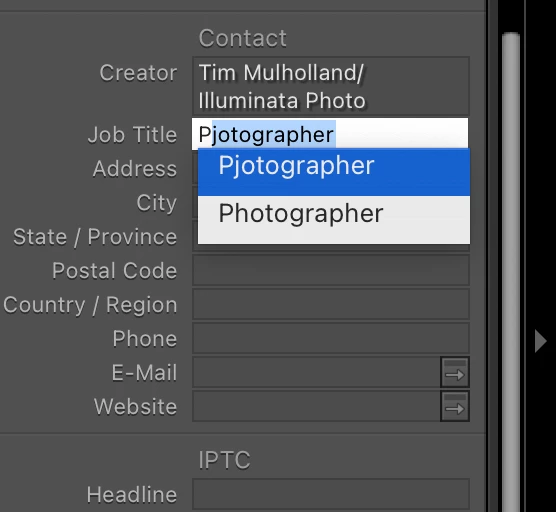
For example, I've attached an image. Over time, I fat fingered "photographer" as "pjotographer" and accepted that spelling and now I'm stuck with it as an alternative when I start typing "photographer" into that field. I'd like to remove "pjotographer" from the pop up so that only "photographer" appears. On several of these fields, I've made one or more errors that are annoying to deal with as I'm inputing this information, so I'd like to clean this stuff up/out. Does anyone know how to remove these bad bits of data? It's not a major issue at all, just an annoying thing that I've done that I'd like to cleanse.
Thank you very much for your help,
Tim
 AdChoices