

Deepboy666
Participating Frequently
June 16, 2020
Answered

Remove cloud icon top right of the screen

  • June 16, 2020
  • 7 replies
  • 1557 views

I just installed new lightroom update, and found that in the top right of the screen a cloud icon has appeared, as per following pic:
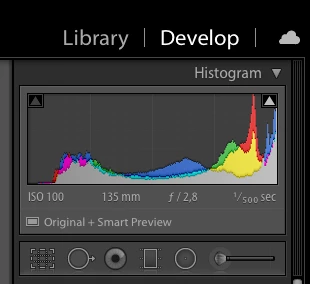
 

Right-clicking on Library/Develop will show me a drop down menu where i can hide other destinations i don't need (map, book, print, web, etc), and i was always happy being able to hide them, but i can find no way to hide the cloud icon, which is pretty annoying and dumb. I don't want any useless interface icon/logo in my view, i like the cleanest possible UI; hope the icon is not permanent and can be removed, otherwise would be a very violent action from Adobe to force me in seeing that at any time.


{Moved from Lightroom Cloud to Lightroom Classic Forum by Moderator} 

This topic has been closed for replies.
Correct answer Ian Lyons

That's the new location for Cloud Sync in Classic. There is no way to hide it at present. However, if you believe that hiding it should be an option, then feel free to submit a feature request at: https://feedback.photoshop.com/photoshop_family/categories/photoshop_family_photoshop_lightroom?

7 replies

Just Shoot Me
Legend
June 16, 2020

Yeah just updated and now have the cloud icon. Win 10.

JP Hess
Inspiring
June 16, 2020

If you really want "the cleanest possible UI" consider collapsing the top panel. Then that icon will be gone along with all of the other "clutter" along the top, and when you need it all you need do is drag your mouse to the top of the screen so that it will drop down temporarily so that you can choose one of those options that you really need. Otherwise, those options are out of sight out of mind. All that shows during normal use is the menubar.

99jon
Legend
June 16, 2020

Yep I understand. At least the engineers will get to note your personal preference if you have posted at Ian’s link.

99jon
Legend
June 16, 2020

Many of us prefer the new icon to be visible rather than hidden under the identity plate. It also has some helpful info overlays which are detailed in my blog together with other enhancements in today’s updates. My cloud icon shows that sync is temporarily paused. Your icon indicates that your catalog is not sync’d at all.

Deepboy666
Participating Frequently
June 16, 2020

Mine show that the catalogue is not sync'd at all, correct; that's because i don't want to synch my catalogue. And why then the icon is totally unuseful and disturbing to me 🙂

Just Shoot Me
Legend
June 16, 2020

Is this on a Mac with OS X? I ask because it isn't on Windows.

Deepboy666
Participating Frequently
June 16, 2020

Yes, MacMini 2018 with latest OS X

Ian Lyons
Community Expert
Ian LyonsCommunity ExpertCorrect answer
Community Expert
June 16, 2020

That's the new location for Cloud Sync in Classic. There is no way to hide it at present. However, if you believe that hiding it should be an option, then feel free to submit a feature request at: https://feedback.photoshop.com/photoshop_family/categories/photoshop_family_photoshop_lightroom?

Deepboy666
Participating Frequently
June 16, 2020

Thanks for your help; i'll try submit a request!

elie_dinur
Participating Frequently
June 16, 2020

You are kidding, right?

Deepboy666
Participating Frequently
June 16, 2020

No, i'm not; can you help?