
Nicole_Rose_Photography
Participant
June 7, 2024
Answered

Remove tool in Lightroom v 13.3.1 is not working correctly

  • June 7, 2024
  • 2 replies
  • 3912 views

Updated my Lightroom Classic to the newest version 13.3.1 but now encountering issues with the Remove/Heal/Clone tool. Even with the Generative AI and Object Aware features unselected, neither one of the tools can effectively remove a simple water spot in my image. 
Correct answer johnrellis

[This post contains formatting and embedded images that don't appear in email. View the post in your Web browser.]


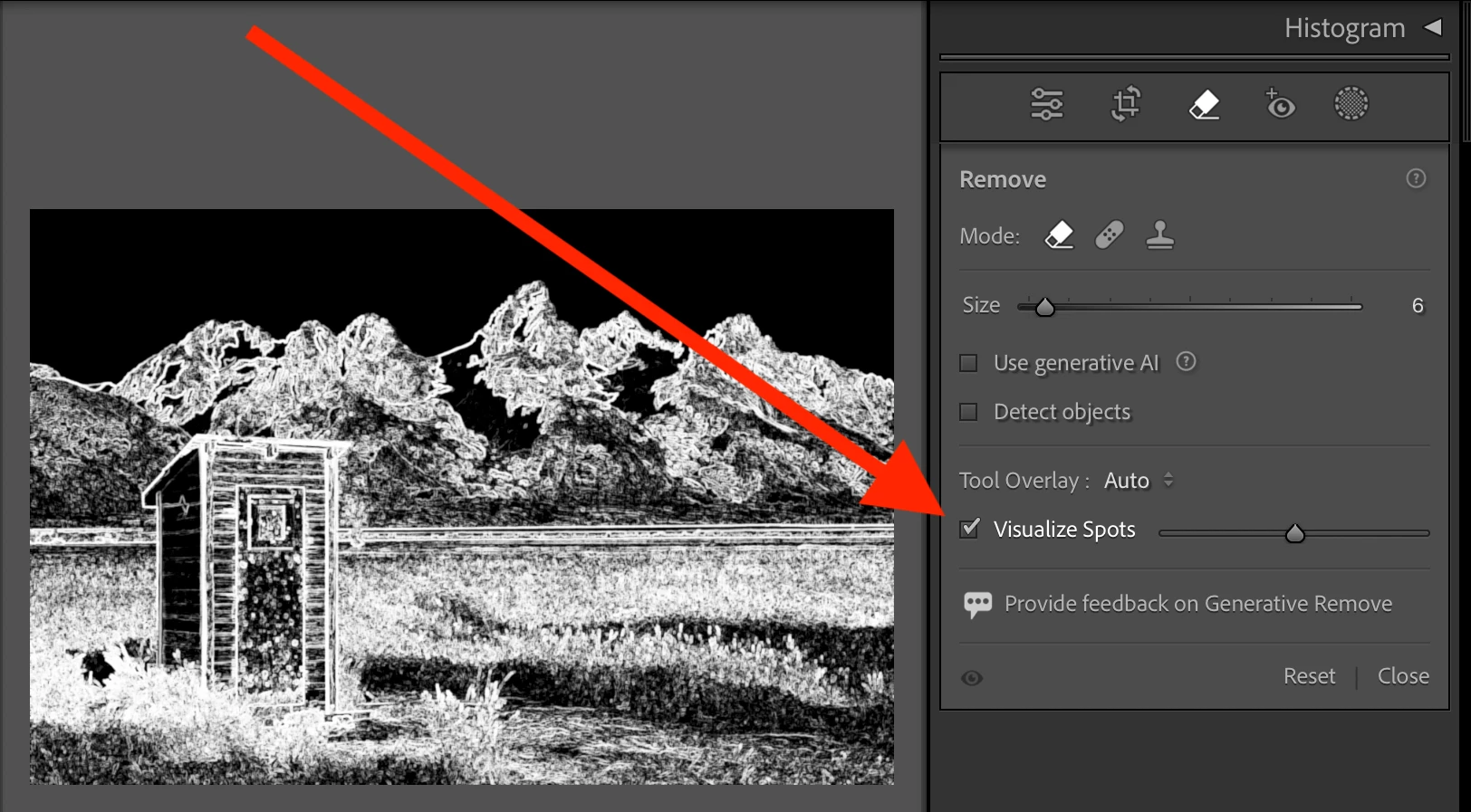
@jeanp26144572: "When I press remove my photo turns to black and white in a jumbled mess."


Sounds like you accidentally enabled Visualize Spots:


2 replies

Participant
September 8, 2024

im having the same problem ..

is anyone having the same

priblem

too ?

jeanp26144572
Participant
May 13, 2025

When I press remove my photo turns to black and white in a jumbled mess.  Never had anything like that before so 

johnrellis
johnrellisCorrect answer
Legend
May 13, 2025

[This post contains formatting and embedded images that don't appear in email. View the post in your Web browser.]


@jeanp26144572: "When I press remove my photo turns to black and white in a jumbled mess."


Sounds like you accidentally enabled Visualize Spots:


johnrellis
Legend
June 8, 2024

[This post contains formatting and embedded images that don't appear in email. View the post in your Web browser.]


1. In you screen recording, it looks like that you're clicking directly on the water spot but the tool's "target" circle is offset to the side:


Is that what you're seeing?  Or is this an imperfection of the screen recording?


2. And then at the end, I don't even recognize what tool /options caused this display:


Do you know what you clicked to bring that up? The Clone or Heal tool would normally look like this:


Nicole_Rose_Photography
Participant
June 9, 2024

I’ve had a spot on my lens since I bought it second hand seven years ago so
I’ve used the remove and healing tool in Lightroom a seemingly infinite
amount of time. With either tool you select the area (or spot in this case)
you need removed. With the healing tool, Lr will select an area similar to
the ‘problem area’ to heal it away which the user can adjust if needed.
With the remove tool, Lr selects the fill automatically.
Both these tools, along with the cloning tool, are not functioning properly
at all in version 13.3.1. Most of the time using the tool produces zero
results. But every once in a while it seems to select a fill area that is
outside of the image entirely.
In short the tool is completely useless at the moment.
I attempted to try the Gen AI feature and was successful at removing some
larger areas in other images but the water spots seemed to be too small in
size for it to work.
I had to export the entire workflow to Photoshop to complete my editing 😞
Nicole
--
Nicole Rose (she/her)

----------------------------


Personal Information removed by Forum Moderator

johnrellis
Legend
June 9, 2024

But what about my first question?