
Inspiring
April 19, 2017
Answered

Remove white "halos"

  • April 19, 2017
  • 2 replies
  • 4855 views

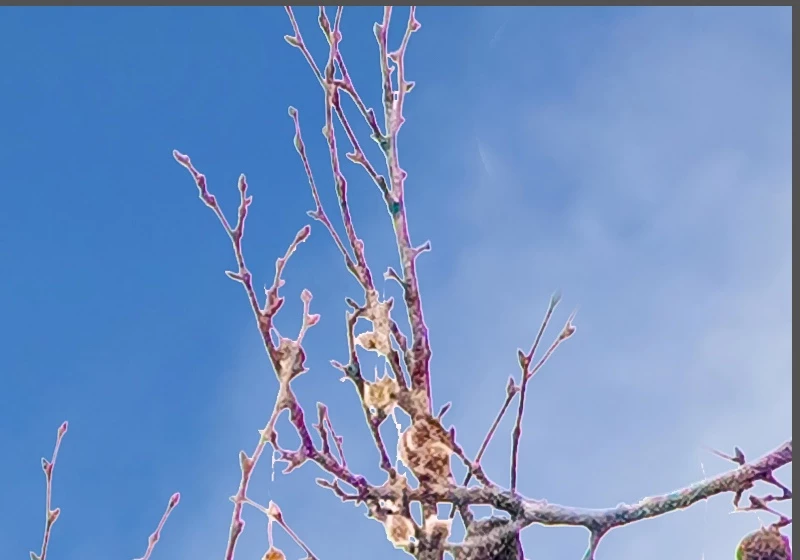
I'm using the latest version of Lightroom with Photoshop Elements 15. I have some photos that I've edited in Elements where I've replaced a slate-gray sky with a blue sky. But no matter what I do, I get these white ghosts or halos around the smaller branches. Attached is a screen shot of one corder of the photo so it's obvious what's happening. I can eliminate (mostly) chromatic aberrations in the green/blue etc. ranges, but these stay. I've tried reducing Clarity to negative numbers to no avail. Wondering if anyone had thoughts about this. I've checked online for answers, and though there were suggestions for using Photoshop, I don't have that or CC. Thanks.
Correct answer Rob_Cullen

You will find the discussion at Lightroomforums very topical to your question-

https://www.lightroomforums.net/threads/clean-line-around-mask.30835/

2 replies

Mohit Goyal
Community Manager
Community Manager
April 20, 2017

Also, refer: Halos in Lightroom

Thanks,

Mohit

Inspiring
May 5, 2017

I did finally find a fix (most of the time) for this problem if anyone else has it. When I am adding a sky in Elements 15, I take the magic wand to select all of the background. What I didn't know (and someone told me) is to go to Feathering in the Select drop down menu and set it to 1. It defaults to 5. That eliminates a lot of the white. Second step: In the layers window, next to opacity, is a drop down. Change it from Normal to Darken. That also helps, although it will also (in some cases) mess up the masking on the photo. These two steps really helped.

Rob_Cullen
Community Expert
Rob_CullenCommunity ExpertCorrect answer
Community Expert
April 19, 2017

You will find the discussion at Lightroomforums very topical to your question-

https://www.lightroomforums.net/threads/clean-line-around-mask.30835/

Regards. My System: Windows-11, Lightroom-Classic 15.1.1, Photoshop 27.3.1, ACR 18.1.1, Lightroom 9.0, Lr-iOS 10.4.0, Bridge 16.0.2 .
Inspiring
April 20, 2017

Thank you. I will read through it and give it all a try.