
Participant
January 18, 2017
Answered

Removing misspelled metadata suggestions

  • January 18, 2017
  • 1 reply
  • 1023 views

Hello,

I'm working on a large archiving project which utilizes Lightroom's IPTC editor to attach relevant information to photos. Every once in a while, I enter a typo and hit enter before catching it. Since I'm editing metadata on thousands of photos which will be uploaded to a database, I need accuracy and efficiency. I usually click the field I'm editing, enter the first few letters, and hit enter when LR suggests a previous entry. My issue is that I've entered erroneous information, which is suggested before the correct information. Is there a way to remove the suggestions I do not want?

For example:

Let's say I have a photographer named John Doe. When I first entered his name under "Creator" I misspelled it "John Dob". I later Corrected this, but Lightroom still suggests "John Dob" ahead of "John Doe" whenever I begin to type "John" into the Creator field.

How do I wipe the typo from the suggestions Lightroom provides for Metadata entries?

Peter
This topic has been closed for replies.
Correct answer Rob_Cullen

I think the OP is asking about metadata, not keywords.

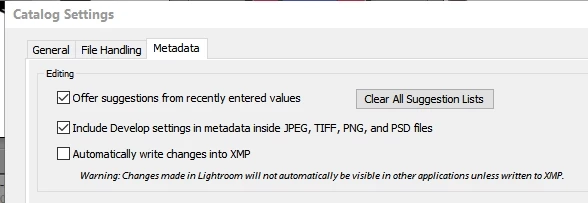
Maybe the option in the Catalog Settings [Clear All Suggestion Lists]  will help-

1 reply

Todd Shaner
Legend
January 18, 2017

Enter the misspelled keyword into the Filter Search box then right-click on the keyword and select 'Delete.' If the count is greater than '0' you need to correct the keyword for those image files before deleting the keyword.

You can also go to Library menu Metadata and select 'Purge Unused Keywords,' which will remove all keywords with 0 tags.

More here: How to use keywords in Lightroom

Rob_Cullen
Community Expert
Rob_CullenCommunity ExpertCorrect answer
Community Expert
January 19, 2017

I think the OP is asking about metadata, not keywords.

Maybe the option in the Catalog Settings [Clear All Suggestion Lists]  will help-

Regards. My System: Windows-11, Lightroom-Classic 15.1.1, Photoshop 27.3.1, ACR 18.1.1, Lightroom 9.0, Lr-iOS 10.4.0, Bridge 16.0.2 .
Todd Shaner
Legend
January 19, 2017

you are absolutely correct!

wobertc wrote:

Maybe the option in the Catalog Settings [Clear All Suggestion Lists] will help-

Unfortunately 'Clear All Suggestion Lists' will remove the correctly spelled suggestions. There doesn't appear to be a way to selectively remove misspelled entries, but you can "clear" the suggestions for specific IPTC metadata fields:

In metadata, how do I delete a previously misspelled country name from auto-completing?

This might be helpful if the misspelled suggestions are only in a few fields.