
Exit
  • Global community
    • Language:
      • Deutsch
      • English
      • Español
      • Français
      • Português
  • 日本語コミュニティ
  • 한국 커뮤니티
0

Resetting/reverting export settings

New Here ,
Jun 19, 2017 Jun 19, 2017

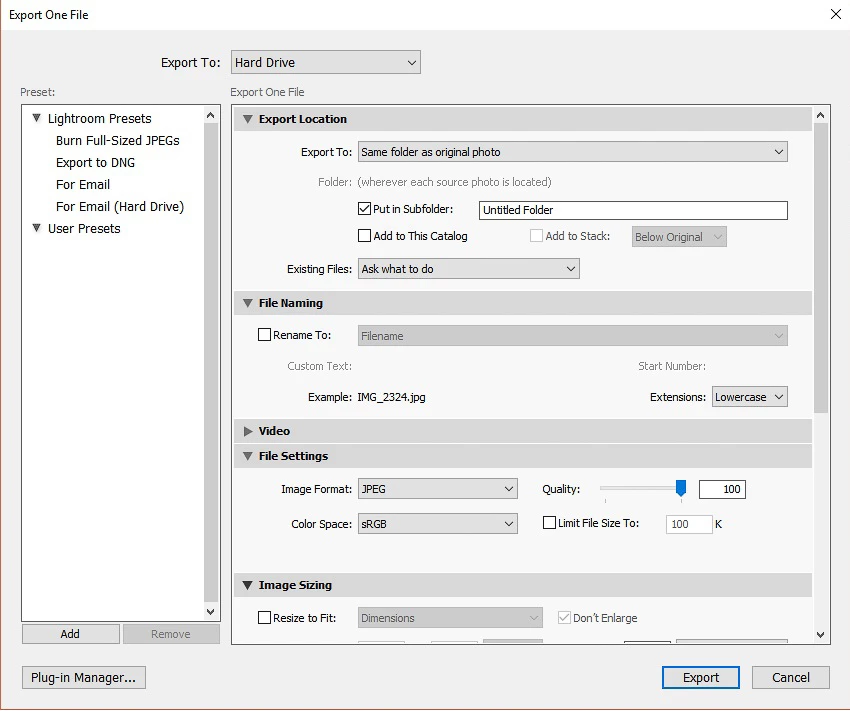
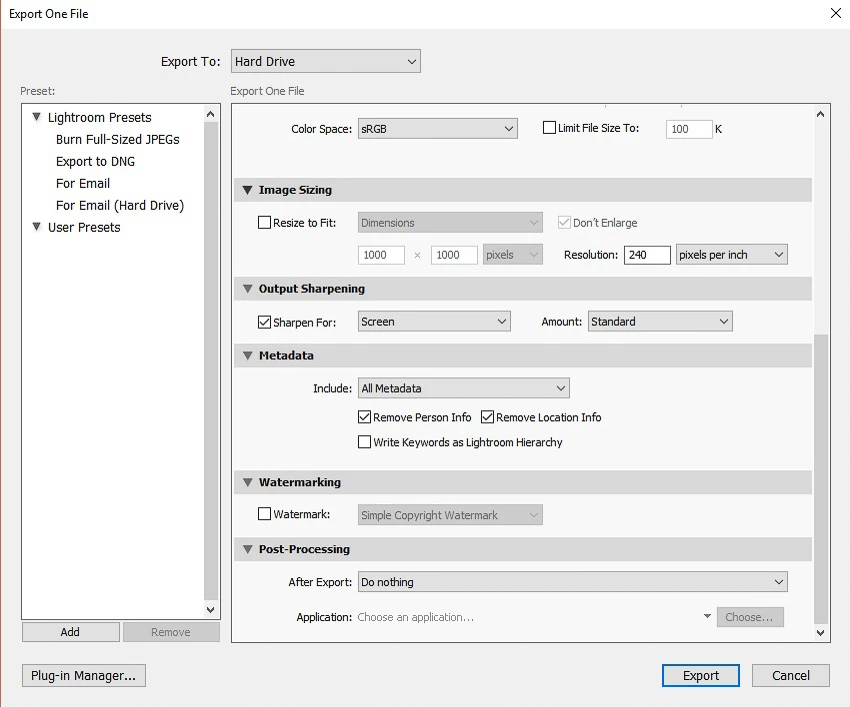
Hey all, a few days ago I changed my export settings entirely from the original and didn't realize it would stay that way unless I saved it as a preset. I tried changing the settings back from what I could remember, but each photo is saving at 20+mb each. How can I reset the export settings to what they originally were?
5.8K
Translate
Report
Community guidelines
Be kind and respectful, give credit to the original source of content, and search for duplicates before posting. Learn more
community guidelines

correct answers 1 Correct answer

LEGEND , Jun 21, 2017 Jun 21, 2017

Yeah you had the quality dialed in lower or the option to Resize the image down to less pixels, "Image Sizing" section, or the "Limit File Size To:" part of the "File Settings" section set to reduce the size in MBs.

IIRC neither of them are checked by default with a fresh install of LR and the Export dialog windows being opened for the first time.

The size in MBs is also dependent on what is actually in the image, the sense. An all white image would be much smaller in MBs than one that had tons of

...
Translate
LEGEND ,
Jun 19, 2017 Jun 19, 2017

Hard to tell without seeing a screen shot of the Export dialog window and knowing what size and file type you were exporting to before.

Translate
Report
Community guidelines
Be kind and respectful, give credit to the original source of content, and search for duplicates before posting. Learn more
community guidelines
New Here ,
Jun 20, 2017 Jun 20, 2017

Was and still am exporting to jpg. Hopefully this helps in any way ? I had never changed the export settings before so I'm really just trying to reset it, I guess.

export_window.jpg

Translate
Report
Community guidelines
Be kind and respectful, give credit to the original source of content, and search for duplicates before posting. Learn more
community guidelines
LEGEND ,
Jun 20, 2017 Jun 20, 2017

Drop the Quality down to 80%.

What size, in MBs, were the exports before you made the change?

Also it is best to show the whole, complete, dialog box with all the sections expanded, except the Video section (that is unless you are exporting a video), and the dialog box filling the whole screen top top bottom.

Like this.

Export Dialog Full Screen.PNG

Translate
Report
Community guidelines
Be kind and respectful, give credit to the original source of content, and search for duplicates before posting. Learn more
community guidelines
New Here ,
Jun 20, 2017 Jun 20, 2017

Thanks for the heads up and sorry about that! Can't get the whole dialogue box in one screen. As for file size, I was going from importing around 23-25mb raw to exporting anywhere from 2.5-5mb jpg's

Untitled.jpgUntitled1.jpg

Translate
Report
Community guidelines
Be kind and respectful, give credit to the original source of content, and search for duplicates before posting. Learn more
community guidelines
LEGEND ,
Jun 21, 2017 Jun 21, 2017

Yeah you had the quality dialed in lower or the option to Resize the image down to less pixels, "Image Sizing" section, or the "Limit File Size To:" part of the "File Settings" section set to reduce the size in MBs.

IIRC neither of them are checked by default with a fresh install of LR and the Export dialog windows being opened for the first time.

The size in MBs is also dependent on what is actually in the image, the sense. An all white image would be much smaller in MBs than one that had tons of activity in it.

Translate
Report
Community guidelines
Be kind and respectful, give credit to the original source of content, and search for duplicates before posting. Learn more
community guidelines
New Here ,
May 16, 2018 May 16, 2018

Hi guys, I had a similar problem exporting made my files to the lower end of 2mb was very low.

I noticed in my case if I removed the original file it was exporting at lower mb but putting original file back it then exported at the higher mb.

For instance file img_1.cr2 raw size 22.4mb exported without original file = 2.3Mb

but with the original, it was exporting it to 11.5mb just with that it was already a big difference

hope it helps

Translate
Report
Community guidelines
Be kind and respectful, give credit to the original source of content, and search for duplicates before posting. Learn more
community guidelines
LEGEND ,
May 16, 2018 May 16, 2018
LATEST

Exporting any file in LR creates a separate, New, Other, file from the original and does not change the original file in any way.

So just Export it again with a higher Quality Setting.

Translate
Report
Community guidelines
Be kind and respectful, give credit to the original source of content, and search for duplicates before posting. Learn more
community guidelines