
Participant
October 28, 2018
Answered

Rollback to Lightroom Classic CC 7.5

  • October 28, 2018
  • 1 reply
  • 4334 views

Client accidentally updated Lightroom Classic to version 8 and it is freezing constantly. I thought there was a way to roll-back to an old version but Creative Cloud doesn't offer that as an option. Client un-installed Lightroom Classic 8 and re-installed version 7 from the Adobe website. However this appears to be a really old version and won't use Mobile or process certain photos. It looks like there was a 7.5 release earlier this year that fixed these problems. We tried to update Lightroom 7 but Creative Cloud changed it back to 8 again.

How can my client get a 7.5 update without going to 8? We are limited on time here and just need a way to get back to 7.5 without messing with version 8. This is on a MAC computer. Thanks for your help.
This topic has been closed for replies.
Correct answer Rob_Cullen

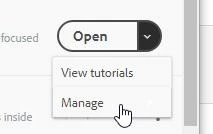
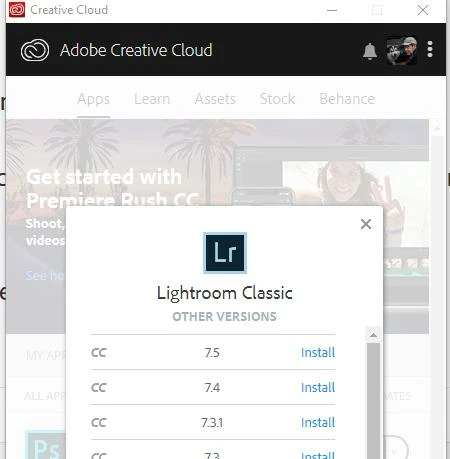
In the Creative Cloud Desktop app, you click the 'Down Arrow' on the [Open] beside Lightroom Classic, choose [Manage] and install other versions from the list that appears-


If your "client" does not have a Creative Cloud Photography plan, and they are installing a Trial of Lightroom, then the only option is the 'latest' version- ie, Classic V8.0

1 reply

Rob_Cullen
Community Expert
Rob_CullenCommunity ExpertCorrect answer
Community Expert
October 28, 2018

In the Creative Cloud Desktop app, you click the 'Down Arrow' on the [Open] beside Lightroom Classic, choose [Manage] and install other versions from the list that appears-


If your "client" does not have a Creative Cloud Photography plan, and they are installing a Trial of Lightroom, then the only option is the 'latest' version- ie, Classic V8.0

Regards. My System: Windows-11, Lightroom-Classic 15.1.1, Photoshop 27.3.1, ACR 18.1.1, Lightroom 9.0, Lr-iOS 10.4.0, Bridge 16.0.2 .
Participant
October 29, 2018

Thank you, they uninstalled Lightroom Classic after it updated to version 8. Previous versions do not show up. Now they have old version 7 (available here: https://creative.adobe.com/products/download/lightroom-classic ) but Creative Cloud always updates to 8 not 7.5. Yes it is a subscription account. They are French speaking (don't know if that matters) but the MAC is set to English. Are you saying there is no way for a subscription member to access updates? This is an older computer and they did not check if 8 would run, which it does not.

Rob_Cullen
Community Expert
Community Expert
October 29, 2018
Are you saying there is no way for a subscription member to access updates?

No, I am not saying that. If they are a subscriber then all updates (and down-grades to 7.5,etc , if wanted) are done through the Creative Cloud Desktop App.

Without knowing the computer specs, I can only refer you to-

Lightroom Classic CC system requirements

Check for a compatible operating system version in the Mac.

Regards. My System: Windows-11, Lightroom-Classic 15.1.1, Photoshop 27.3.1, ACR 18.1.1, Lightroom 9.0, Lr-iOS 10.4.0, Bridge 16.0.2 .