


nukecity
Participating Frequently
March 29, 2024
Question

Same image imported into Lightroom Classic gets darker

  • March 29, 2024
  • 1 reply
  • 196 views

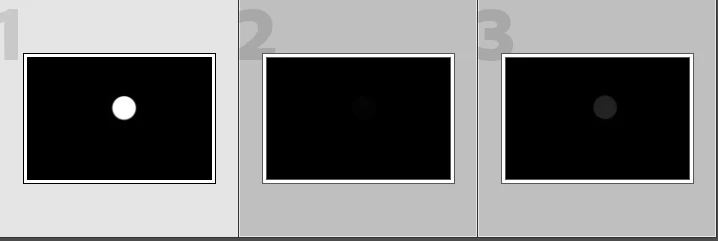
In preparation for the April 2024 eclipse, I am photographing the sun with ND 5.0 solar filter, ISO 200, 500 mm, f/11, 1/1000 using a Nikon D750. I manually took three successive shots within one or two seconds of each other without changing any of the settings. On the Nikon screen they look the same, but when I import them into Lightroom Classic the second and third shots appear much darker. Can anybody explain or resolve this?
 

This topic has been closed for replies.

1 reply

nukecity
nukecityAuthor
Participating Frequently
March 29, 2024

After further testing, I found that if I imort each image individually into LR Classic (rather than all three at once) and allow the standard preview to build before importing the next image, then the images in LR Classic are consistent. But what a pain - import, wait, import, wait, import, wait. I'm running Windows 11 Home on a Lenovo IdeaPad FLEX-15IWL i7-8565 CPU with 20 GB RAM. Any thoughts?

nukecity
nukecityAuthor
Participating Frequently
March 30, 2024

Found the issue, before import, set the Develop Settings to either Adobe Default or Camera Settings. I had it set to None