Exit
  • Global community
    • Language:
      • Deutsch
      • English
      • Español
      • Français
      • Português
  • 日本語コミュニティ
  • 한국 커뮤니티
0

Save multiple Export dialog box settings.

Community Beginner ,
Jan 05, 2023 Jan 05, 2023

The ability to save and name Export dialog box configurations would be a big time saver! I routinely export my photos for different end uses, and it's painful to have to reconfigure the multiple options in the Export dialog box each time. It's also far too easy to overlook a necessary change, such as file format or color space.
341
Translate
Report
Community guidelines
Be kind and respectful, give credit to the original source of content, and search for duplicates before posting. Learn more
community guidelines

correct answers 1 Correct answer

Community Expert , Jan 06, 2023 Jan 06, 2023

Export presets have been a feature of Lightroom (Classic) for many years, probably since version 1 in 2007.

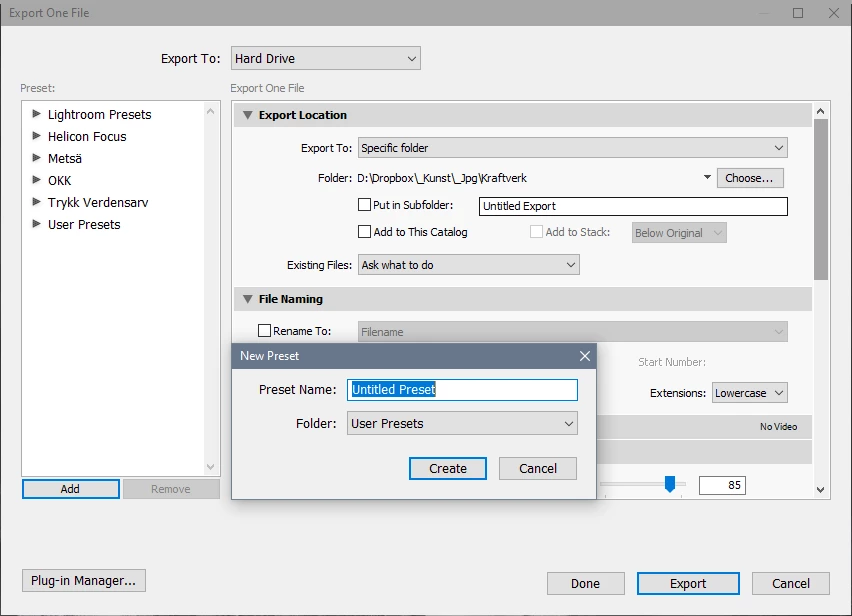
With all options set the way you want them,  click the Add button bottom left in the Export dialog.


image.png

Translate
Community Expert ,
Jan 06, 2023 Jan 06, 2023

Export presets have been a feature of Lightroom (Classic) for many years, probably since version 1 in 2007.

With all options set the way you want them,  click the Add button bottom left in the Export dialog.


image.png

Translate
Report
Community guidelines
Be kind and respectful, give credit to the original source of content, and search for duplicates before posting. Learn more
community guidelines
Community Beginner ,
Jan 06, 2023 Jan 06, 2023

Oh man! Thank you for pointing that out. That is, indeed, exactly what I was looking for. A search on Adobe's support site didn't turn up any answers, but then I wasn't using the term "Preset." Problem solved.

Translate
Report
Community guidelines
Be kind and respectful, give credit to the original source of content, and search for duplicates before posting. Learn more
community guidelines
Community Expert ,
Jan 06, 2023 Jan 06, 2023

As a tip for making these export presets more flexible - one of the "Export to:" options is to not define any particular destination, but rather, to prompt the user to supply one each time.

Translate
Report
Community guidelines
Be kind and respectful, give credit to the original source of content, and search for duplicates before posting. Learn more
community guidelines
Community Expert ,
Jan 06, 2023 Jan 06, 2023
LATEST

And, when you have created your Presets they might show like this under the 'User Presets' heading-

2023-01-07 11_12_13-Export One File.jpg

Hint: Use very descriptive names- it helps greatly. (Mine could be better 🙂  )

***To use an Export Preset- You only need to [Click] on the NAME of the Preset.

Do NOT place a check-mark in the boxes unless you want to do a batch export by checking multiple Presets. eg. you might want a 600x600px version and a 1920x1080px version of an image in the one step. (Note: Checking multiple export presets also prevents changing the Preset options.)


Regards. My System: Windows-11, Lightroom-Classic 15.1, Photoshop 27.2, ACR 18.1.1, Lightroom 9.1, Lr-iOS 10.4.0, Bridge 16.0.1 .
Translate
Report
Community guidelines
Be kind and respectful, give credit to the original source of content, and search for duplicates before posting. Learn more
community guidelines