Participating Frequently
July 17, 2020
Answered

Saving catalogue is becoming impossible

  • July 17, 2020
  • 6 replies
  • 512 views

Hello! I am on Lightroom Classic 9.3 For the last few days, it has become impossible to save my catalogue when exiting Lightroom. I get the message as in the attached file. Any idea of what is going on and how to fix that? Thanks in advance!

Best.

Thierry


This topic has been closed for replies.
Correct answer JohanElzenga

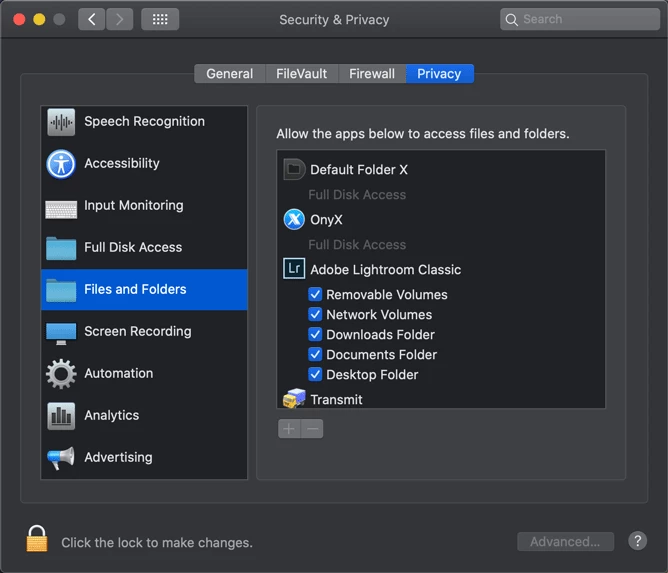
Per is not talking about 'read & write' status for Lightroom or of folders, but permission for Lightroom to access certain folders. If you use MacOS Catalina, you have to give apps special permissions to to so.
 

6 replies

Just Shoot Me
Legend
July 17, 2020

So people don't have to download the image you have attached to your post please Edit your post to remove the Attached screen shot and Include it in the body of the text of your post.

You do that by Clicking the "More..." link at the bottom of your post, Selecting "Edit Message" and then use the "Insert Photos" icon in the tool bar at the top of the Post/Reply/Edit dialog box like this.


Thank you.

TZT92Author
Participating Frequently
July 17, 2020

Thank you for the hint. I'm new on the Community and appreciate pieces of advise like yours. thanks again! Best.


Per Berntsen
Community Expert
Community Expert
July 17, 2020

Actually, I was talking about folder permissions, being a Windows user, I didn't realize that applications need to be given permissions to access folders on a Mac.

So I'll leave it to you figure this out Johan ...

TZT92Author
Participating Frequently
July 17, 2020

Thanks per. I did as per Johan recommendations and it worked. I'll keep watching whether this reappears or not... Best and thanks!

JohanElzenga
Community Expert
JohanElzengaCommunity ExpertCorrect answer
Community Expert
July 17, 2020

Per is not talking about 'read & write' status for Lightroom or of folders, but permission for Lightroom to access certain folders. If you use MacOS Catalina, you have to give apps special permissions to to so.


-- Johan W. Elzenga
TZT92Author
Participating Frequently
July 17, 2020

Thanks Johan. I just checked and ticked the Network volumes box that was not selected and it worked. I'll check whether this keeps functioning as I had that same issue occuring randomly for some time now. Anyway tanks again and best to you!


Per Berntsen
Community Expert
Community Expert
July 17, 2020
It is well on a read & write status for all of Lightroom

Did you check the permissions on the folder that you use for backups? This folder can be anywhere on your computer, and is not a part of Lightroom.

If you click Sélection un autre dossier ... that should take you to the current backup folder.

You can also choose a different folder in another location and see if that works.

TZT92Author
Participating Frequently
July 17, 2020

One precision. I have plenty of disk space available (over 1.2TO) so this is not a disk space issue...


Per Berntsen
Community Expert
Community Expert
July 17, 2020

Based on the very little French I know, I think the message tells you to verify your permissions on the folder you are saving the backup to, and to check that there is sufficient space on the hard drive.

I'm not a Mac user, but I think you use the Get info command in the Finder to change permissions.

You need to have Read and Write permissions on the folder.

You can also do a Google search for "Change permissions Mac".


TZT92Author
Participating Frequently
July 17, 2020

Thank you Per. I have just checked my permissions. It is well on a read & write status for all of Lightroom. And as stated there is plenty of disk space available... Strange!
