
Inspiring
December 15, 2024
Question

Saving/using only catalog files in the Adobe Cloud, instead, the photos locally

  • December 15, 2024
  • 2 replies
  • 381 views

Hi,

I use a large OneDrive account (several TBs) to store my photos, using them mainly on 2 devices.

On this Onedrive account the LR Classic catalog files are also stored. The folder is always / automatically synced.


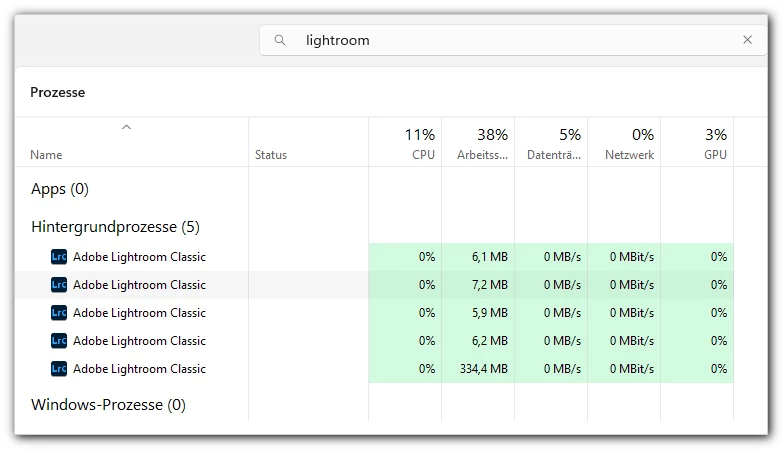
But sometimes I have problems to open a catalog. In the worst case I can't open it anymore – without getting any error message. And in the Task-Manager it looks like this:


My question: can I use/save only the LR catalog file in the Adobe Creative Cloud Storage, but leave the photos where they are, in OneDrive?


Thanks!

mycc


... my photos take up more than 100 GB – too large for the Creative Cloud Storage ...



Edit: I was able to repair the corrupt catalog via:

https://helpx.adobe.com/lightroom-classic/kb/troubleshoot-crash-or-freeze.html#:~:text=Press%20and%20hold%20the%20Alt

... but my question is still the same 😉

This topic has been closed for replies.

2 replies

dj_paige
Legend
December 15, 2024

Catalog  file cannot be stored in the cloud, it must be on a local disk (internal or external).


Catalog file stored in a OneDrive folder is a poor idea, it causes many many potential problems, and you can read about them by searching this forum.


Photo stored in a OneDrive folder is a poor idea, it causes many many potential problems, and you can read about them by searching this forum.


Perhaps you want to use the cloud-based software called Lightroom (not Lightroom Classic), and go for the 1TB plan, then you have space for everything.


So in summary, you pay for this space via your monthly fees, or you pay for more hard disk space. Your choice


my ccAuthor
Inspiring
December 16, 2024

Saving photos to Onedrive has not been a problem so far. But as you mentioned, I actually sometimes have problems with the catalogue files in my huge Onedrive storage.

‘Lightroom not Classic’ is not an alternative, because I need all the options and not a “light version”. As so often in life, a combination would be the best of all worlds 😉

And as I said, so I have more than 1 GB of photos - and only one Onedrive account with more than 1 GB of storage...
But okay, then I'll have to live with ‘my’ problems.

Translated with DeepL.com (free version)

dj_paige
Legend
December 16, 2024

Saving photos to Onedrive has not been a problem so far.


Which does not mean that OneDrive will not cause problems in the future, like it has for others. It's a risk you can choose to take (or not). Getting more local disk space is another solution; it is a cost that you can choose to spend money on (or not).

JohanElzenga
Community Expert
Community Expert
December 15, 2024

The Lightroom Classic catalog needs to be stored locally. It cannot be stored in Creative Cloud.


-- Johan W. Elzenga
my ccAuthor
Inspiring
December 16, 2024

Is there a reason for it?


For people with multiple locations - who need to work with different computers - this would be perfect, a cloud-based storage for the catalogue files and folders.