

RD Hi
Participating Frequently
July 18, 2025
Answered

SDK or API to run Lightroom Classic's Tone Control > Auto and White Balance > Auto

  • July 18, 2025
  • 2 replies
  • 761 views

Does Adobe Lightroom have an SDK or a set of APIs that will let me do something like this:

// fetch a photo image file from local hard drive or network
Image img_original = Image.FromFile("C:\Event123\original\DSC_1337.jpg");

// Use Lightroom's ToneControl.Auto on the ORIGINAL image to create a NEW image
Image img_new = LightroomUtilities.ToneControl.Auto(img_original);

// take that NEW image and perform Lightroom's WhiteBalance.Auto on it
img_new = LightroomUtilities.WhiteBalance.Auto(img_new);

// save the NEW image to a local folder
img_new.Save("C:\Event123\corrected\DSC_1337.jpg");

 I've researched Lightroom's APIs and Firefly APIs several times for the past several months.  And I do not thing this is possible.


Here's the context...


I photograph events where I may shoot 1000s (or tens of 1000s) of photos.  Then after the event, I load the photos into Lightroom and run Tone Control > Auto on all of them.  And often White Balance > Auto as well.  I usually do this in batches of about 1000 to 2000 images at a time.
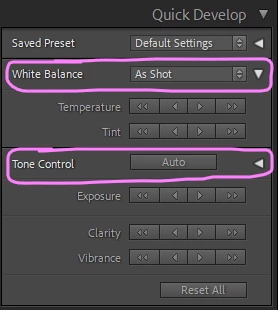


What I'd like to do is have Lightroom do these tasks for me automatically during the event while I am shooting.


I'm a software developer, so I already have my own software to move image files from the camera to a computer, from drive to drive, up to the web, etc.  I don't need Lightroom to do any of these things for me.


All I need is to tell Lightroom...

  1.  To fetch an image at a local path and file name that I tell it (not an image that's in the cloud).
  2.  To perform Tone Control > Auto on that image.
  3.  To perform White Balance > Auto on that image.
  4.  To export that image to another local path and file name that I tell it.


Then when I'm ready, my code needs to tell Lightroom to do the same thing for my next image.


What I'm really looking for is an SDK or a set of local API endpoints (not in the cloud) so that I can access Lightroom features without having to open up Lightroom.


Is what I'm asking for possible?

  • Some kind of SDK or API set that accesses Lightroom's Tone Control > Auto and White Balance > Auto features.
  • Does its work on the local machine.  Does NOT require the full resolution image (or any image) to be pushed up to the cloud.
  • Does not require a user to interact with the Lightroom UI at all.  It's okay to have Lightroom open, if necessary.


Thanks!

Correct answer johnrellis

Lightroom Classic has an SDK with an extensive API that lets you control most aspects of the catalog and photo processing. You can download the SDK, including both an API reference and an introductory Lightroom Classic SDK Programmers Guide, from here:

https://developer.adobe.com/console/67648/servicesandapis


I can't give you a direct link to the SDK because that web site is horribly designed and confusing.


Beware there's a pretty steep learning curve to do more than write a trivial script, especially if you don't know the Lua programming language, a very minimal but powerful language in which most of the LR app is written. I highly recommend investing a couple hours reading a Lua tutorial.


Debugging LR plugins with print statements is a huge waste of time.  Invest in learning the Zerobrane IDE or my Debugging Toolkit for Lightroom Plugins.  The toolkit is not as powerful as the IDE but is better integrated with Lightroom's task architecture.


If you try to just dive in and hack without learning Lua or getting a debugger, you'll regret it.


* *  *

Some hints about where to start:


To set White Balance to Auto, you can do:

photo:applyDevelopSettings {WhiteBalance = "Auto"}


But you can't do that for Auto Settings. The only way for a plugin to set Auto Settings is by applying a preset with photo:applyDevelopPreset(). So you might define a preset that sets both Auto Settings and White Balance and have the plugin apply that preset.


2 replies

C.Cella
Inspiring
July 19, 2025

@RD Hi 

It is possible to run Auto Tone via SDK but only in Develop using 

LrDevelopController.setAutoTone()


If you are looking for a way to do Auto Tone automatically in Library then is better to apply a preset as @johnrellis said.

.

RD Hi
RD HiAuthor
Participating Frequently
July 19, 2025

Thanks for that info, @C.Cella!


I gather that when you and @johnrellis mention the notions of "in Library" and "in Develop" that you are refering to what we see here in the LR UI.  Correct?


In Library ...

In Develop ...


If so, that begins to make sense.


I'm still thinking very simplisticly, like the way I wrote my pseudo-code in my OP.  As I get into the SDK and the docs, I'll post my progress and solution here.


My 3rd grade brain tells me that the first thing I need to figure out how to do is to tell the LR SDK which image file on my hard drive that I want to work with.  Then do the setAutoTone() and a SaveImage() method of some kind.

LrDevelopController.GetImage("C:\Event123\original\DSC_1337.jpg");
LrDevelopController.setAutoTone();
LrDevelopController.SaveImage("C:\Event123\corrected\DSC_1337.jpg");


Thanks again.  I feel like you're pointing me in the right direction.

johnrellis
Legend
July 20, 2025

Figure out what you want to do manually, using LR's terminology and concepts: import one or more photos to the LR catalog, apply a preset to those photos, then export them in the desired format. Then look at the APIs corresponding to that terminology.

johnrellis
johnrellisCorrect answer
Legend
July 18, 2025

Lightroom Classic has an SDK with an extensive API that lets you control most aspects of the catalog and photo processing. You can download the SDK, including both an API reference and an introductory Lightroom Classic SDK Programmers Guide, from here:

https://developer.adobe.com/console/67648/servicesandapis


I can't give you a direct link to the SDK because that web site is horribly designed and confusing.


Beware there's a pretty steep learning curve to do more than write a trivial script, especially if you don't know the Lua programming language, a very minimal but powerful language in which most of the LR app is written. I highly recommend investing a couple hours reading a Lua tutorial.


Debugging LR plugins with print statements is a huge waste of time.  Invest in learning the Zerobrane IDE or my Debugging Toolkit for Lightroom Plugins.  The toolkit is not as powerful as the IDE but is better integrated with Lightroom's task architecture.


If you try to just dive in and hack without learning Lua or getting a debugger, you'll regret it.


* *  *

Some hints about where to start:


To set White Balance to Auto, you can do:

photo:applyDevelopSettings {WhiteBalance = "Auto"}


But you can't do that for Auto Settings. The only way for a plugin to set Auto Settings is by applying a preset with photo:applyDevelopPreset(). So you might define a preset that sets both Auto Settings and White Balance and have the plugin apply that preset.


RD Hi
RD HiAuthor
Participating Frequently
July 19, 2025

Thank you, @johnrellis.  I'll check out the Zerobrane IDE and your Debugging Toolkit.  As well as the SDK link you posted.


And help me make sure that I understand you correctly.  When you say "But you can't do that for Auto Settings," are you saying that it's not possible to perform the Tone Control > Auto feature using the SDK (per my screen snip in the OP)?


That's my main purpose for wanting to access LR features via SDK.  I want LR to auto-adust the exposure, contast, highlights, shadows, whites, blacks, vibrance and saturation for each individual image.  On the fly.  The composition, colors, lighting, etc can vary from image to image.  So a single preset would not work.


Or perhaps is there a way to do an auto-set for each of those individual properties?  auto-exposure, auto-contast, auto-highlights, etc.


Thanks!


johnrellis
Legend
July 19, 2025

A plugin can't use photo:applyDevelopSettings() to set Auto Settings. But it can apply a preset that sets Auto Settings and White Balance using photo:applyDevelopPreset().