Known Participant
July 5, 2024
Question

SDK: Update Transform?

  • July 5, 2024
  • 1 reply
  • 768 views

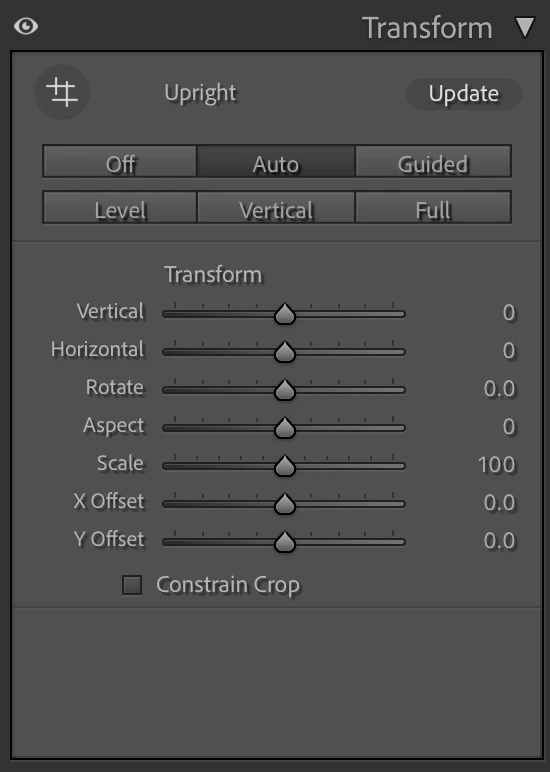
Does anyone know if there is a way to "Update" transform via the SDK? I don't see anything in the documentation.


See the screenshot below for the Update that I am referring to.
 

This topic has been closed for replies.

1 reply

johnrellis
Legend
July 6, 2024

You can use the LrPhoto class, using the methods photo:getDevelopSettings() and photo:applyDevelopSettings() to get and set individual Develop settings. They're mostly undocumented, so you'll have to reverse-engineer their meanings.  The relevant fields are:

    PerspectiveAspect = 0, 
    PerspectiveHorizontal = 0, 
    PerspectiveRotate = 0, 
    PerspectiveScale = 100, 
    PerspectiveUpright = 0, 
    PerspectiveVertical = 0, 
    PerspectiveX = 0, 
    PerspectiveY = 0, 
    UprightCenterMode = 0, 
    UprightCenterNormX = 0.5, 
    UprightCenterNormY = 0.5, 
    UprightFocalLength35mm = 35, 
    UprightFocalMode = 0, 
    UprightFourSegmentsCount = 0, 
    UprightPreview = false, 
    UprightTransformCount = 6, 
cwurzbachAuthor
Known Participant
July 7, 2024

Hi @johnrellis, thanks for your help with this. From my testing, it doesn't look like any of these will replicate pressing the Update button in the UI. Again, thanks for your help!

johnrellis
Legend
July 7, 2024

No, there isn't a way to directly get the effect of the Update button.


But perhaps you could describe the circumstances leading up to why you'd like to do that?  To set one of the auto modes (Auto, Level, Vertical, Full), you set PerspectiveUpright:


photo:applyDevelopSettings {PerspectiveUpright = 1}


That will recompute that mode automatically and won't highlight the Update button.
