
Participant
March 17, 2024
Answered

Selected all Denoise photos Only

  • March 17, 2024
  • 2 replies
  • 1695 views

Hi ,


I have used bracted setting for my real estate shoot and shot 3 images with different exposures. I applied a denosie effect on all of them. After applying this effect now I see a number 2 on top left of every image. (Its the original and the Enhanced Image). Now I need to photomerge only the Denoised images. How can I select only those enhanced images? I tired to stack it but i suppose its taking all 6 images ( 3 original + 3 enhanced ) and stacking it which defeats my purpose. Any help! 


Thanks!

Irfan Sait
This topic has been closed for replies.
Correct answer Jim Wilde

Shown in German. However, it stays the same.


Alernatively, filter on keywords....using Denoise automatically adds an "Enhanced>Denoise" keyword to the enhanced DNG images.

2 replies

DdeGannes
Community Expert
Community Expert
March 17, 2024

@Irfan30749228b6d9 , the number 2 indicates the denoised DNG image is stacked with the original raw image. Unstack to  sort the Denoised images separately, you can also deselect the stacking option when doing the Denoise process.

Regards, Denis: iMac 27” mid-2015, macOS 11.7.10 Big Sur; 2TB SSD, 24 GB Ram, GPU 2 GB; LrC 12.5,; Lr 6.5, PS 24.7,; ACR 15.5,; (also Laptop Win 11, ver 24H2, LrC 15.0.1, PS 27.0; ) Camera Oly OM-D E-M1.
Participant
March 17, 2024

Thanks

F. McLion
Community Expert
Community Expert
March 17, 2024

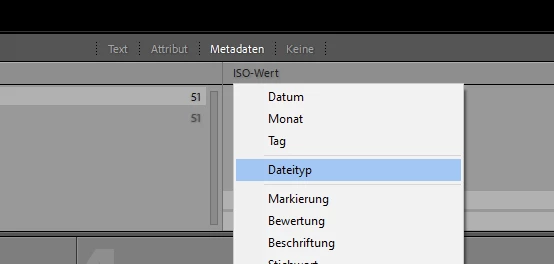
The ones with applied denoise are saved as DNGs. How about using a library filter to select for DNGs only?

--- Got your issue resolved? Please label the response as 'Correct Answer' to help your fellow community members find a solution to similar problems. ---
Participant
March 17, 2024

Hi, I am new to Lightroom , i am unable to find the filter options based on this creteria which selects only DNGs. Pl guide.

Thanks!

F. McLion
Community Expert
Community Expert
March 17, 2024

Shown in German. However, it stays the same.


--- Got your issue resolved? Please label the response as 'Correct Answer' to help your fellow community members find a solution to similar problems. ---