
Participant
January 3, 2020
Answered

Set Filename to title on multiple images

  • January 3, 2020
  • 3 replies
  • 5182 views

Hi all, sorry for a newbie question, but the lack of support of Aperture for Catalina has finally moved me over to Lightroom Classic and Lightroom set up.  I have the latest versions.  


One thing which keeps bugging me (and I seem not to be able to find a solution, so need some of your experts help:  I post pictures onto Flickr - after switching, they all don't have titles anymore.  Is there any plug in or any workaround to set the filename to title as a batch change? Do I have to do this with Adobe Bridge? 


Thanks for your help - I won't be able to find pictures from Flickr without that 😉
This topic has been closed for replies.
Correct answer Ian Lyons

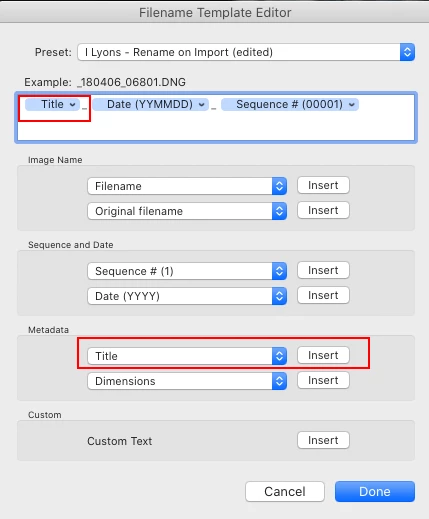
Have you tried renaming the photos in Lightroom as shwon in below screenshot?


Alternatelively, you could have a look at Jeffrey Freidl's Flickr plugin at http://regex.info/blog/lightroom-goodies/flickr His p;igins tend to provide a much larger list of export options than Adobe's


3 replies

john beardsworth
Community Expert
Community Expert
January 16, 2022
quote

 Is there any plug in or any workaround to set the filename to title as a batch change? Do I have to do this with Adobe Bridge? 


See http://lightroomsolutions.com/plug-ins/search-and-replace/

Ronen Schmitz Even Zur
Known Participant
February 9, 2023

Dear John, check my reply to @JacquesCornell above for detailed instructions on how to do that.
You don't need Adobe Bridge. There is a free plugin with many features, and the "Write Data Field" features is what you are looking for.
http://regex.info/blog/lightroom-goodies/bag-o-goodies

Hope that helps!
Ronen

Inspiring
August 25, 2020

I have a similar issue and I don't think I understand the answers here...

Windows 10, current Lightroom classic.

I would like to take the current file Name and put it in the title.  I thought that was what the original post was asking for.  You show a "Filename Template Editor", and in th eexample it looks like it's taking the title and using it for the file name - the opposite of what I'm after.  Am I incorrect in my understanding of the question and/or the answer?

If so, IS there a way to take a group of images in Lightroom, and copy the file name to the Title field?

Ronen Schmitz Even Zur
Known Participant
December 21, 2020

Hi Dave,

there is this plugin you may want to consider:
https://www.photographers-toolbox.com/products/jbeardsworth/findreplace/


If you install the trial, you should be able to once batch rename your Titles in LR with whatever you like from the other fields.

After that, you can only batch rename 10 Titles with the free version.

Hope that helps.

Known Participant
February 10, 2023

Dear Jacques,

check the first screenshot.

In your case:

  1. Select all pictures where you want to add or change meta data.
  2. Of course, "Field to fill" has to be "Title".
  3. "Fill with" can be any text (as you mentioned), but it can as well process tokens, i.e. placeholders to retrieve other meta data from each individual image meta data. In the screenshot I use the {FILENAME} token, which writes the respective file name with extension into the title fields of every selected image. Next to it on the right, you can see I saved this as a preset called "Fill Title with Filename and Suffix"
  4. There are tokens basically for every kind of meta data. To get an overview of all available meta data tokens, click on the button "Token examples" right next to the preset dropdown – second screenshot.
    The examples as well show what data would be pulled from, which is very handy.
  5. Back in the main dialog, you may choose to blindly overwrite the field, or to do so only if empty.
  6. Lastly, check again if the example given below the "Fill with" field is exactly what you want to have. (Even so in most cases you could correct it with another "Write Data Field" process afterwards, if wrong.)
  7. and click ok.


Hope that helps,

Ronen


Thanks!

Ian Lyons
Community Expert
Ian LyonsCommunity ExpertCorrect answer
Community Expert
January 3, 2020

Have you tried renaming the photos in Lightroom as shwon in below screenshot?


Alternatelively, you could have a look at Jeffrey Freidl's Flickr plugin at http://regex.info/blog/lightroom-goodies/flickr His p;igins tend to provide a much larger list of export options than Adobe's


ArendJKAuthor
Participant
January 3, 2020

Thanks - this is something worth trying - do you do that on import or export?