Participant
April 12, 2015
Answered

Sharing photos with Lightroom

  • April 12, 2015
  • 4 replies
  • 17406 views

I am really interested in using Web Collections, but I would like to allow my friends/family to download and save photos. Is there a way to enable this?

If not, would love to hear how others share photo albums.

Thanks!

This topic has been closed for replies.
Correct answer Michael J. Hoffman

Hi Mike, view yes, download no. that's what we are discussing here. unless you tell us how.

thank you


Hi Olivier,

I'm traveling, so don't have access to my Lightroom catalog right now, but I'll show how to do it from the mobile website.

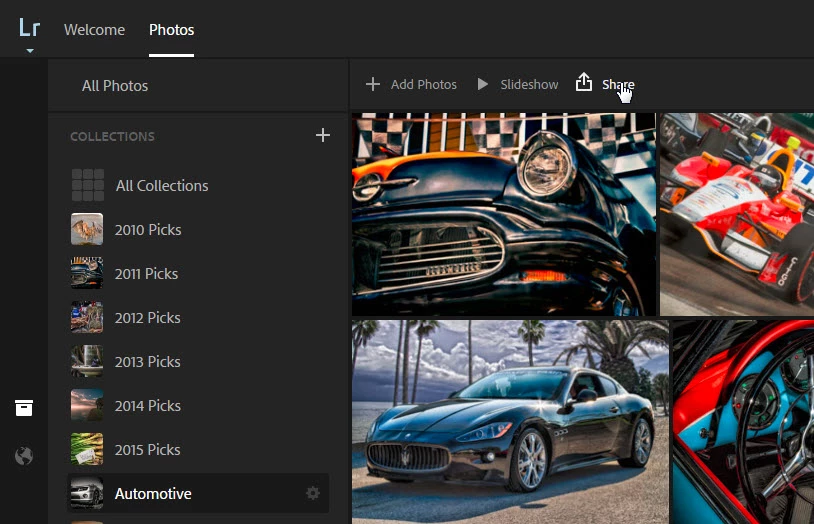
First, go to your Lightroom catalog on the web at lightroom.adobe.com, and select the collection you want to share: Click on "Share" at the top of the grid:
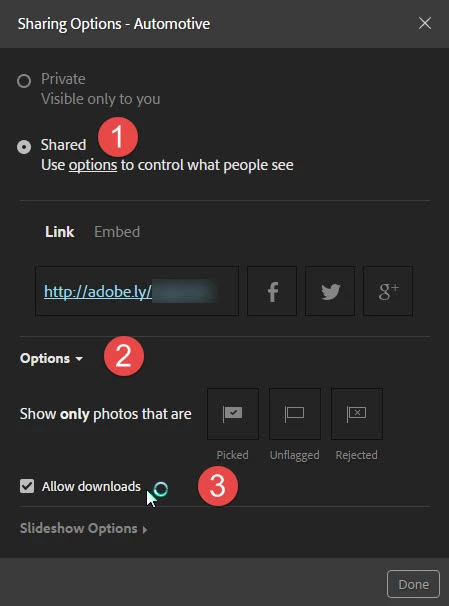
Now, the sharing options appear.

1. Choose "Shared"

2. Open the "Options"

3. Choose "Allow downloads"
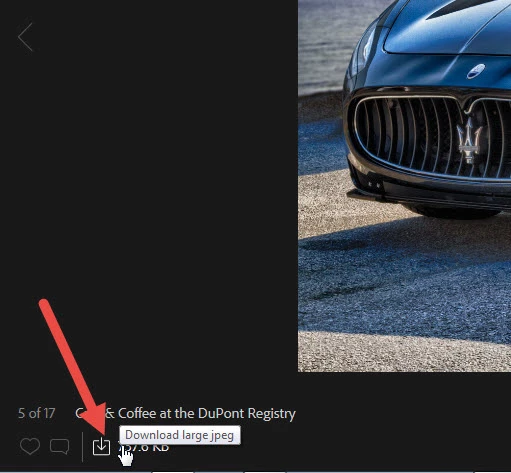
Now anyone who visits your link above (anyone who has the link has this capability) will see the "Download" option at the bottom when viewing images in full screen:
Hope this helps,

Mike

4 replies

Participant
August 29, 2022

It's 2022, and I think the software has changed, there are no longer any "Options", or "allow downloads" buttons or menu, either on laptop or mobile.  Very frustrating.  Do I have to specifically upload full files by exporting to people who need to download?  

Participant
September 27, 2017

Hey, this kind of relates, and this post is already extremely helpful, but if I edit any of the shared photos in the catalog after the fact, will the shared images reflect those new changes?

thanks!

Michael J. Hoffman
Community Expert
Community Expert
September 27, 2017

dullrelief  wrote

Hey, this kind of relates, and this post is already extremely helpful, but if I edit any of the shared photos in the catalog after the fact, will the shared images reflect those new changes?

thanks!

Yes, always. Assuming that you are connected and your library is able to sync, the shared photos are always the latest.

Mike

Participant
September 27, 2017

Sweet. It makes so much sense, but I was struggling to resolve this earlier when I’d shared collections of rough edits, only to find myself tinkering with them after I’d shared it.

ashrafh74213906
Participant
July 21, 2017

I would like to know why it isn't allowing me to download a few pictures. When I download it just keeps saying 'downloading' then it says 'Failed- Network error' but for some pictures it downloads immediately. Also the same for when I want to download the whole collection.

Michael J. Hoffman
Community Expert
Community Expert
April 13, 2015

If you're a subscriber to Creative Cloud for Photographers or the full CC suite, you have access to LR mobile. With LR Mobile, you can sync collections to the cloud. These collections can be viewed and edited on your mobile device, but more to the point of your question, you can make the collections available to anyone with a web browser, to view and download the photos.

Look specifically through these steps, Ste 7 covers your question: Get started with Lightroom mobile | Adobe Photoshop Lightroom tutorials

If you're not a CC subscriber, there are other solutions - just shout if you need further help.

Mike

scola77Author
Participant
April 13, 2015

Thanks for the response. I am a creative cloud subscriber and have several web collections already setup. Unfortunately I tried everything in that tutorial, but my photos cannot be saved or downloaded from web collections. I think this is by design, but just want to make sure before I abandon the workflow. 

99jon
Legend
September 30, 2016

Hi Scott

If you log-in to Lightroom for Web any public collection will show the share button highlighted in blue. If you click the blue icon and go to options there is a checkbox to allow viewers to download jpegs.

https://lightroom.adobe.com/