maximed98057933
Participant
August 21, 2022
Answered

Shift + S for "before - after"

  • August 21, 2022
  • 6 replies
  • 3440 views

I am very disappointed because I was using this shortcut all the time (Shift + S) to see the before-after and I am now totally lost. Will that shortcut be back again ? 


Thanks

M.

This topic has been closed for replies.
Correct answer johnrellis

[This post contains formatting and embedded images that don't appear in email. View the post in your Web browser.]


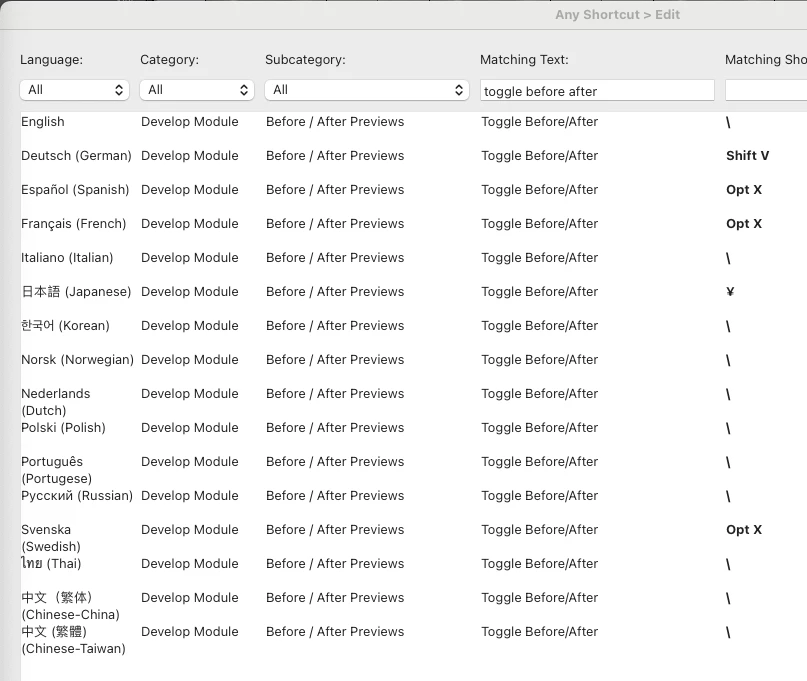
Which language are you in?  In most languages, Toggle Before/After has long been assigned to "\" but Spanish, French, and Swedish it was silently changed in LR 11.5 from Shift + S to Opt X.  (Adobe usually doesn't announce changes in keyboard shortcuts.) Here's the current assignments in LR 11.5 for the various languages:
 

6 replies

J-P L 53
Known Participant
October 10, 2022

Si vous êtes sur mac c'est Option+X pour windows je ne sais pas


Et je ne ferais pas comme certain, juste vous dire vous de chercher le réponse sur le forum 

Diego254536130kd4
Participant
September 28, 2022

Hola a todo el mundo!!!

Por algún motivo shift+s (antes/después) ha dejado de funcionar. Si sirve de algo, soy usuario de Mac y tengo todas las actualizaciones al día. Tanto las de Mac como las de Adobe.

Un saludo!!!


{Thread Merged}

Ranjisha Sengupta
Legend
September 28, 2022

Hi there,


Thanks for reaching out. Which version of Lightroom are you using? 

In which language are you using Lightroom? When was the last time it worked?

In most languages, Toggle Before/After has long been assigned to "\" but in Spanish, French, and Swedish, it was changed in LR 11.5 from Shift + S to Opt X. 

You can check a similar community discussion on this: https://community.adobe.com/t5/lightroom-classic-discussions/shift-s-for-quot-before-after-quot/m-p/13148661.


Let us know if it helps.


Thanks,

Ranjisha


johnrellis
Legend
October 1, 2022
Participating Frequently
September 28, 2022

Antes usaba Mayus+S para ver el antes y despues en LR pero ahora solo me sale una lupa, como corrijo eso?

ya probe cambiando el idioma del teclado pero aun nada.

Participant
September 28, 2022

Buenas, a mi también me pasa esto, y lo peor esque adobe después de hacer estosa cambios tan ridiculos no te dá ninguna solución ni hay manera de contactar con ellos. PASAROS A DAVINCI TODOS

Diego254536130kd4
Participant
September 28, 2022

Totalmente deacuerdo contigo Joshua!!!!🤜🏽🤛

Todo el mundo a Davinci!!!!!

Pero para el camino me vendría bien una solución...

¿No tendrás una para compartir?

Participating Frequently
August 24, 2022

So it's "ALT + X" for the French on windows.

I have to remap shortcuts on my mouse now 🙂


If only the Adobe shortcut list in lightroom was correct.

Participant
August 23, 2022

Does anyone else's shortcut shift + s not work to see the before and after?

Participant
August 23, 2022

Thank you so much. You saved me

johnrellis
johnrellisCorrect answer
Legend
August 21, 2022

[This post contains formatting and embedded images that don't appear in email. View the post in your Web browser.]


Which language are you in?  In most languages, Toggle Before/After has long been assigned to "\" but Spanish, French, and Swedish it was silently changed in LR 11.5 from Shift + S to Opt X.  (Adobe usually doesn't announce changes in keyboard shortcuts.) Here's the current assignments in LR 11.5 for the various languages:


celines35675063
Participant
August 29, 2022

Thankssssss !!