
Participating Frequently
May 14, 2019
Answered

Slideshow on second monitor - not working

  • May 14, 2019
  • 2 replies
  • 1046 views

I have my MacBook Pro connected to a BenQ SW271 monitor, used as a second monitor. In dual monitor mode the LR slideshow does not progress on the second monitor, but runs normally on my MacBook. After a frustrating 2 hours with an advisor I have been told there is an incompatability between DPI of BenQ Monitor and MacBook Pro (an assumption I believe). Has anybody esle had this problem and does anyone have any idea how to resolve it?
This topic has been closed for replies.
Correct answer JohanElzenga

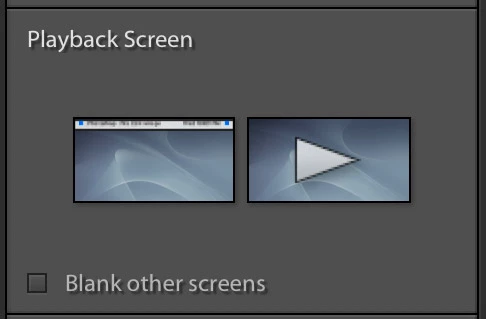
Did you remember to set the second screen as the playback screen? Click on it in the right panel.

2 replies

JohanElzenga
Community Expert
JohanElzengaCommunity ExpertCorrect answer
Community Expert
May 15, 2019

Did you remember to set the second screen as the playback screen? Click on it in the right panel.

-- Johan W. Elzenga
stevecushAuthor
Participating Frequently
May 15, 2019

Thanks Johan. Not quite sure where I find that screen but have resolved the problem as you will see from the post I have just submitted. If you have time to come back to me I would be interested to know where this screen that you put up as a screenshot is to be found. Appreciate your time.

JohanElzenga
Community Expert
Community Expert
May 15, 2019

Assuming that you indeed use Lightroom Classic, then what I showed is part of the right panel in the slide show module. You have to scroll down to see it.

-- Johan W. Elzenga
Tony_See
Inspiring
May 15, 2019

Can we have a little fact here to supplement your post thanks?

  1. What is your Lightroom and OS exact version? This is important for establishing where you are with your system and user software.
  2. Can you see your 2nd monitor in any other part of Lightroom?
  3. Is there any support from BenQ in regard of MacBook Pro that you can quote?

Look forward to your post Steve . . .

stevecushAuthor
Participating Frequently
May 15, 2019

Thanks for your time. Fortunately, despite and not because of the Adobe adviser, I have resolved the problem. As I expected it was nothing to do with the respective resolution of the MacBook and BenzQ monitor. I clicked on play under slideshow on the second screen rather than on my MacBook and it played without any problem. It now seems to work whet  I click on “play” on my MacBook or the second monitor. Not sure quite why this works but just glad that it has!