Inspiring
October 23, 2023
Answered

Small colored square at bottom of thumbnail in G view

  • October 23, 2023
  • 2 replies
  • 453 views

Hi guys,

Why do I have a small colored square at bottom of thumbnail in G view?
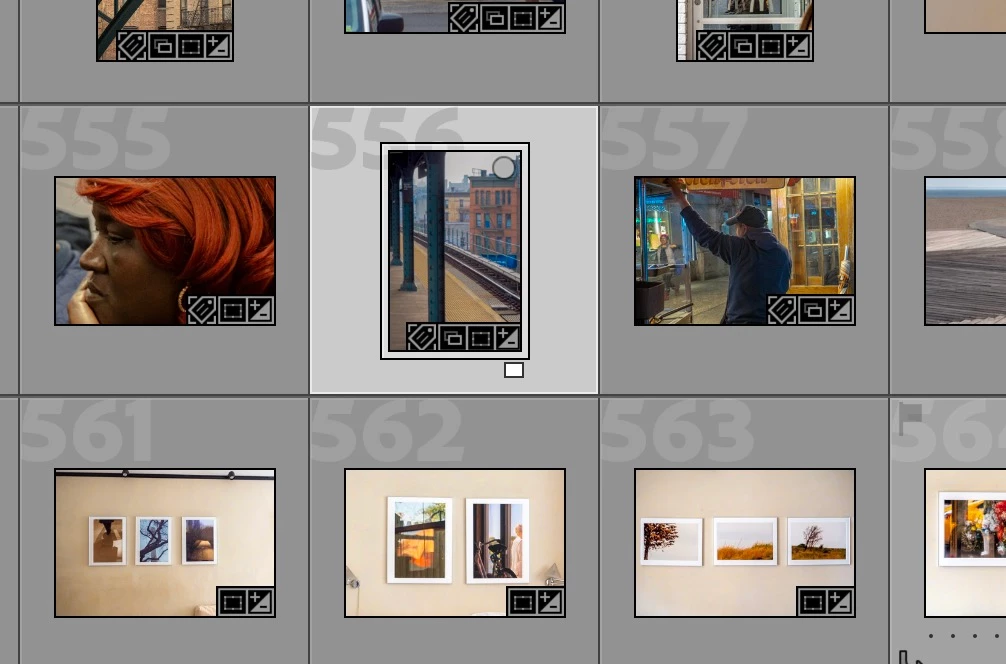
 

Thanks a lot.

 

This topic has been closed for replies.
Correct answer JohanElzenga

That is a color label, except that you have used a different label set than you use now, and so the label name and the label color don't match for this image. That is why the color is white rather than one of the normal label colors.


2 replies

Inspiring
October 24, 2023

Thank you John. Which color labels are those?

JohanElzenga
Community Expert
Community Expert
October 24, 2023

By default Lightroom simply uses the name of the color, so a red color label is called 'Red'. That text is what Lightroom uses. You can change this however. In the Metadata menu you'll find a submenu to select another label set, or create one of your own. That means that in your catalog a red label may now be defined by the text 'HDR', or 'No edits yet', or anything else you like. If that custom label set gets deselected, then Lightroom will show a white label for 'No edits yet', because that text is no longer defined as red label.


-- Johan W. Elzenga
Inspiring
October 25, 2023

Thank you so much Johan.

JohanElzenga
Community Expert
JohanElzengaCommunity ExpertCorrect answer
Community Expert
October 23, 2023

That is a color label, except that you have used a different label set than you use now, and so the label name and the label color don't match for this image. That is why the color is white rather than one of the normal label colors.


-- Johan W. Elzenga