
Participating Frequently
October 28, 2023
Answered

Solo Mode not working in masking section of LRC

  • October 28, 2023
  • 1 reply
  • 1102 views

Why can't I get solo mode to work in the masking panel section of LR classic 13.0.1 when it works perfectly in the global panel section of LRC? I've tried right clicking on a panel but it just opens the panel and doesn't show any option to choose solo mode. I tried resetting the preferences but that made no difference. Running Mac OS 14.1 (Sonoma). Any suggestions would be greatly appreciated.
This topic has been closed for replies.
Correct answer Sean McCormack

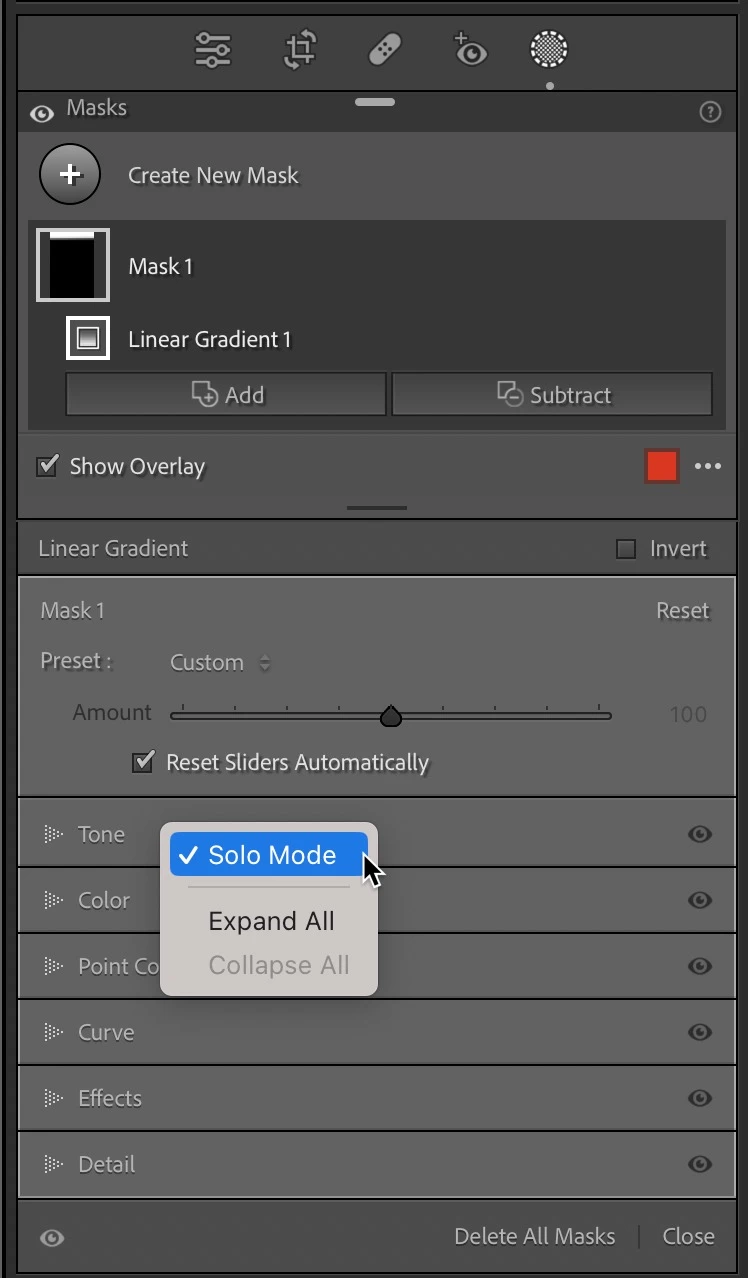
You need to right click on one of the panel headers inside masking to select Solo Mode for Masking.  Here I right clicked on Tone. 


1 reply

Sean McCormack
Community Expert
Sean McCormackCommunity ExpertCorrect answer
Community Expert
October 29, 2023

You need to right click on one of the panel headers inside masking to select Solo Mode for Masking.  Here I right clicked on Tone. 


Sean McCormack. Author of 'Essential Development 3'. Magazine Writer. Former Official Fuji X-Photographer.
Known Participant
October 29, 2023

Sean:  Forgive me if I am thickheaded. When I rt-click on any of the panel headers in Masking, it simply either opens or closes that panel.

nclevenAuthor
Participating Frequently
October 30, 2023

https://youtube.com/shorts/tnjm5bfSo8A 


I can't embed this as it thinks the /shorts bit means it's not a correct URL for youtube.. Apologies as it's left side audio only. 


That is exactly how I'm trying to access solo mode, but no amount of right clicking on a masking panel header brings up the solo mode fly out menu as I've stated in my earlier posts.