
twistedaddictionpro
Participating Frequently
November 1, 2019
Answered

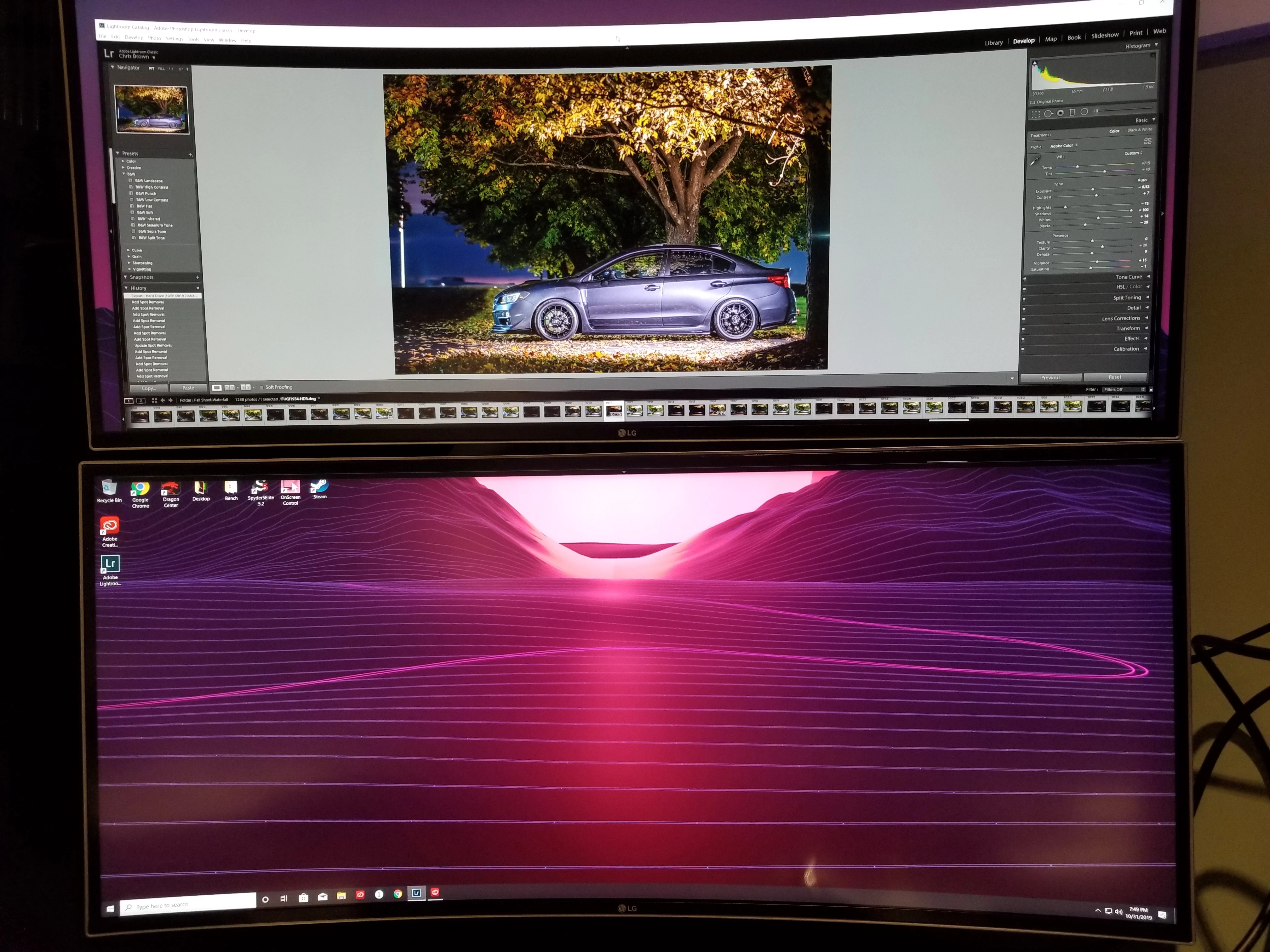
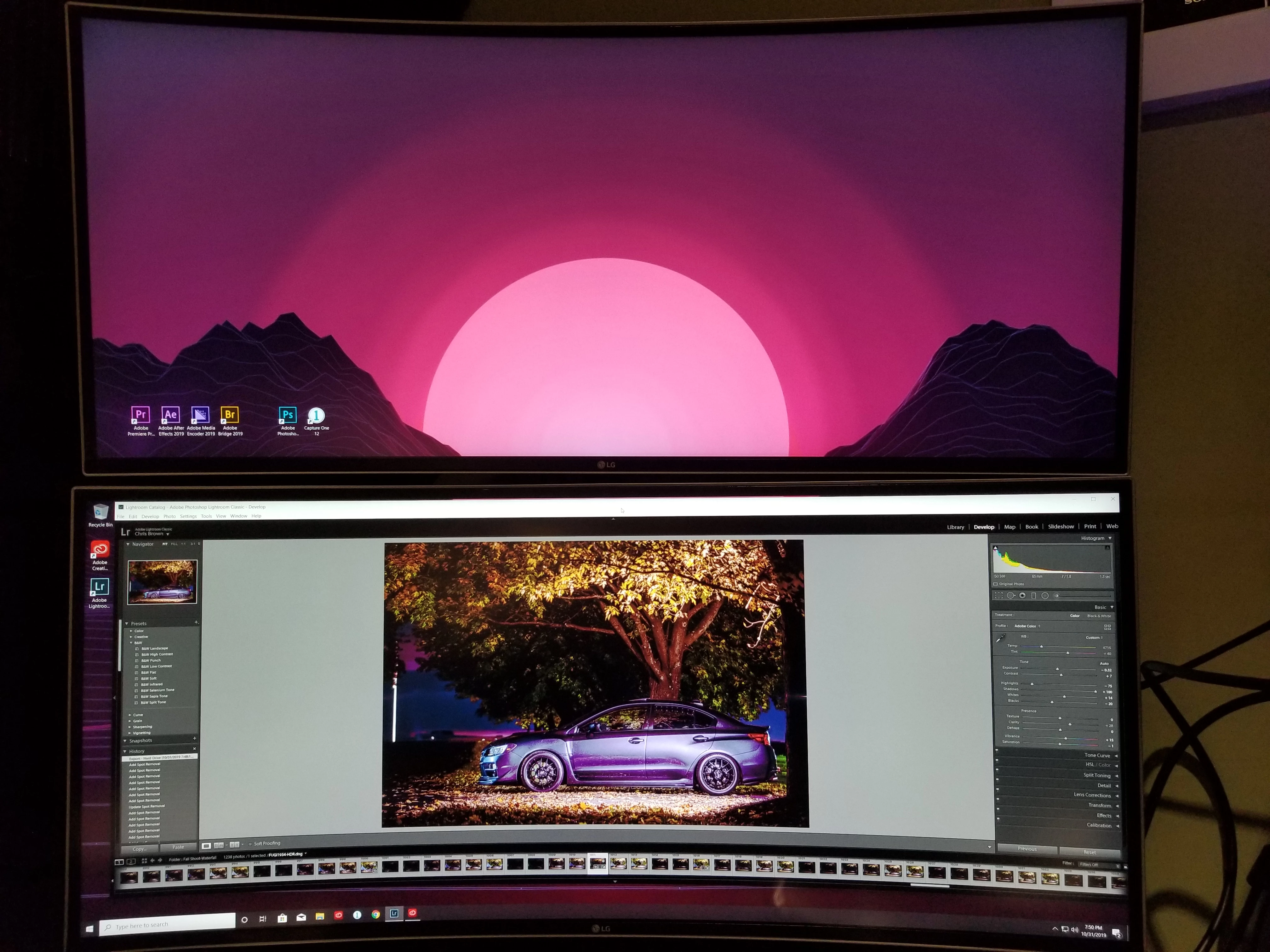
Something WAY OFF with colors in Adobe lightroom and photoshop. Please Help! :(
  • November 1, 2019
  • 6 replies
  • 677 views

I have two ultrawide monitors both are the exact same. As you can see in the photos when I drag my workspace onto my bottom monitor the colors get messed up. I have tried several things to try to resolve the issue with no luck.. including... color calibration on both monitors several different times and different ways with displaycal, spyder software and even windows built in color calibration also tried uninstalling lightroom and photoshop separately and uninstalling the entire cc suite. All other programs seem to work fine including after effects, premiere pro, capture one, windows photo viewer, etc.. if I split the workspace in between the two monitors leaving a little more on the top the color displays fine on the bottom monitor but as soon as I cross a certain threshold it's like th he entire color profile gets changed and messed up. I've also tried unplugging the top monitor to see if maybe having two different profiles was messing with it but no luck. I've had three different brand monitors hooked up before and never had this issue (with the three monitors the colors were a little off between them but nothing like this) any suggestions would be greatly appreciated! Thanks!

This topic has been closed for replies.
Correct answer Tony_See
Also check if your monitor profile is possibly corrupt . . .
Details in this link:
 

6 replies

GoldingD
Legend
November 1, 2019

Check your lower monitors connection. Is it loose.


twistedaddictionpro
Participating Frequently
November 1, 2019

No I've tried swapping the cables out. But from what I'm experiencing I would think it is an issue directly with Adobe Lightroom and Photoshop somehow switching the profile or something. No other programs have this issue and they display color totally fine. I actually started using capture one pro more because of this issue.

twistedaddictionpro
Participating Frequently
November 1, 2019

Here is a close up showing how the bottom monitor displays the colors. It's like it replaces the blacks with a magenta and gets pixelated. Thanks again for any help on my situation.

Tony_See
Tony_SeeCorrect answer
Inspiring
November 1, 2019
Also check if your monitor profile is possibly corrupt . . .
Details in this link:
 
twistedaddictionpro
Participating Frequently
November 1, 2019

I have been through these steps before but I will try again. As you can see in my original post I have tried several different options. The only thing that I haven't done that I can think of is reinstalling windows and nvidia drivers 

Tony_See
Inspiring
November 1, 2019

Both screen shots show you are working in the Develop Module. Is there a difference (between monitor  display AND Module display when you are viewing the Library Module)?

Is the GPU on in Lightroom Prefs?

Maybe this might shed some light for your issue . . .

twistedaddictionpro
Participating Frequently
November 1, 2019

Yes the gpu is on. And I believe its doing the same thing in all the modules but I will double check when I get home. 

GoldingD
Legend
November 1, 2019

Change your display background (OS) to a solid color, perhaps gray. Minimize and/or close everything. Compare. Is one monitor brighter than the  other?


twistedaddictionpro
Participating Frequently
November 1, 2019

No the monitors are set to the same brightness or almost near the same. If it looks different in the photos its probably because I took it with my phone and my settings changed

GoldingD
Legend
November 1, 2019

How are  each  of  the monitors connected to your computer? 


Display Port

HDMI

DVI

VGA

Thunderbolt

USB-C


PLEASE USE THE REPLY FROM THE TOP POST WHEN REPLYING TO POSTS.
Helps to show posts in date/time order, improves visibility (as not hidden in a reply to a reply), and is easier to use


twistedaddictionpro
Participating Frequently
November 1, 2019

Both with a display port