
Participant
July 8, 2018
Answered

Sony A6500 Camera Calibration

  • July 8, 2018
  • 2 replies
  • 2048 views

Hello,

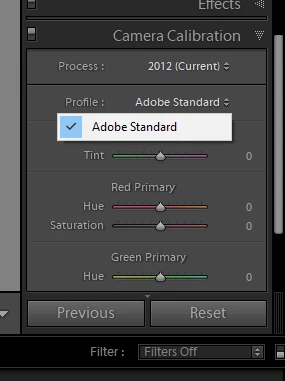
I shoot my photos as raw file by Sony A6500 camera. Then, I used Adobe converter to convert the ARW to DNG file ( for some reason my lightroom do not recognize the ARW file). However, when using Lightroom to edit them, the camera calibration only have one option "Adobe Standard" instead of Landscape, Deep, Clear, Light,... Could you help me to fix this please?
    This topic has been closed for replies.
    Correct answer ssprengel

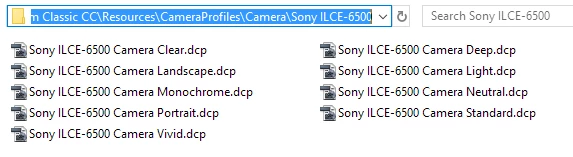
    However, in a new enough version of LR, there are other profiles for the A6500:

    2 replies

    Rob_Cullen
    Community Expert
    Community Expert
    July 8, 2018

    I shoot my photos as raw file by Sony A6500 camera. Then, I used Adobe converter to convert the ARW to DNG file ( for some reason my lightroom do not recognize the ARW file).

    It depends on the Version Number of Lightroom that you are using. (Minimum v6.8  CC2015.8 needed)

    Cameras supported by Camera Raw

    However, when using Lightroom to edit them, the camera calibration only have one option "Adobe Standard" instead of Landscape, Deep, Clear, Light,...

    Commonly, "Mirrorless" cameras (as is the A6500), the profile is embedded in the image metadata by the camera. Lightroom will only show the Adobe Standard.

    Regards. My System: Windows-11, Lightroom-Classic 15.1.1, Photoshop 27.3.1, ACR 18.1.1, Lightroom 9.0, Lr-iOS 10.4.0, Bridge 16.0.2 .
    ssprengel
    ssprengelCorrect answer
    Inspiring
    July 8, 2018

    However, in a new enough version of LR, there are other profiles for the A6500:

    Participant
    July 9, 2018

    Hello, I know how to fix my problem. Could you send me those .dcp file?

    ssprengel
    Inspiring
    July 8, 2018

    The Sony A6500 was first supported by LR 6.8 or LR CC 2015.8 and your LR is clearly older than that.  If you have a LR 6.x series and just need to update then download and install the patch installer for 6.14 from here:

    https://helpx.adobe.com/download-install/kb/lightroom-downloads.html

    If you have an older version of LR than 6, like LR 5.x, then why?. You have the power to fix it by paying Adobe for their work in supporting your camera.


    The current desktop version of LR Class CC is 7.4 and available along with Photoshop as a $120/year subscription which is billed at $10/month, I think, still, unless it's gone up a $1/month, I'm not sure.