

Just Shoot Me
Legend
November 4, 2019
Answered

Sort by Process version

  • November 4, 2019
  • 2 replies
  • 676 views

Is there a way to sort images by the Calibration section Process version? I have images that have been in LR from 2007 and in that time there has been 5 different process versions. I want to Sort out all that have the version 5 process so I can Upgrade all the others, whether V1 to V4, to V5 process.

I've looked in all the sections of the filter bar but haven't seen any filter that would do that. I haven't tried the Text section yet but will now and then maybe Smart Collections.
This topic has been closed for replies.
Correct answer johnrellis

[This post contains embedded images that don't appear in email. View the post in your Web browser to see the images.]


"I want to Sort out all that have the version 5 process so I can Upgrade all the others, whether V1 to V4, to V5 process."


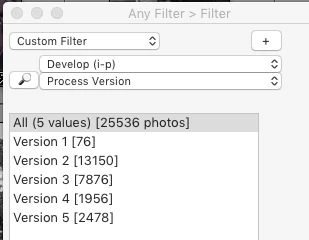
The menu command Library > Find Previous Process Photos will find all photos with versions prior to 5.  Filters and smart collections don't have any criterion for process version, so if you want to search for particular process versions, you'll have to use the Any FilterData Explorer, or Search Replace Transfer plugins, e.g.


[Use the reply button under the first post to ensure replies sort properly.]

2 replies

johnrellis
johnrellisCorrect answer
Legend
November 4, 2019

[This post contains embedded images that don't appear in email. View the post in your Web browser to see the images.]


"I want to Sort out all that have the version 5 process so I can Upgrade all the others, whether V1 to V4, to V5 process."


The menu command Library > Find Previous Process Photos will find all photos with versions prior to 5.  Filters and smart collections don't have any criterion for process version, so if you want to search for particular process versions, you'll have to use the Any FilterData Explorer, or Search Replace Transfer plugins, e.g.


[Use the reply button under the first post to ensure replies sort properly.]

Just Shoot Me
Legend
November 5, 2019

Thanks John.

99jon
Legend
November 4, 2019

Images are automatically upgraded to P/V 5 if you decide to amend the original editing.

Just Shoot Me
Legend
November 4, 2019

I unmarked your answer as correct because over on your blog in the LR V9 updates/feature article you state

"but a dividing line is good as this version requires a catalog conversion update (your previous copy is preserved) and any editing of old photos with process version 3 or 4 will automatically update to the current process version – P/V5."


That did not happen on my system. I had to do a Select All then change P/V to 5 on the main selected images and then Synced with just P/V selected. Took a while but now all my images are all on P/V 5.


99jon
Legend
November 4, 2019

Stop being petty.