Answered
Speed up video playback in Lightroom?
Is there any way to speed up video playback in Lightroom? Like how with Youtube, you can watch at 1.5x or 2x speed.

Is there any way to speed up video playback in Lightroom? Like how with Youtube, you can watch at 1.5x or 2x speed.
You can't change the playback speed, but you can quickly move through the video (scrubbing) by clicking on the gear icon:
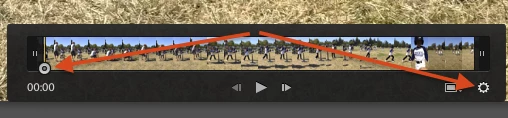
LR's player is limited and can often be jerky. Another approach is to open the video in an external video player that has the capabilities you want. It's a little inconvenient, though: Right-click the video thumbnail, do Show In Finder / Explorer, then double-click the video file in the Finder / Explorer. The Any File plugin has an Open command that does that in one fell swoop, and you can assign a keyboard shortcut to it.
Already have an account? Login
Enter your E-mail address. We'll send you an e-mail with instructions to reset your password.
 AdChoices