stephane_benhamou
Participant
December 23, 2018
Answered

Star character not displayed in collections

  • December 23, 2018
  • 3 replies
  • 1317 views

Hi,

Star character (★) is no more displayed in the collection pane : instead of this a square character is displayed.

This character is displayed correctly below thumbnails for rating, but when trying to create a new collection containing it, it's replaced by a square a shown above. When trying to cut and paste in Word this square character, the star character is displayed correctly.

It seems that Lightroom 8.1 has an issue displaying correctly this character in Windows 10 (1809) but only in the collections pane.

Thanks in advance for your help !

Stéphane

.

This topic has been closed for replies.
Correct answer johnrellis

Hi

Thanks to all for your help, but the issue is concerning all special characters like ★.

This issue was brought by Windows 10 update 1809. If you update your system with it, you'll get this issue in Lightroom, Bridge and all other applications using such characters.

It has been confirmed by other users in MS Forums, and many feedbacks to MS engineers have already been made.

One advice : don't update to 1809 !


This issue was brought by Windows 10 update 1809. ... It has been confirmed by other users in MS Forums, and many feedbacks to MS engineers have already been made.

Interesting -- I just updated to 1809 and observed the problem. According to the many other reports, update 1809 broke font substitution / fall-back, which is the mechanism in which Windows automatically uses another font to display a Unicode character that isn't in the current font:

https://www.google.com/search?biw=1280&bih=1252&ei=DZUiXLXCD4Oh8AP16bT4DQ&q=windows+update+1809+font+fallback&oq=windows…

This doesn't affect all Unicode special characters, just those that aren't in the current display font.  Here's my test with LR 8.1 / Windows 10 update 1809, showing that just ★ is displayed incorrectly:
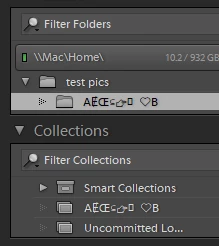
It's pretty shameful that Microsoft hasn't fixed this basic bug in over 2.5 months.

3 replies

johnrellis
Legend
December 24, 2018

Adobe wants bugs reported in the official Adobe feedback forum:Lightroom Classic CC | Photoshop Family Customer Community . Adobe product developers read everything posted there but rarely participate in this forum (a user-to-user forum).

johnrellis
Legend
December 24, 2018

I just tested LR 8.1 / Windows 10, and on my configuration, various unicode characters "AɆŒ⊆☞★  ❤️B" are properly displayed in collection and folder names:

So I suspect there may be a font-configuration issue on your computer, but I'm not sure what that might be.

Participant
December 25, 2018

Hi

Thanks to all for your help, but the issue is concerning all special characters like ★.

This issue was brought by Windows 10 update 1809. If you update your system with it, you'll get this issue in Lightroom, Bridge and all other applications using such characters.

It has been confirmed by other users in MS Forums, and many feedbacks to MS engineers have already been made.

One advice : don't update to 1809 !

Rob_Cullen
Community Expert
Community Expert
December 24, 2018

I might suggest that Lightroom is considering * as an 'illegal character' as for photo filenames.

Regards. My System: Windows-11, Lightroom-Classic 15.1.1, Photoshop 27.3.1, ACR 18.1.1, Lightroom 9.0, Lr-iOS 10.4.0, Bridge 16.0.2 .
GoldingD
Legend
December 24, 2018

I first was thinking of that, but in me preferences those are indeed the default and set as such, but I was able to nAmerica a collection as ***

GoldingD
Legend
December 23, 2018

So I it you named a few collections, perhaps smart collections ***, and **** as opposed to Four Star , and Three Star. And instead of * your getting some squares? As in wrong symbol.

If that assumption is correct, what happens when you rename the collection to "Four Stars" , and then what happens when you rename it back to ****

Oh, and did you use the * that is on your keyboard (shift 8) or a special character?
