
May 20, 2019
Question

Straighten ALL photos automatically and individually?

  • May 20, 2019
  • 1 reply
  • 14412 views

Hi,

having several photos, which I want to straighten them automatically picture for picture (indiviual setting/angle for each picture). But after I have selected all pictures and applied the "Auto" feature, the angle only of the selected photo will be figured and applied to all the others, not individual for each photo. Therefore: what's the trick for doing this?

Thanks a lot!

carlos
This topic has been closed for replies.

1 reply

Sahil.Chawla
Adobe Employee
Adobe Employee
May 20, 2019

Hi there,

As you're looking to Straighten multiple images automatically in Lightroom, could you please check this thread and let us know if it helps?

Lightroom Classic: Batch auto straighten | Photoshop Family Customer Community

Regards,
Sahil

May 20, 2019

I checked this long thread with the different results of different users having different problems ...

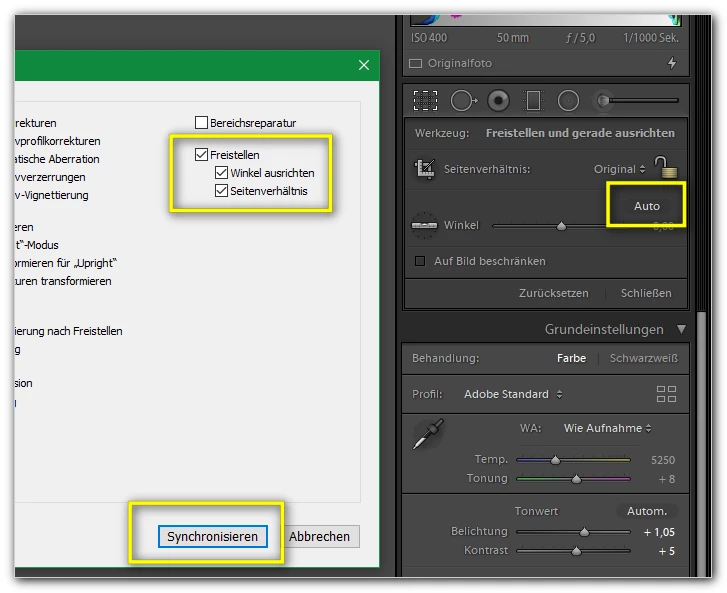
... but e.g. this setting doesn't work for me, too:

Each time the same angle of the actual photo will be applied to all of the other photos.

Lightroom doesn't recognize the (effect of the) Auto button...

Still a bug or just not a feature?

Thanks a lot!

webaschtl

Sean McCormack
Community Expert
Community Expert
May 21, 2019

These are the corrrect settings for copying/syncing Auto:

Lightroom Classic: Batch auto straighten | Photoshop Family Customer Community


That is awesome johnrellis

Sean McCormack. Author of 'Essential Development 3'. Magazine Writer. Former Official Fuji X-Photographer.