

ouiouiphoto
Known Participant
February 14, 2022
Answered

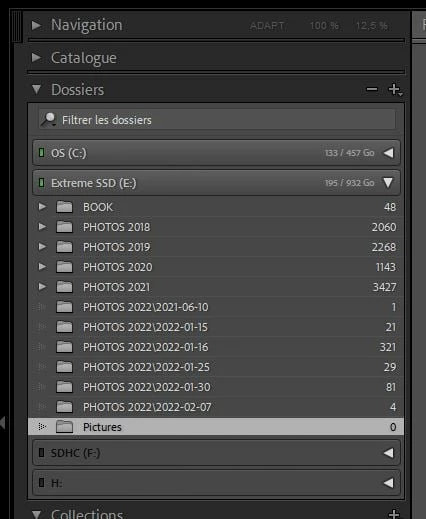
Subfolders displayed with the folder as "Folder\Subfolder" when created outside of LRC

  • February 14, 2022
  • 4 replies
  • 1145 views

Dear all


One of my community member has this issue. The subfolders are not displayed correctly. You should have PHOTOS 2022 and inside PHOTOS 2022 you should have all the subfolders.  I have checked the structure on the Disk. On the disk you have a PHOTOS 2022 folder and inside it the subfolders. Resetting the pref seems to have no impact. The PHOTOS 2022 and the subfolders has been created outside Lightroom. If you import and let LRC create the folders there is no issue. Any idea is welcome 😉 
 

This topic has been closed for replies.
Correct answer Todd Shaner

Try right-clicking on each of the PHOTOS 2022\ folders and select 'Show Parent Folder.'

4 replies

Todd Shaner
Legend
February 15, 2022

1) If it happens again with a new import try reseting your LrC Preferences file as outlined at the below article. Place a copy of the current preferencs file on your desktop so it can be easily restored if the issue remains.

https://www.lightroomqueen.com/how-do-i-reset-lightrooms-preferences/


2) Remove (not delete) the newly imported files and folders.


3) Try importing the same files and folders again.

Todd Shaner
Legend
February 15, 2022

What does the LrC Folders panel look like now after right-clicking on each of the PHOTOS 2022\ folders and select ing'Show Parent Folder?' Please post a screenshot, which might give us  a clue as to what's happing to cause this issue. Thank you.

ouiouiphoto
Known Participant
February 15, 2022

It looks normal now with Photo 2022 and inside the subfolders. This happens to one of my community member, so I cannot unfortunately  make more tests.  


.Sheepdog trying to help Lightroom and Photoshop beginners
Rob_Cullen
Community Expert
Community Expert
February 14, 2022

Might not be relevant, but- Do NOT use the [ \ ] character in Folder names.


Regards. My System: Windows-11, Lightroom-Classic 15.1.1, Photoshop 27.3.1, ACR 18.1.1, Lightroom 9.0, Lr-iOS 10.4.0, Bridge 16.0.2 .
ouiouiphoto
Known Participant
February 15, 2022

Thanks but There is no special characters in the folder name. LRC just don't display the folder and subfolder correctly 

.Sheepdog trying to help Lightroom and Photoshop beginners
Todd Shaner
Todd ShanerCorrect answer
Legend
February 14, 2022

Try right-clicking on each of the PHOTOS 2022\ folders and select 'Show Parent Folder.'

ouiouiphoto
Known Participant
February 15, 2022

Thanks. It did the trick. 

.Sheepdog trying to help Lightroom and Photoshop beginners