
Participating Frequently
September 18, 2018
Answered

Sync errors will not clear, holds up all other syncing

  • September 18, 2018
  • 1 reply
  • 9615 views

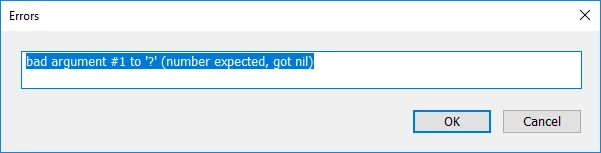
I have an issue with syncing pictures from iphone as well as from my desktop. WHen i've made a collection and sync it, sometimes it gives me errors for one reason or another which make no sense as to whats actually happening. When this happens it halts all other syncing in the queue until the error is cleared. I attempt to clear the error and nothing happens. Maybe someone can shed some light on whats going on and how to fix it? I've attached screenshots to the sync dialog box and error.
This topic has been closed for replies.
Correct answer Akash Sharma

PMd as requested


We checked the logs and it seems that you have a similar issue as listed in Lightroom Classic: sync problem: bad argument #1 to '?' (number expected, got nil) | Photoshop Family Customer Community

Our engineers are tracking this issue in the above discussion. Please share your issue details in the discussion so that they can look into it.

Regards,

Akash

1 reply

Akash Sharma
Legend
September 19, 2018

Hi JSkeff,

We'e sorry that Lightroom gives out an error while syncing images. could you please try the following:

Open Lightroom Classic CC -> Preferences -> Lightroom Sync -> Press alt/option -> Rebuild Sync data.

Lightroom will restart and syncing will reset and there will be no impact on your images.

Let us know how if goes.

Thanks,

Akash

JSkeffAuthor
Participating Frequently
September 20, 2018

I rebuilt the sync data as requesting and still have the same issue and the errors persist.

Akash Sharma
Legend
September 21, 2018

Thanks for the screenshot and providing the update.

It seems that the image returning an error while syncing in the "sync activity" menu is causing the sync to stuck.

Could you please navigate to the image in Lightroom library and remove it temporarily?

If that still shows error in the activity menu, head over to Lightroom web: Photo Editor | Online Photoshop Lightroom  and delete the problematic image from there.

Let us know how it goes.

~Akash