
Participant
July 13, 2020
Answered

Sync Lightroom Classic on PC to iPad Pro

  • July 13, 2020
  • 3 replies
  • 5251 views

Hi:


I have Lightroom Classic installed on a Windows desktop PC. I recently bought an iPad Pro. How do I sync my Lightroom photos (collections) from the desktop to be able to view and edit on the iPad Pro using the Lightroom app? Also, as an Enterprise customer I don't have a lot of Creative Cloud storage, so how can I do this using a third party cloud storage service (like Dropbox)?


Thank you.
Correct answer DdeGannes

I do not think that is possible Lightroom Classic syncs Smart Previews which I believe are proprietary to Adobe. There is no cost of storage for those files. When you sync original files from your mobile devices up to the cloud storage they will count toward your storage allocation, copies of these will sync down to Lightroom Classic on your computer.

See the screen capture. The green x relates to mobile and all synced images.


3 replies

Participant
March 6, 2025

Thank you so much 

DdeGannes
Community Expert
Community Expert
July 13, 2020

I am not familiar with "Enterprise customer" but if you have access to LrC, you should also have to Lightroom (cloud-based) app for a computer. It is not normally recommended you install LrC and Lr on the same computer but it could be useful if you have on a desktop and the other on a laptop. Both apps will be in sync with your mobile devices.


Regards, Denis: iMac 27” mid-2015, macOS 11.7.10 Big Sur; 2TB SSD, 24 GB Ram, GPU 2 GB; LrC 12.5,; Lr 6.5, PS 24.7,; ACR 15.5,; (also Laptop Win 11, ver 24H2, LrC 15.0.1, PS 27.0; ) Camera Oly OM-D E-M1.
DdeGannes
Community Expert
Community Expert
July 13, 2020

See the little "cloud" symbol at the top right corner of the Lightroom window. Sign in to your creative cloud a/c and start syncing.

At the left panel select the collections you wish to sync. The very left button.

Regards, Denis: iMac 27” mid-2015, macOS 11.7.10 Big Sur; 2TB SSD, 24 GB Ram, GPU 2 GB; LrC 12.5,; Lr 6.5, PS 24.7,; ACR 15.5,; (also Laptop Win 11, ver 24H2, LrC 15.0.1, PS 27.0; ) Camera Oly OM-D E-M1.
Participant
July 13, 2020

Thank you so much for the fast reply Denis. The screen shots were particularly helpful. This seems to be working.


What about my second question: How can I sync from Lightroom Classic to mobile apps using a cloud storage service like Dropbox (or in my case, I use Sync.com)?


Thanks again.


Hersh

DdeGannes
Community Expert
DdeGannesCommunity ExpertCorrect answer
Community Expert
July 13, 2020

I do not think that is possible Lightroom Classic syncs Smart Previews which I believe are proprietary to Adobe. There is no cost of storage for those files. When you sync original files from your mobile devices up to the cloud storage they will count toward your storage allocation, copies of these will sync down to Lightroom Classic on your computer.

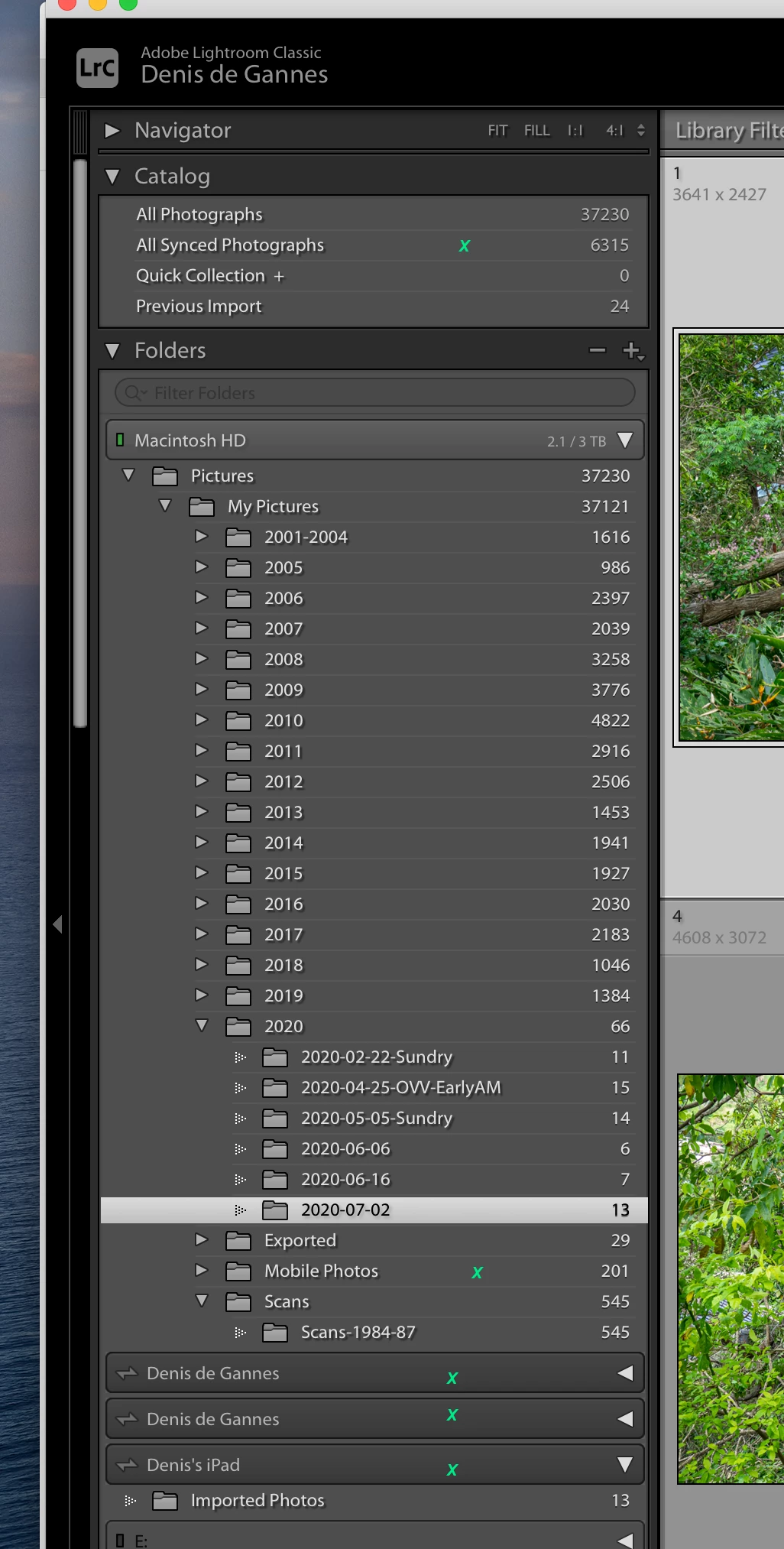
See the screen capture. The green x relates to mobile and all synced images.


Regards, Denis: iMac 27” mid-2015, macOS 11.7.10 Big Sur; 2TB SSD, 24 GB Ram, GPU 2 GB; LrC 12.5,; Lr 6.5, PS 24.7,; ACR 15.5,; (also Laptop Win 11, ver 24H2, LrC 15.0.1, PS 27.0; ) Camera Oly OM-D E-M1.