
laurien44900083
Participant
May 26, 2022
Question

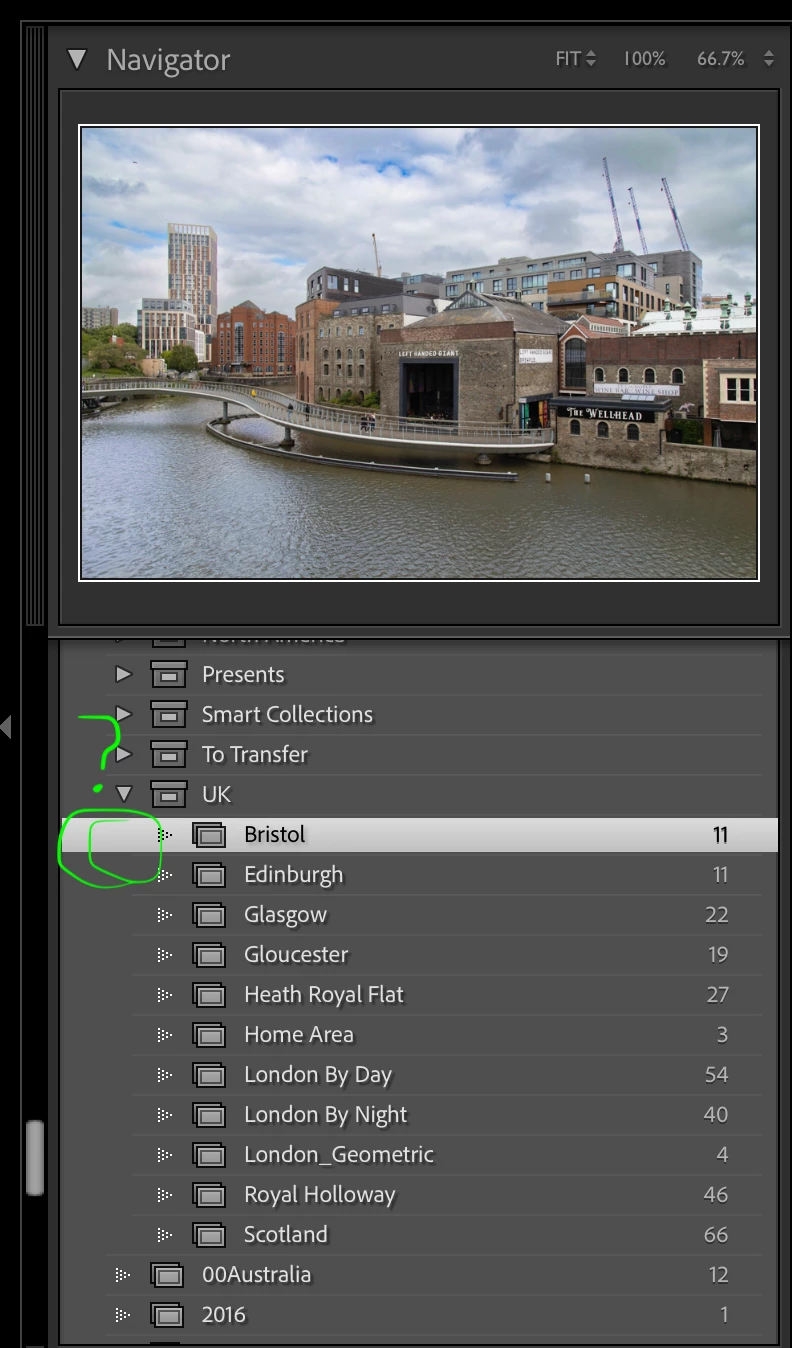
Sync to Lightroom Web is missing - no sync boxes for collections

  • May 26, 2022
  • 2 replies
  • 327 views

I cannot sync or unsync collections anymore since the recent update. There are no sync boxes beside any collections despite my existing sync'd collections still existing online on lightroom.adobe.com.  I have internet connect and it shows everything sync'd in the cloud connection icon on the top right, but I just have no control.  This is pretty bad as I cannot share photos with people I need to asap...


Lightroom Classic 11.3.1. Build 202204181225-f90ebff5

Mac OS 11.6.6
 

This topic has been closed for replies.

2 replies

Theresa J
Community Expert
Community Expert
May 26, 2022

First, use the Creative Cloud desktop app to make sure you are signed into the correct account. Second, check the cloud icon in Lr Classic to make sure the sync is turned on.

Only one catalog can be synced at a time. Perhaps you have synced a different catalog. When you turn the sync on for this catalog you will ge given the option to replaced the sync contents in Lightroom with this one.

JP Hess
Inspiring
May 26, 2022

Are you using the catalog that is synchronized with the cloud? Remember that it is only possible to synchronize one catalog with the cloud. If you have opened a different catalog then you won't have the option to synchronize collections.