
Answered
Synchronize folder says photos are missig, but they are not
Hi,
LR 14.4 Release, Windows 11.
In many folders the "Synchonize folder" dialog says there are missing photos, but the actual files do exist in that folder.
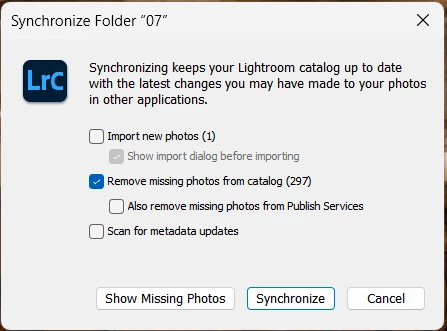
LR does not show an exclamation point for these photos and lets me develop and export them, so it does not really interfere with my workflow.
But not being able to know if a folder is synchronized is quite annoying.
Is that a known issue or it might it be a consistency problem of my catalog?
How does LR handle NEF+JPEG files? Could this behaviour be the result of synchonizing RAW+JPEG files?
Thanks,
J


 AdChoices