

Jon-M-Spear
Legend
February 12, 2019
Answered

System Update Required
  • February 12, 2019
  • 5 replies
  • 9171 views

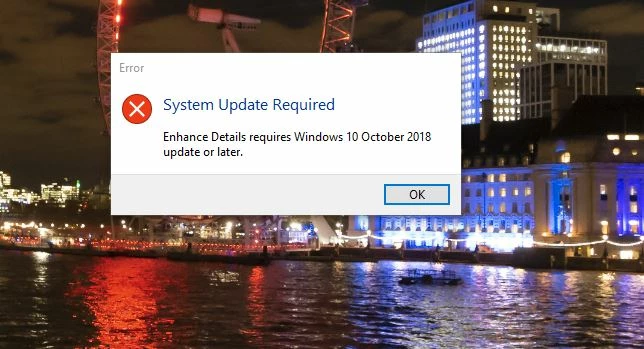
I'm unable to run the new Enhance Details feature, as I get this error message.

I'm running Windows 10 1803 build.  I have checked, and my system says this is the current version.  Version 1809 was released, but pulled in October last year.

Any advice would be welcome.

    This topic has been closed for replies.
    Correct answer John Waller

    Version 1809 was released, but pulled in October last year.

    Pulled in Oct and re-released in November.

    https://blogs.windows.com/windowsexperience/2018/11/13/resuming-the-rollout-of-the-windows-10-october-2018-update/

    Looks like you need to install 1809. Try installing manually using the Update Assistant

    https://support.microsoft.com/help/4028685/windows-10-get-the-update

    5 replies

    elie_dinur
    Participating Frequently
    February 13, 2019

    As to why Vs. 1809 is needed, Laura Shoe's blog https://laurashoe.com/2019/02/12/enhance-raw-file-details-in-lightroom-classic-cc-and-lightroom-cc/?fbclid=IwAR2w0YBsNi0…  says:

    "That it is not supported on Windows 7 is a technical constraint, not a policy decision by Adobe. Enhanced Details relies on the machine learning platform WinML, which was just released in Windows 10 1809."

    This is apparently derived from an Adobe Blog article by Sharad Mangalik  Enhance Details | Adobe Blog  who writes:

    Enhance Details uses an extensively trained convolutional neural net (CNN) to optimize for maximum image quality. We trained a neural network to demosaic raw images using problematic examples, then leveraged new machine learning frameworks built into the latest Mac OS and Win10 operating systems to run this network. The deep neural network for Enhance Details was trained with over a billion examples.

    ChandniK
    Adobe Employee
    Adobe Employee
    July 14, 2021

    Hi,


    Please try this link - https://helpx.adobe.com/x-productkb/multi/eol-tls-support.html


    Thanks,

    Participant
    February 12, 2019

    I found a solution to the update issue, at least for me. I went to Download Windows 10​ and manually updated to the new version. The update utility on my laptop wasn't doing it, and was insisting that I was updated. I hope this helps someone...

    Participant
    February 12, 2019

    That is correct, your Laptop and my Desktop do not have a official upgrade available yet. If you used the "WIndows 10 Update Assistant" it allows you to update to a "unsupported, for your system" version of Windows 10. This is due to a small number of people that experience data loss when this version was first released. I would recommend doing a full backup before using the WIndows 10 Update Assistant. At least that is what I have found. I did a full backup and am now doing the Windows 10 update via the Update Assistant. Wish me luck LOL

    Participant
    February 12, 2019

    On my Workstation which meets all of the system requirements. (I checked for updates and there are none) as far as Microsoft is concerned my system is completely up to date. But as John Waller pointed out it does not have the update that Microsoft released and then Pulled last October 2018. And Adobe says this is needed. Why Adobe chose to release a product that will not work on a computer that is fully updated by Microsoft is a bit puzzling. But as it does work on some machines and Adobe tells you that it needs to have the update that was pulled or not released for some Windows 10 processors, I guess the end story is perform a unsupported update that was pulled (see John Waller's post for how to do this, some maybe only a few users losing data files when upgraded. I would do a complete back up before doing this upgrade!!!). I am in the process of backing up and trying to install the pulled update now I'll update this when it is finished.

    System Information

    ------------------

          Time of this report: 2/12/2019, 12:10:51

                 Machine name: DON-HP-Z240

                   Machine Id: {8143AB0C-B5ED-46A0-B102-69A357C2511D}

             Operating System: Windows 10 Pro 64-bit (10.0, Build 17134) (17134.rs4_release.180410-1804)

                     Language: English (Regional Setting: English)

          System Manufacturer: HP

                 System Model: HP Z240 Tower Workstation

                         BIOS: N51 Ver. 01.34 (type: UEFI)

                    Processor: Intel(R) Xeon(R) CPU E3-1270 v5 @ 3.60GHz (8 CPUs), ~3.6GHz

                       Memory: 16384MB RAM

          Available OS Memory: 16304MB RAM

                    Page File: 4330MB used, 28357MB available

                  Windows Dir: C:\WINDOWS

              DirectX Version: DirectX 12

          DX Setup Parameters: Not found

             User DPI Setting: 144 DPI (150 percent)

           System DPI Setting: 144 DPI (150 percent)

              DWM DPI Scaling: Enabled

                     Miracast: Available, with HDCP

    Microsoft Graphics Hybrid: Not Supported

               DxDiag Version: 10.00.17134.0001 64bit Unicode


    Get the same error message. You are not alone!
    I also tried both LR CC and LR Classic CC same issue. Looks like Adobe released this a little bit early.

    It does run on my Laptop, which is much slower, with these specs

    System Information

    ------------------

          Time of this report: 2/12/2019, 12:58:48

                 Machine name: HP-SPECTRE-LAPT

                   Machine Id: {BA9C55AE-4396-4E34-80F6-86FDA87A74F7}

             Operating System: Windows 10 Home 64-bit (10.0, Build 17763) (17763.rs5_release.180914-1434)

                     Language: English (Regional Setting: English)

          System Manufacturer: HP

                 System Model: HP Spectre x360 Convertible 15-bl0XX

                         BIOS: F.31 (type: UEFI)

                    Processor: Intel(R) Core(TM) i7-7500U CPU @ 2.70GHz (4 CPUs), ~2.9GHz

                       Memory: 16384MB RAM

          Available OS Memory: 16266MB RAM

                    Page File: 4239MB used, 14458MB available

                  Windows Dir: C:\WINDOWS

              DirectX Version: DirectX 12

          DX Setup Parameters: Not found

             User DPI Setting: 216 DPI (225 percent)

           System DPI Setting: 240 DPI (250 percent)

              DWM DPI Scaling: Enabled

                     Miracast: Available, with HDCP

    Microsoft Graphics Hybrid: Supported

               DxDiag Version: 10.00.17763.0001 64bit Unicode

    But obviously I would rather not have to use the much slower laptop to run this feature.

    Both have all the Windows 10 and and video card updates applied

    I took a image of the eye of a very small damselfly that was taken with a Nikon D850 (Full Frame 45.7mPix) and a 90 mm Tamron Macro lens. After processing it with enhanced Detail on my Laptop I viewed it and the original file in LR on my workstation with a 27" 4k screen. I honestly couldn't see any difference even at 4X magnification so I am not too sure how well this really works.

    Known Participant
    February 12, 2019

    I have exactly the same problem, Win 10 1803 build, installed yesterday and the current version.

    John Waller
    Community Expert
    John WallerCommunity ExpertCorrect answer
    Community Expert
    February 12, 2019

    Version 1809 was released, but pulled in October last year.

    Pulled in Oct and re-released in November.

    https://blogs.windows.com/windowsexperience/2018/11/13/resuming-the-rollout-of-the-windows-10-october-2018-update/

    Looks like you need to install 1809. Try installing manually using the Update Assistant

    https://support.microsoft.com/help/4028685/windows-10-get-the-update

    Participant
    February 12, 2019

    According to the system info on my Windows 10 laptop I have Version    10.0.17134 Build 17134

    which should work. I get the same error message as the OP.

    John Waller
    Community Expert
    Community Expert
    February 12, 2019

    Understood but Enhance Details requires version 1809.

    Enhance Details | Adobe Blog

    See first bullet point under “Best Practices”.