
Participant
November 24, 2024
Answered

The Lightroom catalog cannot be opened because it is too new to be used by this version

  • November 24, 2024
  • 1 reply
  • 1534 views

Hi there,

I have been using Lightroom Classic on my iMac 2015 model for almost 9 years, and I have one catalog that has everything on it.


I use an external drive that has both my catalogs and photos, and run Lightroom through that.


Recently I took the hard drive to work, and used it to run Lightroom on a 2022 model Macbook Pro to finish off some freelance work during my lunch break.


Back at home today, I tried to open my reglular catalog, but I got this message: 

The Lightroom catalog named “my catalog" cannot be opened because it is too new to be used by this version of Lightroom. Would you like to select a different catalog?


With my iMac being old, I am unable to update to the latest version of Lightroom, which my work MacBook Pro uses, and I am guessing its updated the catalog to that.


My questions are:

• Is there anyway to roll back the catalog so I can use it on my older iMac?

• If not, is there a way to salavge the catalog so I can use it on my older mac?

There is around 2 years of missing edited images from the last catalog I have before that, so if I can save it I would be so happy.


Any advice will be greatly appriecated!
This topic has been closed for replies.
Correct answer Per Berntsen

LrC always upgrades a copy of the old catalog.

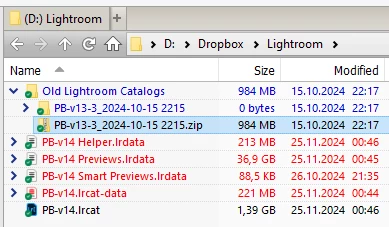
If the upgrade was done with LrC 14, there will be a folder named Old Lightroom catalogs inside the folder that contains the catalog. Inside this folder you'll find a zip file that contains the old catalog.

Unzip the file (preferably to a new location to avoid confusion), then double-click the catalog file to launch your old version of LrC.


1 reply

F. McLion
Community Expert
Community Expert
November 24, 2024

It has nothing to do with the age of the Mac. It has to do with the Version of Lightroom Classic. Once a catalog has been upgraded to work with a newer version, it can not be used with an older version of LrC.

They need to be forward-upgraded and are not backward-compatible.

That said, on the 2022 model, a newer version was installed, and your catalog has been upgraded, but not without a message showing to inform you, that you eventually ignored.


--- Got your issue resolved? Please label the response as 'Correct Answer' to help your fellow community members find a solution to similar problems. ---
Participant
November 24, 2024

Thanks, I thought that was the case that the catalog was upgraded. I wouldn't say 'ignored', but I've obviously missed it or not realised at the time the issues upgrading would cause for my home setup...


Is there a way to create a new catalog on the old computer and import the data? Or have I lost it all together to use on my older Mac? 

Per Berntsen
Community Expert
Per BerntsenCommunity ExpertCorrect answer
Community Expert
November 25, 2024

LrC always upgrades a copy of the old catalog.

If the upgrade was done with LrC 14, there will be a folder named Old Lightroom catalogs inside the folder that contains the catalog. Inside this folder you'll find a zip file that contains the old catalog.

Unzip the file (preferably to a new location to avoid confusion), then double-click the catalog file to launch your old version of LrC.