Participating Frequently
April 21, 2022
Question

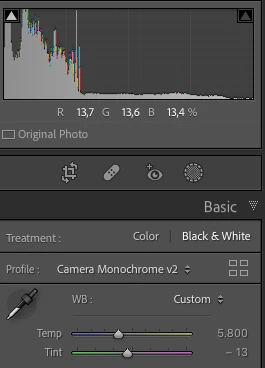
The "Camera Monochrome v2" profile of the Z6 is not monochrome throughout.

  • April 21, 2022
  • 3 replies
  • 1132 views

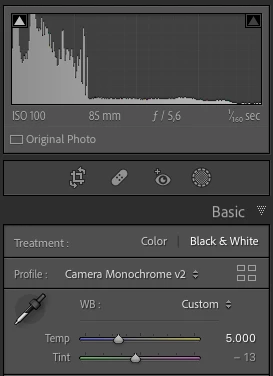
The profile "Camera Monochrome v2" for the Nikon Z6 should be a monochrome profile. There is a narrow temperature range in which the profile is coloured. If you set the temperature to a value outside this range, it becomes a monochrome profile again. This can be seen in the histogram and also in the RGB values for a point. As long as I use the Z6, this error already exists in LR.

Version: LR Classic 11.3.1

OS: MacOS 12.3.1 (21E258)
 

This topic has been closed for replies.

3 replies

TheDigitalDog
Inspiring
April 21, 2022

The image is colored, not monochrome. Decreasing the temperature (image with the boy) to 5300k changes from color to monochrome.


Didn't you provide a WB in the DNG that did produce (for you) the color? I saw none. Do you need to upload a different DNG with another edit?

This also begs the question, with "monochrome" conversions with this profile, why are you altering the color temp? 

Author “Color Management for Photographers" & "Photoshop CC Color Management/pluralsight"
Participating Frequently
April 21, 2022

I'm altering the temperature to get "real" black and white to get rid of colour stitches.

TheDigitalDog
Inspiring
April 21, 2022

All I can report is what I see from your DNGs with your edits; neutral rendering visually, numerically and in my Histograms. 

Author “Color Management for Photographers" & "Photoshop CC Color Management/pluralsight"
TheDigitalDog
Inspiring
April 21, 2022

After setting 'outside this range" you dial down Saturation or Vibrance, what happens? 

I agree as well, we need a DNG with your edits saved and uploaded. DNG so again, whatever settings you've applied are embedded with the raw, for testing.

Author “Color Management for Photographers" & "Photoshop CC Color Management/pluralsight"
Participating Frequently
April 21, 2022

You can't dial down saturation or vibrance. Both sliders are disabled because it's a monochrome profile.

johnrellis
Legend
April 21, 2022

I downloaded a sample Z 6 raw from dpreview.com and don't see that issue, so it must be photo-dependent. Upload a problem photo to Dropbox or similar and post the sharing link here to allow Adobe to reproduce the problem.

Participating Frequently
April 21, 2022

Thanks a lot for your support! Here you find one of the problem files:

https://www.dropbox.com/sh/dgjq055dvnw3a1a/AADK4r9KA8VrRSd__U0MOww0a?dl=0

Participating Frequently
April 21, 2022

We really need you to export as DNG with your profile and edits. Those appear to be NEFs. If you give us a DNG, the profile in question, and all your edits are embedded into it, we see what you see. 


I uploaded both files in DNG format.