boisNgyrls
Known Participant
March 9, 2022
Answered

The reaons why Nikon lens profile is "none"

  • March 9, 2022
  • 3 replies
  • 3030 views

I realized nikon lenses in EXIF is labled "Nikkon" insteadl of "Nikon" therefore the lens profile is always shows none simply it cannot find it.  As soon as I manually added the brand to Nikon, then the model and profile are called as expected.  See the screenshot I have attached.  Note, the #1 screenshot shows lens labelled "Nikkon" but it's "Nikon" as brand in the lens profile.  That's why the lens profile doesn't triggered accordingly.


It would be a simple fix at adobe side to add one simple logic like if brand equals "Nikon" or "Nikkon" then apply blar blar blar...


This topic has been closed for replies.
Correct answer johnrellis

We did a remote session to my screen, he has created a ticket number.  It's confirmed a programming issue.  So I can only cross my finger and hope they will do something. 


This locked thread about lens profiles went wildly astray and contains misleading information that should be corrected. It's important to help the author @boisNgyrls and the other participants to understand what's really going on, but it's even more important to correct wrong information reportedly confirmed by Support so that others reading the thread aren't misled.  


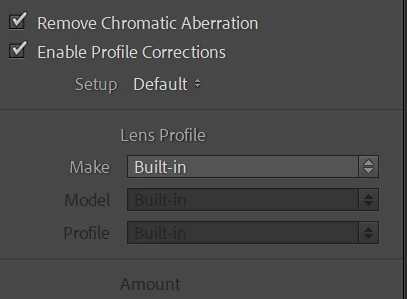
boisNgyrls provided these two screenshots of the Metadata panel and the Lens Correction panel:
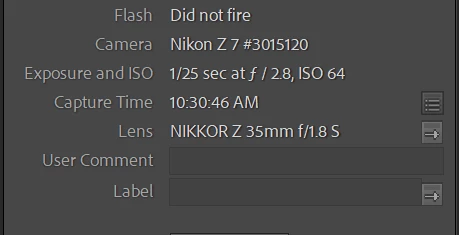
and wonders why, when Enable Profile Corrections is checked, the Lens Profile says Make: Built-in rather than automatically selecting a profile for the lens shown in the EXIF metadata.


I downloaded a sample image from dpreview.com from the same camera model (Nikon Z 7) with the same lens (NIKKOR Z 35mm f/1.8 S). The Metadata panel shows the same camera and lens information as in boisNgyrls' screenshot:
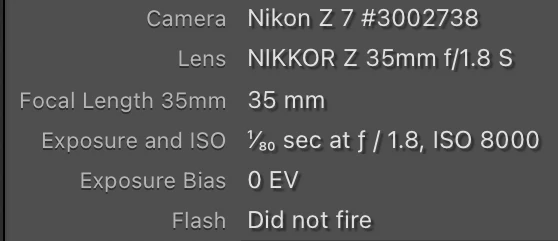
 

The Z 7 is a mirrorless camera, and for most mirrorless cameras, LR automatically applies the lens profile that the camera manufacturer embeds in the raw file.  The Lens Corrections panel says, "(i) Built-in Lens Profile applied", and when you click on the "i", it gives more detail about the corrections applied by the built-in profile:
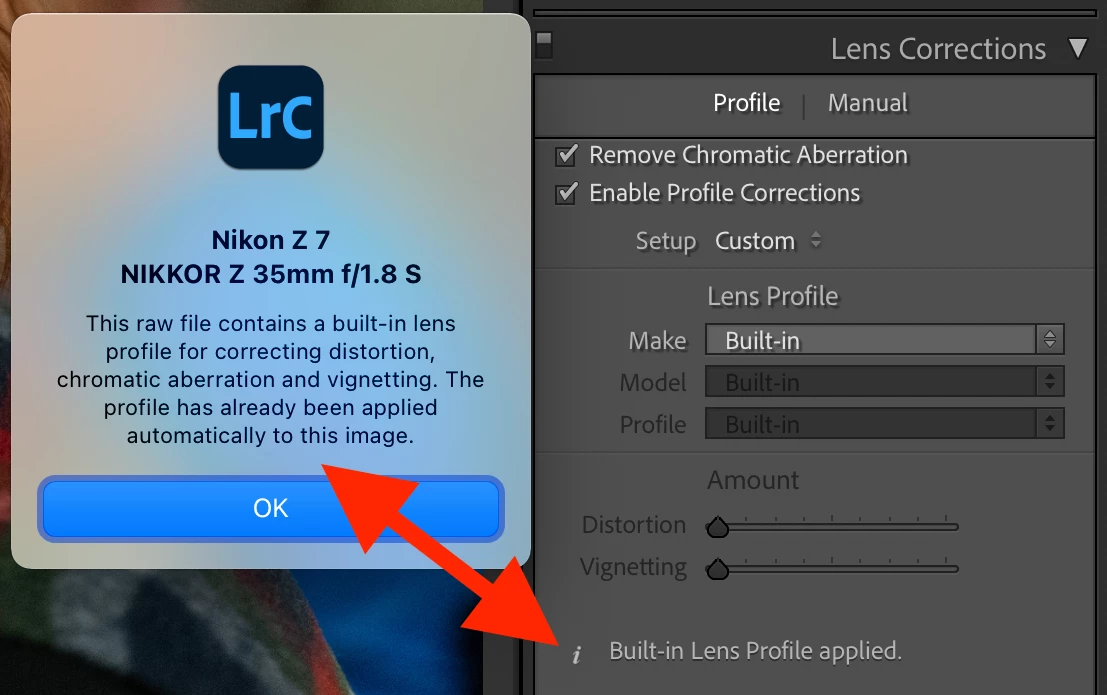


(boisNgyrls' screenshot crops out that message.)


For cameras supported by LR prior to version 9.4 (including the Z 7), it isn't possible to turn off the built-in lens profile (embedded in the raw file). For some cameras added in 9.4 and later (including the Z 7 II), you can disable the built-in profile. 


Thus, for those cameras for which you can't turn off the built-in profile, there's no point in checking Enable Profile Corrections and manually selecting a lens profile, since that profile will applied on top of the built-in profile, with undesirable results.


Adding to the confusion, in boisNgyrls' last screenshot, boisNgyrls thinks that a lens profile for the NIKKOR Z 35mm f/1.8 S has been manually selected:
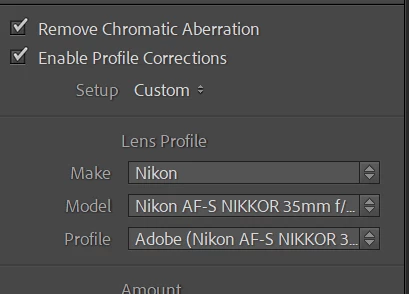
 

But that's for a different lens (Nikon AF-S NIKKOR 35mm f/1.8G ED).  Adobe does not provide a lens profile for the NIKKOR Z 35mm f/1.8 S (or for any NIKKOR Z lenses):

https://helpx.adobe.com/camera-raw/kb/supported-lenses.html


Unfortunately, the relevant help page has never been updated with the changes made in 9.4 to allow built-in profiles to be turned off in some newer cameras:

https://helpx.adobe.com/x-productkb/multi/lens-profile-support.html#Cameraswithbuiltinlensprofilesupport



3 replies

boisNgyrls
Known Participant
March 10, 2022

I have opened a new ticket for the same issue.  As far as I know it's the brand name issue, Nikon has 2 names "Nikon" and "Nikkor" and they use it in random manner which is really confusing.  Basically LR's database doesn't have a brand call "Nikkor" therefore the lens will never match.  I've ask Adobe tech to add an alias for Nikkor. 

I've also found out there are even more problems for older AF-S lenses... do you use AF-S lenses too?  If so, you should have the same problem.

Sean McCormack
Community Expert
Community Expert
March 10, 2022

In the meantime, this is where the Setup option in Lens Corrections comes in. Select the profile, then in the Setup dropdown menu, choose 'Set New Lens Profile Defaults'. You'll need this for each camera, but it should remember the correct profile from then on.

Sean McCormack. Author of 'Essential Development 3'. Magazine Writer. Former Official Fuji X-Photographer.
TheDigitalDog
Inspiring
March 9, 2022

Are all three of your captures from the same camera and if so, which one? I don't see 'none' but I see one listed as built-in, which is often the case with mirrorless cameras with a fixed lens and to be expected.

If a lens profile is provided, Nikon, Nikkor, whatever, what is the issue? The lens is being detected and correction should be applied if so set.

Author “Color Management for Photographers" & "Photoshop CC Color Management/pluralsight"
boisNgyrls
Known Participant
March 10, 2022

It's came from the same camera and same lens in this example.  There is no "none" and it's indeed it's built-in, but it's the same.  Internestly people here love to catch this little things instead of looking into the real issue. 


The second screen was before I manually select Nikon as brand.  The 3rd screenshot was done after I picked brand = Nikon.


TheDigitalDog
Inspiring
March 10, 2022

So do all three options produce the same results?

Author “Color Management for Photographers" & "Photoshop CC Color Management/pluralsight"
Ruurd van Dijk
Participating Frequently
March 9, 2022

Nikon lenses have a 'brand name' Nikkor'. not Nikon or Nikkon.

boisNgyrls
Known Participant
March 9, 2022

That's typo, but that's not the point. See the screenshot and it's Nikkor okay.