

Answered
Turn off Smart Previews on Import
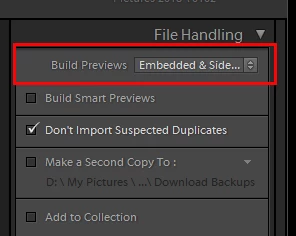
As I have no need to work on my files remotely, I don't need Smart Previews. How do I turn off Smart Previews when I import into Lightroom? I don't need to use the space or the CPU capacity but I just can't fine anything in Preferences or anywhere else to shut it off. As I'm importing off of a card, I can click on the progress graph in the upper left, then wait until it starts building the Smart Previews and cancel the operation, but that is not only inefficient, several are produced before I can cancel the operation.
There must be a way to just say no....I'm running a Windows 10 Pro machine and 64 bit LR Classic CC. Any help?
Jeff
 AdChoices