


- Home
- Lightroom Classic
- Discussions
- Re: Unable to import CR3 files in Lightroom
- Re: Unable to import CR3 files in Lightroom
Unable to import CR3 files in Lightroom

Copy link to clipboard
Copied
I have lightroom CC 10.1 w/camera raw 9.10.1. I am unable to import any CR3 files. When I hit import and go to the folder the files are in, Lightroom doesn't see them...it just says "no photos to show". Any solutions?


 9
Replies
9
9
Replies
9




Copy link to clipboard
Copied
"Lightroom CC 10.1" does not exist. There is Lightroom Classic, which is at version 9.2.1 right now, and there is Lightroom (desktop), which is at version 3.2.1 I believe. Camera Raw 9.10.1 is very old (the current version is 12.2.1), so any version of Lightroom that comes with the 9.10.1 version of the Camera Raw engine will indeed not support .CR3 files.
Copy link to clipboard
Copied
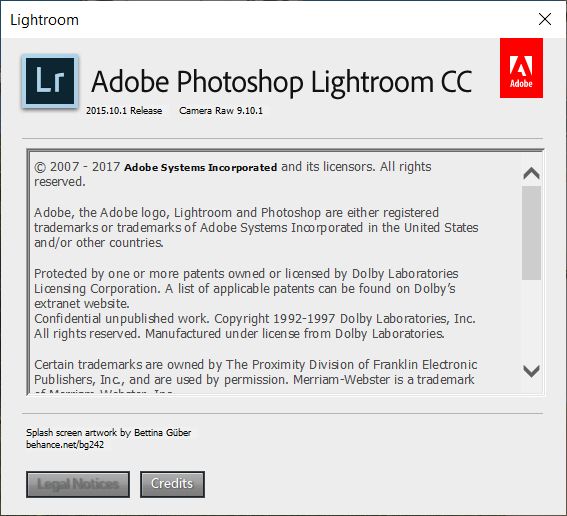
Apologies, I'm guessing my eyes are playing tricks on me. Here's what it says...

Copy link to clipboard
Copied
If this really the version that you are using? This version is very old and doesn't support any of the new CR3 - files.
Here you'll find infos which LR version do you need to support your camera.
https://helpx.adobe.com/camera-raw/kb/camera-raw-plug-supported-cameras.html

Copy link to clipboard
Copied
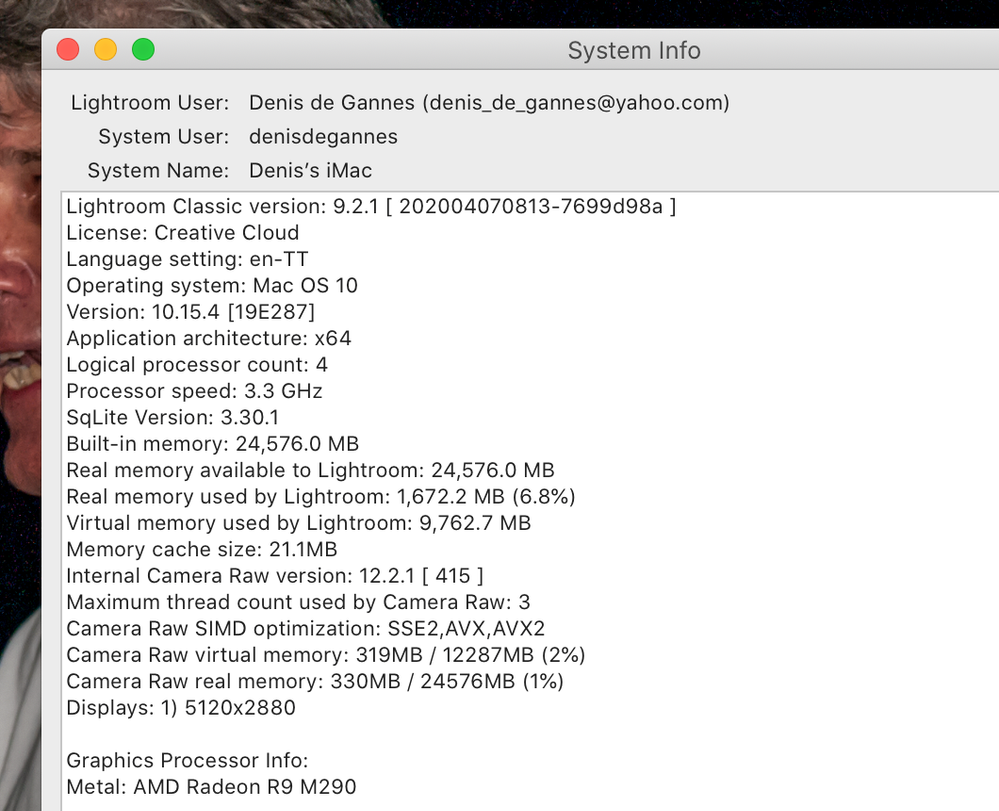
I agree with Johan, please go to the menu bar of your Lightroom application and click on the help button, then select on "System info" and take a screen capture of the top part of the pop-up, and post in the forum.
This will give us info about Lightroom and your operating system. Also, let us know the exact camera model the CR3 files were produced by. This will help responders to offer a clear and focused response.

Copy link to clipboard
Copied
What operating system are you using? If you are subscribed and up-to-date then you should be using Lightroom Classic 9.2.1 unless you are using an extremely old operating system or you are creative desktop manager is out of date and not keeping you up-to-date.
Copy link to clipboard
Copied
I'm gonna download Lightroom Classic and see what happens. Apparently, I had a really old version.

Copy link to clipboard
Copied
"Apparently, I had a really old version."
Indeed. The version of LR Classic you showed above was written three years ago, at which time the CR3 format did not exist.
Copy link to clipboard
Copied
I believe you probably had a Licensed Version of Lightroom 6, that was sold at the same time as Lightroom CC 2015 so LR 6.10.1 would have been the same as the subscription version Lightroom CC 2015.10.1. / Adobe Camera Raw 9.10.1.
Copy link to clipboard
Copied
Link in the Lightroom Journal blog, the forum where Adobe was releasing information to the Lightroom and ACR regular updates and full info on what was included. The link below June 2015, is when Lightroom CC 2015.1 (subscription version) was released, Lightroom 6.1 (Licensed version) and Adobe Camera Raw 9.1 was also released then.
In that forum, it is possible to view the full history of Lightroom and Camera Raw development.
https://blogs.adobe.com/lightroomjournal/2015/06


Find more inspiration, events, and resources on the new Adobe Community
Explore Now
 AdChoices