Participating Frequently
May 24, 2018
Answered

Unable to import new .xmp preset into Lightroom 7.3

  • May 24, 2018
  • 4 replies
  • 41422 views

Hi all,

My friend has made a new preset for me in Lightroom 7.3 (so is only a .xmp file, no .lrtemplate file) and sent it to me, but when I try to import it into my 7.3 (via the Adobe > Camera Raw > Settings > folder), it isn't showing in Lightroom at all. I'm using a Mac.

Please let me know if I'm doing something wrong, or if the .xmp preset is supposed to be stored somewhere else. If someone could help me solve this, I would really appreciate it.

Thanks!
This topic has been closed for replies.
Correct answer johnrellis

That preset uses the profile Adobe Standard, so it will appear for both JPEGs and raws.  It successfully imported into my LR. Try doing what I did:

1. Place a copy of the .xmp file on your Desktop.

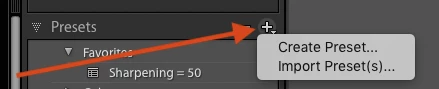
2. Click the "+" on the right side of the Presets panel and selecting Import Preset(s):

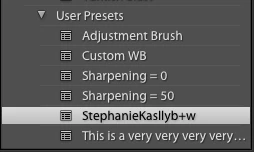
3. The preset appears in the User Presets group:

Note that the preset may not appear in the proper alphabetical order due to the notorious LR 7.3 bugs. So scan the entire list in User Presets for the preset.

4 replies

Participant
November 13, 2020

Thank you for the information.  It works exactly as you said.  Fantastac!   That was problem that was an annoyance for me.

Now all I have to do is find a way to move  the folder.  I Will try that next time.  

Participant
September 17, 2018

I am having the same issue, except I paid for a preset bundle and then followed all of the instructions to import the XMP files into Lightroom Classic (including copying preset XMP files into the Adobe Camera Raw > Settings folder).  Yet, the XMP files do not show up. lrtemplate files still work for me, but XMP files do not.  I have no updates available for Lightroom so I assume everything is up to date. So annoying!

Rob_Cullen
Community Expert
Community Expert
September 18, 2018

Some have found that "no updates available" is not always correct.

Post a screen-clip of your Lightroom System Info to confirm your Lr Version.

LR Menu: HELP > SYSTEM INFO...

Regards. My System: Windows-11, Lightroom-Classic 15.1.1, Photoshop 27.3.1, ACR 18.1.1, Lightroom 9.0, Lr-iOS 10.4.0, Bridge 16.0.2 .
Participant
September 18, 2018

Oh wow that was actually the issue, I was in fact using the wrong lightroom. I was using Lightroom version: CC 2015.14 but now I am on Lightroom Classic version: 7.5 ,and the presets loaded! Thank you

johnrellis
Legend
May 24, 2018

I think dj_paige got confused by versions -- starting with LR 7.3, presets are stored as .xmp files.  Old presets in the .lrtemplate format are converted to .xmp format.

but when I try to import it into my 7.3 (via the Adobe > Camera Raw > Settings > folder), it isn't showing in Lightroom at all. I'm using a Mac.

Are you editing a JPEG or a raw?  Edit a raw file and see if the preset appears in the Presets panel. (There is a LR misfeature/bug where some presets only show for raw files.)

Please share the preset here: Open the .xmp file in a text editor (e.g. TextEdit or Notepad) and copy and paste its contents here.  Then we can determine authoritatively what's going on.

Participating Frequently
June 5, 2018

Hi johnrellis,

Thanks for the reply! They are all RAW files but nothing is showing.

Here is the contents of the .XMP file:

<x:xmpmeta xmlns:x="adobe:ns:meta/" x:xmptk="Adobe XMP Core 5.6-c140 79.160451, 2017/05/06-01:08:21        ">

<rdf:RDF xmlns:rdf="http://www.w3.org/1999/02/22-rdf-syntax-ns#">

  <rdf:Description rdf:about=""

    xmlns:crs="http://ns.adobe.com/camera-raw-settings/1.0/"

   crs:PresetType="Normal"

   crs:Cluster=""

   crs:UUID="A0583C1C631FEDEEBC9BCE479D327930"

   crs:SupportsAmount="False"

   crs:SupportsColor="True"

   crs:SupportsMonochrome="True"

   crs:SupportsHighDynamicRange="True"

   crs:SupportsNormalDynamicRange="True"

   crs:SupportsSceneReferred="True"

   crs:SupportsOutputReferred="True"

   crs:CameraModelRestriction=""

   crs:Copyright=""

   crs:ContactInfo=""

   crs:Version="10.3"

   crs:ProcessVersion="10.0"

   crs:WhiteBalance="As Shot"

   crs:Sharpness="0"

   crs:LuminanceSmoothing="0"

   crs:ColorNoiseReduction="25"

   crs:VignetteAmount="0"

   crs:ShadowTint="0"

   crs:RedHue="0"

   crs:RedSaturation="0"

   crs:GreenHue="0"

   crs:GreenSaturation="0"

   crs:BlueHue="0"

   crs:BlueSaturation="0"

   crs:GrayMixerRed="0"

   crs:GrayMixerOrange="0"

   crs:GrayMixerYellow="0"

   crs:GrayMixerGreen="0"

   crs:GrayMixerAqua="0"

   crs:GrayMixerBlue="0"

   crs:GrayMixerPurple="0"

   crs:GrayMixerMagenta="0"

   crs:SplitToningShadowHue="0"

   crs:SplitToningShadowSaturation="0"

   crs:SplitToningHighlightHue="0"

   crs:SplitToningHighlightSaturation="0"

   crs:SplitToningBalance="0"

   crs:ParametricShadows="+47"

   crs:ParametricDarks="-62"

   crs:ParametricLights="+51"

   crs:ParametricHighlights="-78"

   crs:ParametricShadowSplit="18"

   crs:ParametricMidtoneSplit="40"

   crs:ParametricHighlightSplit="88"

   crs:SharpenRadius="+1.0"

   crs:SharpenDetail="25"

   crs:SharpenEdgeMasking="0"

   crs:PostCropVignetteAmount="0"

   crs:GrainAmount="0"

   crs:ColorNoiseReductionDetail="50"

   crs:ColorNoiseReductionSmoothness="50"

   crs:LensProfileEnable="0"

   crs:LensManualDistortionAmount="0"

   crs:AutoLateralCA="0"

   crs:Exposure2012="0.00"

   crs:Contrast2012="+27"

   crs:Highlights2012="-21"

   crs:Shadows2012="+18"

   crs:Whites2012="-10"

   crs:Blacks2012="+30"

   crs:Clarity2012="+20"

   crs:Dehaze="0"

   crs:ConvertToGrayscale="True"

   crs:OverrideLookVignette="False"

   crs:ToneCurveName2012="Custom"

   crs:CameraProfile="Adobe Standard"

   crs:HasSettings="True">

   <crs:Name>

    <rdf:Alt>

     <rdf:li xml:lang="x-default">StephanieKasllyb+w</rdf:li>

    </rdf:Alt>

   </crs:Name>

   <crs:ShortName>

    <rdf:Alt>

     <rdf:li xml:lang="x-default"/>

    </rdf:Alt>

   </crs:ShortName>

   <crs:SortName>

    <rdf:Alt>

     <rdf:li xml:lang="x-default"/>

    </rdf:Alt>

   </crs:SortName>

   <crs:Group>

    <rdf:Alt>

     <rdf:li xml:lang="x-default">User Presets</rdf:li>

    </rdf:Alt>

   </crs:Group>

   <crs:Description>

    <rdf:Alt>

     <rdf:li xml:lang="x-default"/>

    </rdf:Alt>

   </crs:Description>

   <crs:ToneCurvePV2012>

    <rdf:Seq>

     <rdf:li>0, 0</rdf:li>

     <rdf:li>255, 255</rdf:li>

    </rdf:Seq>

   </crs:ToneCurvePV2012>

   <crs:ToneCurvePV2012Red>

    <rdf:Seq>

     <rdf:li>0, 0</rdf:li>

     <rdf:li>30, 27</rdf:li>

     <rdf:li>72, 77</rdf:li>

     <rdf:li>122, 130</rdf:li>

     <rdf:li>171, 179</rdf:li>

     <rdf:li>230, 234</rdf:li>

     <rdf:li>255, 255</rdf:li>

    </rdf:Seq>

   </crs:ToneCurvePV2012Red>

   <crs:ToneCurvePV2012Green>

    <rdf:Seq>

     <rdf:li>0, 0</rdf:li>

     <rdf:li>30, 27</rdf:li>

     <rdf:li>72, 77</rdf:li>

     <rdf:li>122, 130</rdf:li>

     <rdf:li>171, 179</rdf:li>

     <rdf:li>230, 234</rdf:li>

     <rdf:li>255, 255</rdf:li>

    </rdf:Seq>

   </crs:ToneCurvePV2012Green>

   <crs:ToneCurvePV2012Blue>

    <rdf:Seq>

     <rdf:li>0, 0</rdf:li>

     <rdf:li>30, 27</rdf:li>

     <rdf:li>72, 77</rdf:li>

     <rdf:li>122, 130</rdf:li>

     <rdf:li>171, 179</rdf:li>

     <rdf:li>230, 234</rdf:li>

     <rdf:li>255, 255</rdf:li>

    </rdf:Seq>

   </crs:ToneCurvePV2012Blue>

   <crs:Look

    crs:Name=""/>

  </rdf:Description>

</rdf:RDF>

</x:xmpmeta>

johnrellis
johnrellisCorrect answer
Legend
June 5, 2018

That preset uses the profile Adobe Standard, so it will appear for both JPEGs and raws.  It successfully imported into my LR. Try doing what I did:

1. Place a copy of the .xmp file on your Desktop.

2. Click the "+" on the right side of the Presets panel and selecting Import Preset(s):

3. The preset appears in the User Presets group:

Note that the preset may not appear in the proper alphabetical order due to the notorious LR 7.3 bugs. So scan the entire list in User Presets for the preset.

dj_paige
Legend
May 24, 2018

You can't import an .xmp file

Presets cannot be .xmp, presets are .lrtemplate.

Whatever your friend sent as .xmp cannot be used as a preset.