
Unable to Import videos in Lightroom Classic 11.2 due to Dynamic link media server error on Windows
Hello, recently I've upgraded from LR6 to LRC (version 11.2 on Windows 10 x64). When uploading video's I get the error message "cannot connect to dynamic link server". I've tried with .mp4 (taken with my Samsung Galaxy A41) but also with a .avi taken in 2005 (and a file which previously already has been taken up into my catalog).
I've already followed these steps: https://helpx.adobe.com/nl/lightroom-classic/kb/troubleshoot-video-issues.html. I also searched the forum and don't seem te find a solution that works.
(I've also checked this post: https://community.adobe.com/t5/lightroom-classic-discussions/lr-classic-not-importing-videos/m-p/12554545#M254656 but the dll is not missing on my pc.)
Any ideas what else I could try? I use LRC ao to tag people in photo's but also to tag people in video's. It would be a loss for me not being able to do that anymore.
Note: sometimes I get this message, most of the time it's the dynamic link message...
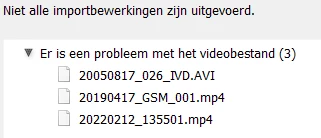
Thanks in advance!
Kind regards
{Thread title edited by moderator}
 AdChoices