Participant
January 10, 2018
Beantwortet

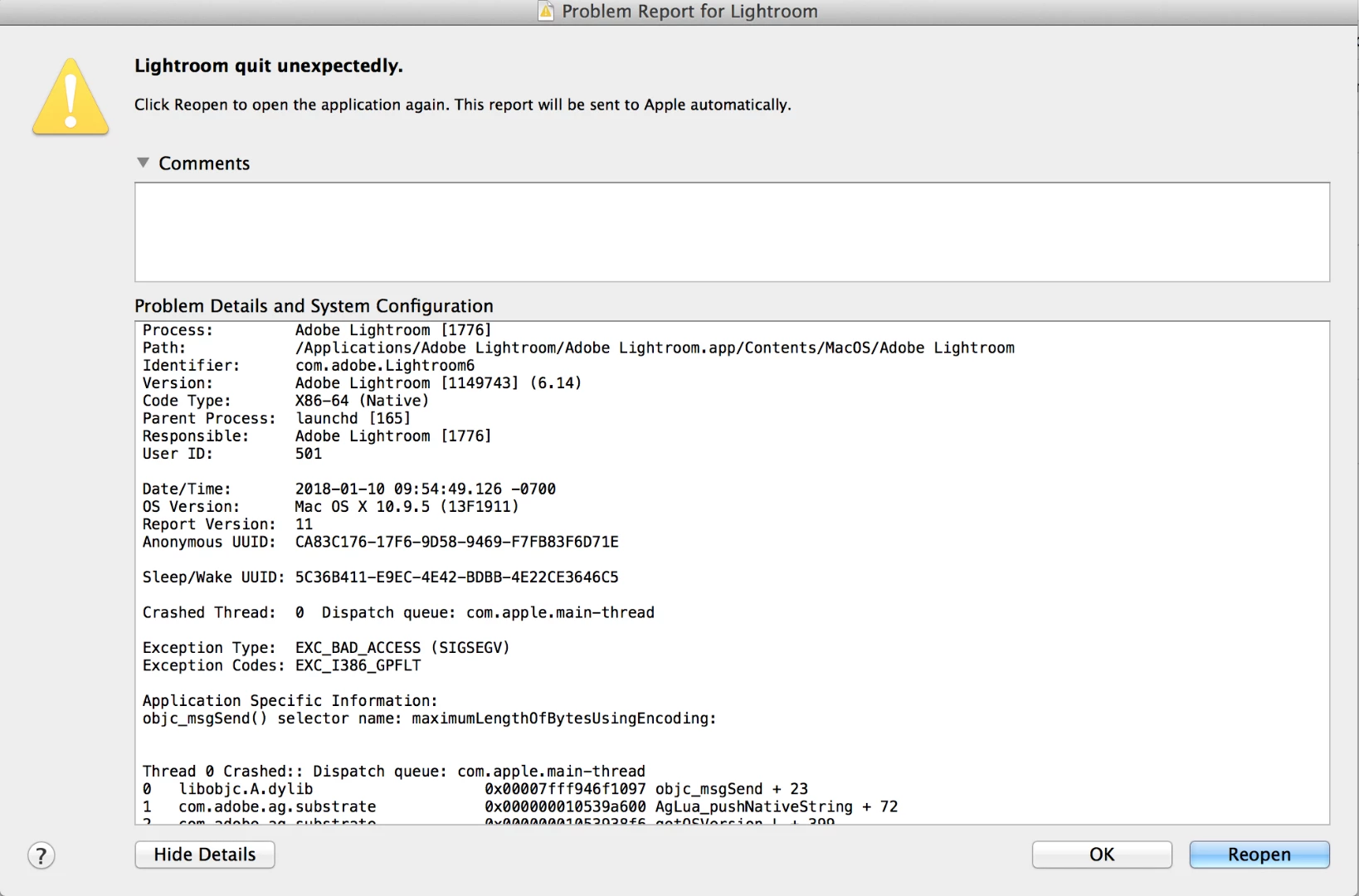
Updated LR 6 on Mac - will not open or launch

  • January 10, 2018
  • 2 Antworten
  • 827 Ansichten

I updated LR6 CC version on my MacBook last week, cannot open the app.  When I click on it to open, I receive an error message.  Any help would be appreciated.  I have already moved the lrdata Preview file and still nothing.  Thanks for the assistance.

    Dieses Thema wurde für Antworten geschlossen.
    Beste Antwort von Just Shoot Me

    It is because you shouldn't of updated to 6.14. LR 6.14 does not run on the version of OS X that is installed on your Mac.

    ** Lightroom CC 2015.1/Lightroom 6.1 and earlier versions are supported on Mac OS X v10.8. Lightroom CC 2015.6.1/Lightroom 6.6.1 and earlier are supported on Mac OS X v10.9. Lightroom CC 2015.6.12/Lightroom 6.12 and earlier are supported on Mac OS X v10.10.

    Lightroom Classic CC system requirements

    The last version that works on OS X 10.9.x is LR 6.6.1

    You will need to Uninstall LR. Then go to the link below and download both the Base installed, it's at the top, and the 6.6.1 update.

    Install the base program then update it to 6.6.1. Then NEVER Check for updates  again.

    Or you can upgrade OS X to a never version if your Mac supports it.

    Download Photoshop Lightroom

    2 Antworten

    Just Shoot Me
    Legend
    January 10, 2018

    It is because you shouldn't of updated to 6.14. LR 6.14 does not run on the version of OS X that is installed on your Mac.

    ** Lightroom CC 2015.1/Lightroom 6.1 and earlier versions are supported on Mac OS X v10.8. Lightroom CC 2015.6.1/Lightroom 6.6.1 and earlier are supported on Mac OS X v10.9. Lightroom CC 2015.6.12/Lightroom 6.12 and earlier are supported on Mac OS X v10.10.

    Lightroom Classic CC system requirements

    The last version that works on OS X 10.9.x is LR 6.6.1

    You will need to Uninstall LR. Then go to the link below and download both the Base installed, it's at the top, and the 6.6.1 update.

    Install the base program then update it to 6.6.1. Then NEVER Check for updates  again.

    Or you can upgrade OS X to a never version if your Mac supports it.

    Download Photoshop Lightroom
    dgerety
    Participant
    August 28, 2023

    I think I know the answer, but I'm going to ask anyway. I've been running LR 6.14 for years on OS Catalina, but my 12 year old Mac Mini was showing signs of its age, so I upgraded to a new Mini running OS Ventura 13.5. LR won't open. Is it toast? I may have to get an A/B switch for my monitor and use the old Mini just for LR. 

    Thanks for help/advice. DG

    Rob_Cullen
    Community Expert
    Community Expert
    August 29, 2023

    Thank you, Rob. If you don't mind, I'll bother you for the next few steps. I've added a volume to my hard drive and named it Lightroom since that's all that will be on it. 

    Since I have a running copy of LR 6.14 on my old Mac Mini running in Catalina, is there a way to move LR to the new computer or can I copy the LR that won't open from the Ventura volume to the Lightroom volume, after I install Catalina? 

    Will I need to copy the Catalina OS from the old Mini to the new one, or should I install Catalina from a usb drive?

    Thanks for your help. I'm trying to do this without screwing up my brand new computer too badly. 

    David


    No. to everything (I think!). You cannot "move LR"- it has to be 'installed' to any new computer system and that cannot be done in either Catalina or Ventura.

    My oldies would say you are "flogging a dead horse!."


    Can you afford to buy two or three coffees from a cafe each month? Really, that is all it costs to subscribe to the Photography plan and have the very latest versions of Lightroom-Classic, Photoshop, Lightroom-mobile, etc.

    $9.99 PHOTOGRAPHY PLAN (USA)


    Regards. My System: Windows-11, Lightroom-Classic 15.3, Photoshop 27.5, ACR 18.3, Lightroom 9.3, Lr-iOS 10.4.0, Bridge 16.0.3 .
    dj_paige
    Legend
    January 10, 2018

    Updated to what?

    If it is LR 6.14, this won't run on your operating system.

    I believe the latest version of LR taht will run on your operating system is 6.6.1, but you should really look that up yourself in the System Requirements page for Lightroom.