Known Participant
February 23, 2024
Answered

Watermark Editor Fonts changed after 13.2 update

  • February 23, 2024
  • 2 replies
  • 622 views

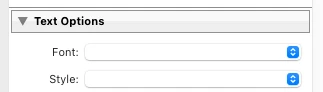
My watermark presets previously had specific fonts, but as you can see the pulldown menu isn't showing it after the 13.2 update. If I click it, I get a list of all my fonts, but the one I used, "Myriad Pro" isn't in the list. I've opted for Adobe Clean.


Anyone else having this issue?

TIA


LrC 13.2

MacOS Sonoma 14.3
This topic has been closed for replies.
Correct answer Rob_Cullen

I checked my watermarks in Classic v13.2 and found this-

-Most of my watermark presets were intact with their defined Font. (eg. Papyrus)

-Myriad Pro font was missing, not available, in the watermark editor font selector.

-Myriad Pro was not even installed in my Windows-11 system!

-I found the Myriad font files in a Lightroom folder and 'Installed' them to my system.

-Now they are available in the watermark editor!

What removed them from my system I have no clue.


Screen-clips are-

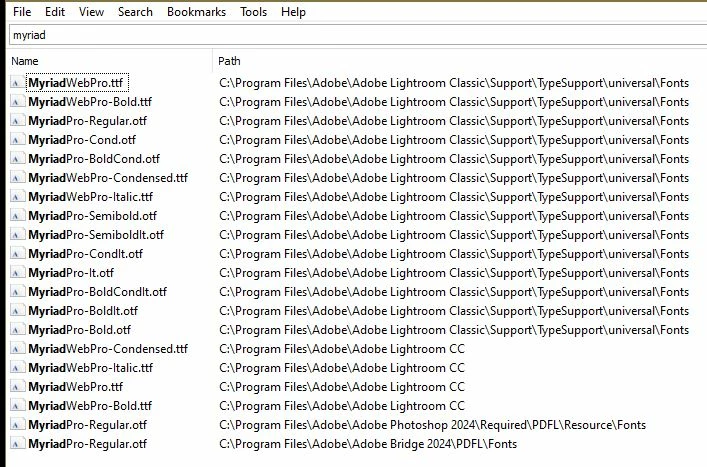
1) A search for fonts in folders-

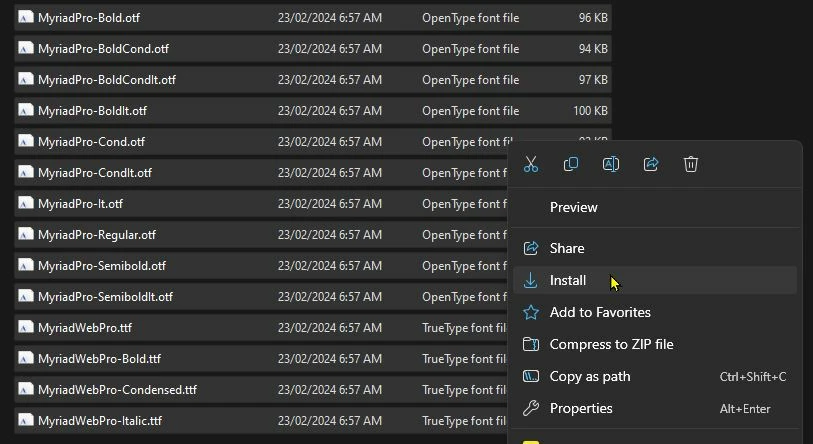
2) Selected and INSTALLED those found from the search-


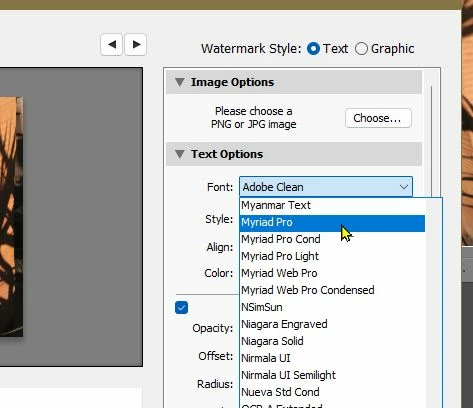
3) Fonts (Myriad Pro) previously missing now appears in the watermark editor (after a LrC restart!)

2 replies

Rob_Cullen
Community Expert
Rob_CullenCommunity ExpertCorrect answer
Community Expert
February 23, 2024

I checked my watermarks in Classic v13.2 and found this-

-Most of my watermark presets were intact with their defined Font. (eg. Papyrus)

-Myriad Pro font was missing, not available, in the watermark editor font selector.

-Myriad Pro was not even installed in my Windows-11 system!

-I found the Myriad font files in a Lightroom folder and 'Installed' them to my system.

-Now they are available in the watermark editor!

What removed them from my system I have no clue.


Screen-clips are-

1) A search for fonts in folders-

2) Selected and INSTALLED those found from the search-


3) Fonts (Myriad Pro) previously missing now appears in the watermark editor (after a LrC restart!)

Regards. My System: Windows-11, Lightroom-Classic 15.1.1, Photoshop 27.3.1, ACR 18.1.1, Lightroom 9.0, Lr-iOS 10.4.0, Bridge 16.0.2 .
Ian Lyons
Community Expert
Community Expert
February 23, 2024

I just opened the Watermark Editor and found that 'Adobe Clean' is the default font. I also checked for Myriad Pro in the list of available fonts and it's not present. 

Known Participant
February 23, 2024

Thanks for your reply and confirmation. And I see large centered watermarks like a © filling the image are still being placed above center. That happened a few updates ago.