Participant
June 20, 2022
Answered

Weird colors after opening and saving to LR in Photoshop!

  • June 20, 2022
  • 1 reply
  • 2574 views

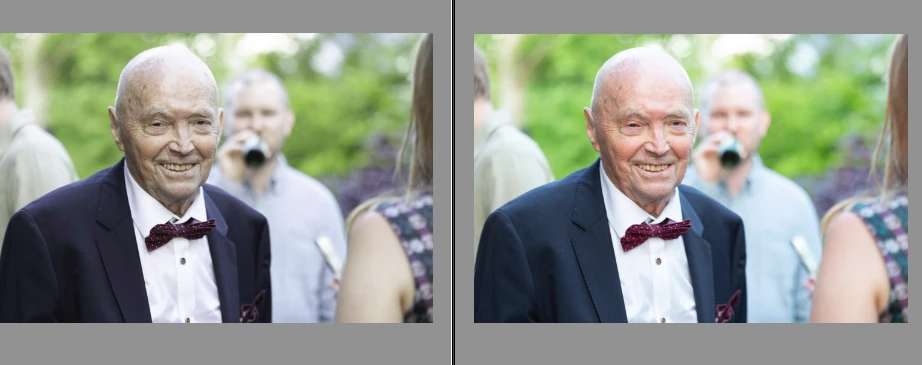
H E L P! Suddenly after this latest update in Lightroom Classic the colors turn extremely weird after opening up a photo via LR to Photoshop, editing something and then saving them. When returning to LR the color turn to a lifeless mess!! I did not do anything different than usual. What is happening?! Help!


The photo to the left is obviously the edited photo from Photoshop with the weird color and the right one is the original imported to LR.
This topic has been closed for replies.
Correct answer Anja C.

This is now resolved! I found a similar post and got the solution there. (To launch PS and immeditatey press option, command, shift and delete the settings).

1 reply

Anja C.AuthorCorrect answer
Participant
June 20, 2022

This is now resolved! I found a similar post and got the solution there. (To launch PS and immeditatey press option, command, shift and delete the settings).

TheDigitalDog
Inspiring
June 20, 2022

Its a bug, resetting preferences in Photoshop should fix this for the time being. However, the bug messes up the embedded profiles from the edited images from Photoshop. So you'll need to open them in Photoshop and Assign the ICC profile you selected in the LR preferences (Edit In Photoshop prefs). So if you asked for say, Adobe RGB (1998), you'll need to open those images and use the Assign Profile command, pick Adobe RGB (1998). Now they should preview correctly. 
If you can save a copy of the preference from Photoshop before resetting, it would really help Adobe find a fix.
Please see this original thread about this issue and if possible, provide the original preference file to Adobe as requested here:

https://community.adobe.com/t5/photoshop-ecosystem-discussions/p-colors-shift-when-going-from-lrc-to-ps-and-back-to-lrc/m-p/12961154

Author “Color Management for Photographers" & "Photoshop CC Color Management/pluralsight"
Anja C.Author
Participant
June 28, 2022

See: https://community.adobe.com/t5/photoshop-ecosystem-discussions/p-colors-shift-when-going-from-lrc-to-ps-and-back-to-lrc/m-p/12961154

Contact Pete Green via PM so you can provide him or the team, that preference file before you reset. 


Navigate to Photoshop's Preferences folder:
MacOS**: Users/[user name]/Library/Preferences/Adobe Photoshop [version] Settings
Windows 10: Users/[user name]/AppData/Roaming/Adobe/Adobe Photoshop [version]/Adobe Photoshop [version] Settings

**Note:
The user Library folder is hidden by default on macOS. In the Finder, hold down the Option key when using the Go menu. Library will appear below the current user's home directory. Now you can drag the entire Adobe Photoshop [Version] Settings folder to the desktop or somewhere safe for a back-up of your settings 


Thank you so much!