
Participating Frequently
May 9, 2023
Question

Weird dotted, colored lines after denoise

  • May 9, 2023
  • 4 replies
  • 1955 views

Hey there. I was trying out the denoise Feature for the first time today and stumbled over this problem. On every dng i try it on. it leaves those weird vertical lines. I have no clue where it comes from, but maybe one of you people had smth similar and knows how to fix it
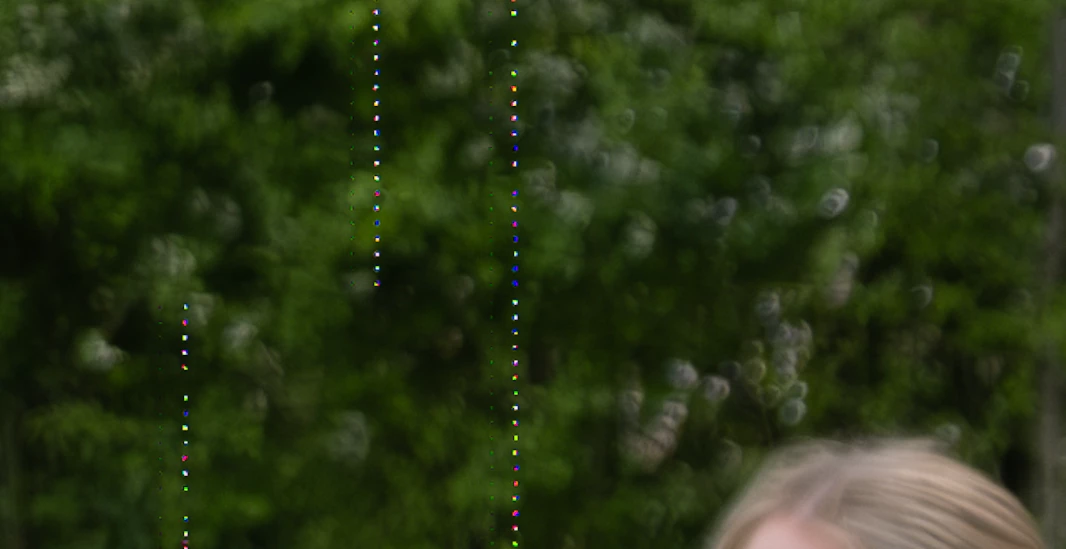

Here is my setup:

  • Lightroom Classic version: 12.3 [202304101834-a085245c]
  • License: Creative Cloud
  • Language setting: German
  • Operating system: Windows 10 - Home Premium Edition, Version 10.0.19045
  • Application architecture: x64
  • System architecture: x64
  • Number of logical processors: 12
  • Processor speed: 3.6GHz
  • SQLite version: 3.36.0
  • CPU usage: 6.0%
  • Integrated memory: 32718.8 MB
  • Dedicated GPU memory used by Lightroom: 4802.1MB / 8151.9MB (58%)
  • Physical memory available for Lightroom: 32718.8 MB
  • Physical memory used by Lightroom: 4257.8 MB (13.0%)
  • Virtual memory used by Lightroom: 9564.1 MB
  • Number of GDI objects: 1290
  • Number of USER objects: 2639
  • Number of process handles: 4319
  • Cache storage size: 535.0MB
  • Internal Camera Raw version: 15.3 [1451]
  • Maximum number of threads that Camera Raw uses: 5
  • Camera Raw SIMD optimization: SSE2, AVX, AVX2
  • Virtual memory in Camera Raw: 1631MB / 16359MB (9%)
  • Physical memory in Camera Raw: 1712MB / 32718MB (5%)
  • System DPI setting: 96 DPI
  • Desktop composition enabled: Yes
  • Default preview size: 2560 pixels
  • Monitors/display devices: 1) 2560x1440
  • Input types: Multitouch: No, Integrated touch input: No, Integrated pen: No, External touch input: No, External pen: No, Keyboard: No

Information about the graphics processor:

  • DirectX: AMD Radeon RX 5700 XT (30.0.13033.1000)
  • Initial status: GPU support for export is supported by default
  • User preference: Automatic

    Installed plug-ins:

    1. AdobeStock
    2. Flickr
    3. Nikon Tether plug-in

      I would really appreciate the Help 🙂 Thanks in advance!


This topic has been closed for replies.

4 replies

Ian Lyons
Community Expert
Community Expert
May 10, 2023

I just tried Camera Raw, Lightroom Classic and Lightroom Desktop using a Mac Studio Ultra running Ventura 13.3.1. The dotted lines aren't visible in original with any of them, and not in the the denoised version either.

TheDigitalDog
Inspiring
May 10, 2023

I saw the dots on whatever I downloaded yesterday. I thought it was the ”original”. 

I will try this again.

Edit: Test1 from yesterday:

Author “Color Management for Photographers" & "Photoshop CC Color Management/pluralsight"
Ian Lyons
Community Expert
Community Expert
May 10, 2023
Herni95Author
Participating Frequently
May 10, 2023

Update: 
it also happens if i use the ai denoise in Camera Raw. 

johnrellis
Legend
May 10, 2023

1. You could try installing the Pro Edition of the driver:

https://www.amd.com/en/support/graphics/amd-radeon-5700-series/amd-radeon-rx-5700-series/amd-radeon-rx-5700-xt


As with Nvidia's Studio drivers, AMD says they test the Pro editions against 100 professional applications for creative workflows. They don't disclose the list of apps, and they probably don't test AI (machine-learning) much.   But it's worth a try.


2. If that doesn't work, verify it's the graphics driver and not something else in your computer by restarting into Windows Safe Mode With Networking and then running LR Denoise, which could take about 20 - 30 minutes:

https://support.microsoft.com/en-us/windows/start-your-pc-in-safe-mode-in-windows-92c27cff-db89-8644-1ce4-b3e5e56fe234


I think it's more likely a graphics problem than some other issue, but given your card is only four years old with 8 GB of graphics memory, it's worth verifying. Unfortunately, Adobe refuses to provide a preference option to disable the use of the GPU for its AI commands, making this harder than it needs to be.


johnrellis
Legend
May 10, 2023

"DirectX: AMD Radeon RX 5700 XT (30.0.13033.1000)"


That driver is 1.5 years old.  You can download the most recent driver from here:

https://www.amd.com/en/support/graphics/amd-radeon-5700-series/amd-radeon-rx-5700-series/amd-radeon-rx-5700-xt

Herni95Author
Participating Frequently
May 10, 2023

Did that, unfortunately the problem still occurs. Only happens with ai Denoise yet

Herni95Author
Participating Frequently
May 9, 2023
Rikk Flohr_Photography
Community Manager
May 9, 2023

It would be better to share the non-Enhanced (pre Denoise) DNG/raw so we can attempt to replicate what you are seeing. This DNG is of little diagnostic value. 

Rikk Flohr: Adobe Photography Org
Herni95Author
Participating Frequently
May 10, 2023